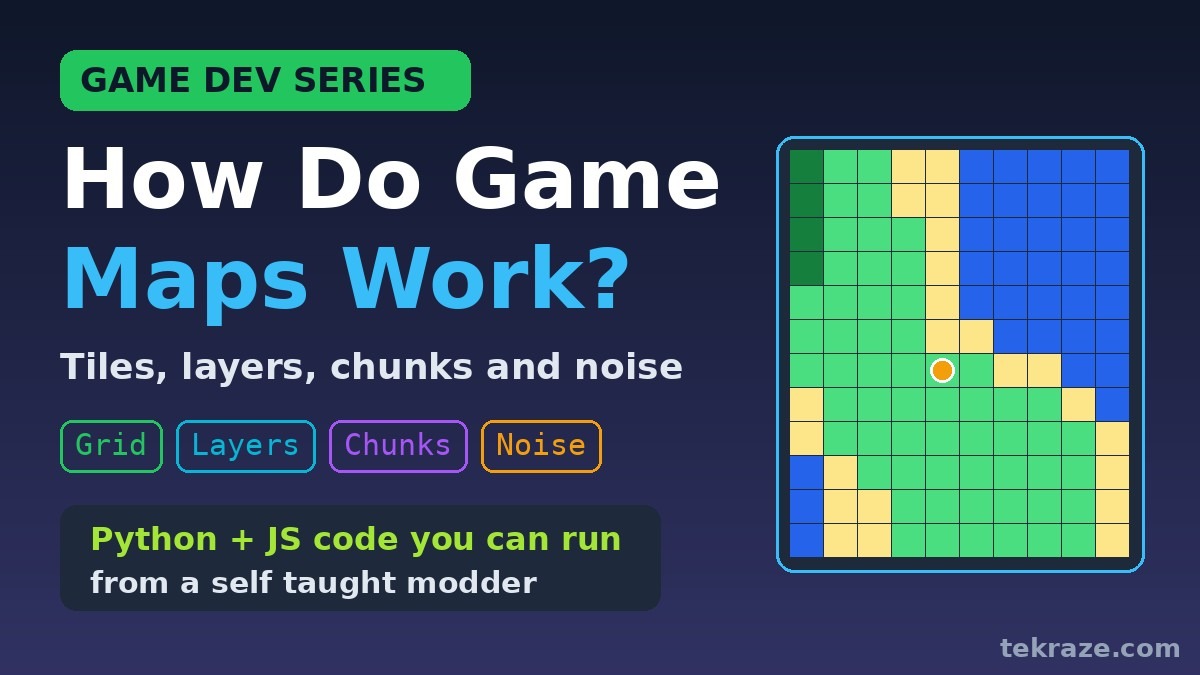

A game map is the first thing every game needs, and it was the first thing I wanted to understand properly. I have modded games and I have vibe coded a few small ones, but I would not call myself a game developer yet. This post kicks off a new Game Dev Series where I learn how games work one idea at a time and write down what I find, with pictures and code you can run.
If you have ever wondered about switching careers into games, or you just like seeing what is under the hood, you are welcome to learn along with me. We start with the game map because every game has one. How does a game remember a whole world, show it on screen and know where you can walk?
What is a game map really?
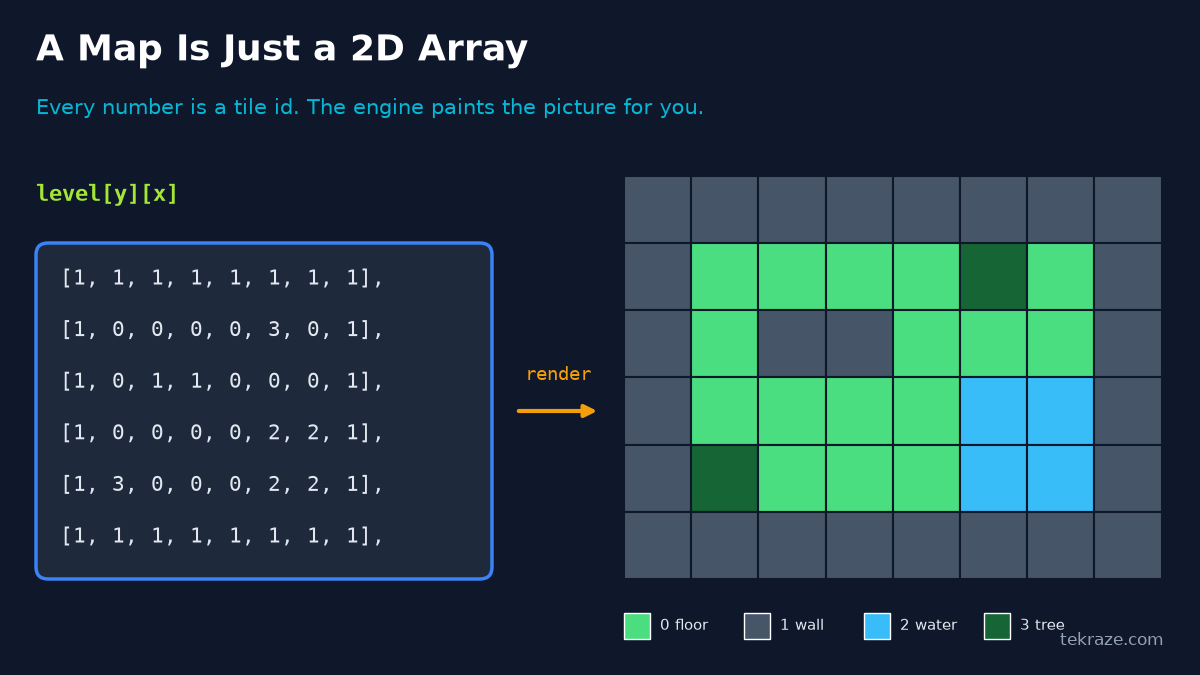
When I first opened a modding tool I expected a game map to be a huge scary file. It is not. In most 2D games a game map is just a grid, and every cell in that grid holds a number. That number is a tile id that means something like floor, wall, water or tree. The game keeps one small picture for each id and paints it into the right spot.
How does a game map look in code?
Here is the same game map as code. You read it as level[y][x], row first and column second, which trips up almost everyone at the start, me included.
python
# A map is just a 2D array of tile ids
TILES = {0: ".", 1: "#", 2: "~", 3: "T"}   # floor, wall, water, tree
level = [
    [1, 1, 1, 1, 1, 1, 1, 1],
    [1, 0, 0, 0, 0, 3, 0, 1],
    [1, 0, 1, 1, 0, 0, 0, 1],
    [1, 0, 0, 0, 0, 2, 2, 1],
    [1, 3, 0, 0, 0, 2, 2, 1],
    [1, 1, 1, 1, 1, 1, 1, 1],
]
def show(grid):
    for row in grid:
        print("".join(TILES[t] for t in row))
def tile_at(grid, x, y):
    # x is the column, y is the row
    if 0 <= y < len(grid) and 0 <= x < len(grid[0]):
        return grid[y][x]
    return 1          # outside the map counts as a wall
if __name__ == "__main__":
    show(level)
    print("tile at (5, 1):", tile_at(level, 5, 1))
    print("tile at (-1, 0):", tile_at(level, -1, 0))
Running it prints the game map as text and checks two lookups.
text
########
#....T.#
#.##...#
#....~~#
#T...~~#
########
tile at (5, 1): 3
tile at (-1, 0): 1
Notice that asking for a tile outside the game map returns a wall. That is a small trick that saves you from a lot of crashes when a character walks off the edge.
Why do games use tiles instead of one big image?
A big painted picture is heavy and cannot tell you anything about what is inside it. Tiles are cheap. A few dozen small pictures can build a thousand different rooms, and because the world is a grid you can ask simple questions like what is at column 5, row 1. That makes level design, saving, editing and collision checks much easier.
The same idea works in a browser. This small JavaScript function draws a 2D array onto an HTML canvas, one coloured square per tile. In a page you would call it with canvas.getContext("2d"). I tested it here with a fake drawing context that records every rectangle, and it drew all four tiles at the right spots.
javascript
// Draw a 2D array of tile ids onto an HTML canvas
const COLORS = { 0: "#4ade80", 1: "#475569", 2: "#38bdf8", 3: "#166534" };
function drawMap(ctx, map, tileSize) {
  for (let y = 0; y < map.length; y++) {
    for (let x = 0; x < map[y].length; x++) {
      ctx.fillStyle = COLORS[map[y][x]];
      ctx.fillRect(x * tileSize, y * tileSize, tileSize, tileSize);
    }
  }
}
// In a browser: drawMap(canvas.getContext("2d"), level, 32);
if (typeof module !== "undefined") module.exports = { drawMap };
text
4 rects drawn
[["#4ade80",0,0,32,32],["#475569",32,0,32,32],["#38bdf8",0,32,32,32],["#166534",32,32,32,32]]
How do layers work in a tile map?
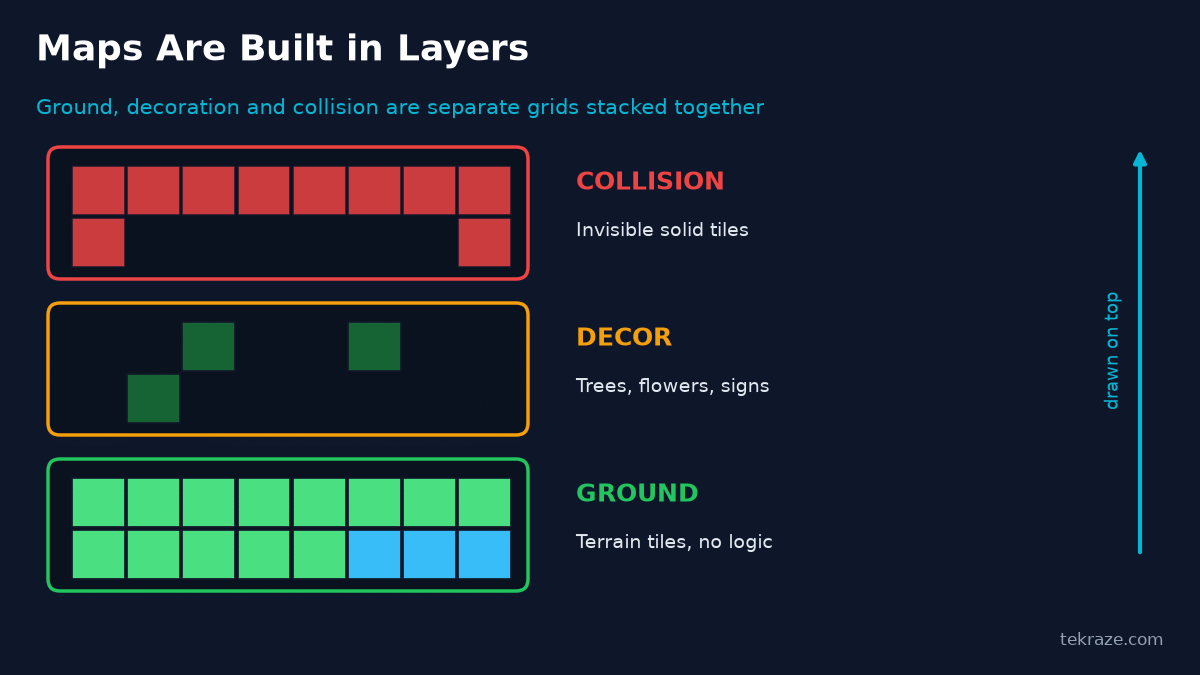
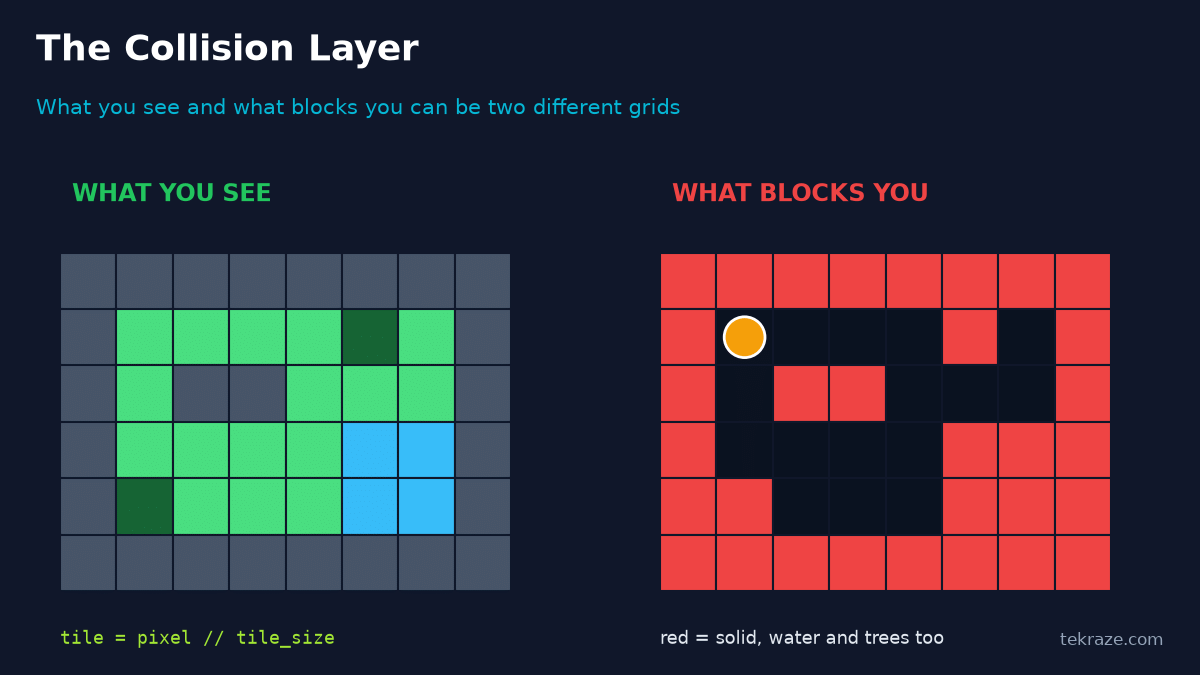
A real game map is rarely one grid. It is a stack of grids called layers. The ground layer holds grass, sand and water. A decor layer sits above it with trees and signs. A collision layer holds invisible solid tiles. Splitting things up means an artist can change a tree without touching the terrain, and a programmer can change what blocks the player without touching the art.
How does the collision layer stop the player?
This was my favourite thing to learn. What you see and what blocks you do not have to be the same grid. The collision layer is simply another array where 1 means solid and 0 means free. To check if the player can step somewhere, convert the pixel position to a grid position by dividing by the tile size, then look it up in the game map.
from tilemap import level
SOLID = {1, 2, 3}                 # walls, water and trees block the player
COLLISION = [[1 if t in SOLID else 0 for t in row] for row in level]
TILE = 32                         # pixels per tile
def blocked(px, py):
    # convert pixel position to grid position, then look it up
    gx, gy = px // TILE, py // TILE
    return COLLISION[gy][gx] == 1
def try_move(px, py, dx, dy):
    nx, ny = px + dx, py + dy
    return (px, py) if blocked(nx, ny) else (nx, ny)
if __name__ == "__main__":
    pos = (2 * TILE + 10, 1 * TILE + 10)     # inside tile (2, 1)
    print("start", pos)
    pos = try_move(*pos, 0, TILE)            # tile (2, 2) is a wall
    print("after moving down", pos)
    pos = try_move(*pos, TILE, 0)            # tile (3, 1) is floor
    print("after moving right", pos)
text
start (74, 42)
after moving down (74, 42)
after moving right (106, 42)
The first move goes down into a wall tile, so the position does not change. The second move goes right onto free floor, so it works. Real physics gets more detailed than this, but the core idea of looking up the tile you are about to enter is exactly how many classic games did it.
How are game maps stored?
There are three common ways to store a game map, and you will meet all of them as a beginner.
A 2D array in code
Great for learning, prototypes and game jams. Hard to edit once the map grows.
A JSON or text file
The map lives outside the code, so you can edit it, load it and share it without rebuilding the game.
A map editor like Tiled
You paint maps visually and it exports JSON or another format that your game loads. A Tiled export stores each layer as a flat list of numbers, row after row, with 0 meaning empty. To read the tile at column x and row y you use y * width + x. This is a trimmed down example based on that format, and the code reads it the way a game loader would.
python
import json
# A trimmed down version of what Tiled exports
tiled = json.loads("""
{
  "width": 4, "height": 3, "tilewidth": 32, "tileheight": 32,
  "layers": [
    {"name": "ground",    "type": "tilelayer", "data": [1,1,1,1, 1,2,2,1, 1,1,1,1]},
    {"name": "decor",     "type": "tilelayer", "data": [0,0,5,0, 0,0,0,0, 0,6,0,0]},
    {"name": "collision", "type": "tilelayer", "data": [0,0,0,0, 0,1,1,0, 0,0,0,0]}
  ]
}
""")
def layer(name):
    return next(l for l in tiled["layers"] if l["name"] == name)
def get(name, x, y):
    return layer(name)["data"][y * tiled["width"] + x]   # flat list, row by row
if __name__ == "__main__":
    print("layers:", [l["name"] for l in tiled["layers"]])
    print("ground at (1, 1):", get("ground", 1, 1))
    print("collision at (1, 1):", get("collision", 1, 1))
    print("collision at (0, 0):", get("collision", 0, 0))
    print("map size in pixels:", tiled["width"] * tiled["tilewidth"], "x", tiled["height"] * tiled["tileheight"])
text
layers: ['ground', 'decor', 'collision']
ground at (1, 1): 2
collision at (1, 1): 1
collision at (0, 0): 0
map size in pixels: 128 x 96
I trimmed the file to the parts that matter here. A real Tiled export also lists tilesets, object layers and extra properties, so treat this as a small taste and not the whole format.matter here. A real Tiled export also lists tilesets, object layers and extra properties, so treat this as a small taste and not the whole format.
What are chunks and why do big worlds need them?
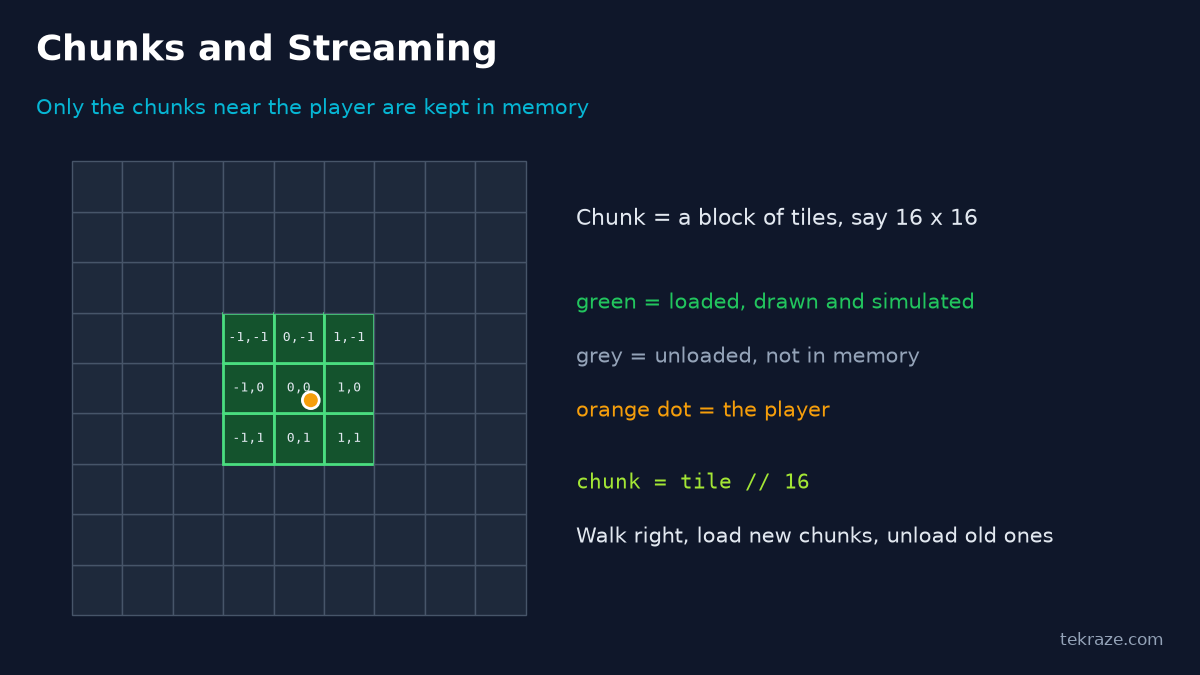
A tiny dungeon fits in memory without trouble. A huge open world does not. Games like Minecraft split the world into chunks, which are square blocks of tiles, for example 16 by 16. The game only keeps the chunks near the player loaded. When you walk, new chunks load in front of you and old ones disappear behind you. That is called streaming, and it is how a big world stays small in memory.
A tiny dungeon fits in memory without trouble. A huge open world does not. Games like Minecraft split the world into chunks, which are square blocks of tiles, for example 16 by 16. The game only keeps the chunks near the player loaded. When you walk, new chunks load in front of you and old ones disappear behind you. That is called streaming, and it is how a big world stays small in memory.
Nine chunks around the player are loaded. Everything else waits on disk or is generated when needed.
The maths is small. Dividing the tile position by the chunk size, rounding down, gives the chunk. Python’s // rounds down even for negative numbers, which is exactly what you want.
python
import random
CHUNK = 16        # tiles per chunk side
RADIUS = 1        # load the chunk we stand in plus 1 ring around it
def world_to_chunk(tx, ty):
    # // rounds down, so negative tiles land in the right chunk too
    return tx // CHUNK, ty // CHUNK
def chunks_around(cx, cy, radius=RADIUS):
    return {(cx + dx, cy + dy)
            for dx in range(-radius, radius + 1)
            for dy in range(-radius, radius + 1)}
def make_chunk(cx, cy, seed=42):
    rng = random.Random(f"{seed}:{cx}:{cy}")   # same chunk, same result, always
    return [[1 if rng.random() < 0.2 else 0 for _ in range(CHUNK)]
            for _ in range(CHUNK)]
loaded = {}
def update(player_tx, player_ty):
    wanted = chunks_around(*world_to_chunk(player_tx, player_ty))
    for key in wanted - loaded.keys():
        loaded[key] = make_chunk(*key)       # load or generate
    for key in loaded.keys() - wanted:
        del loaded[key]                      # unload to save memory
if __name__ == "__main__":
    update(5, 5)
    print("player at tile (5, 5) in chunk", world_to_chunk(5, 5), "loaded", len(loaded))
    update(40, 5)
    print("player at tile (40, 5) in chunk", world_to_chunk(40, 5), "loaded", len(loaded))
    print("tile (-1, -1) lives in chunk", world_to_chunk(-1, -1))
    print("same chunk twice is identical:", make_chunk(3, 2) == make_chunk(3, 2))
text
player at tile (5, 5) in chunk (0, 0) loaded 9
player at tile (40, 5) in chunk (2, 0) loaded 9
tile (-1, -1) lives in chunk (-1, -1)
same chunk twice is identical: True
Look at the last line. Generating the same chunk twice gives the same result because the random generator is seeded with the chunk position. That means the world never needs to be saved until the player changes something. If you want to see why only touching nearby data matters for speed, our Big O helper post on time and space complexity explains how work grows as data grows.
How does procedural generation make maps?
Procedural generation means the computer builds the game map by following rules instead of a person placing every tile. If you use plain random numbers you get static, a mess of single tiles. Natural looking land needs smooth randomness, where nearby tiles have similar values. That is what noise functions give you.
Building a game map with value noise
This is a simple version called value noise. It picks random values on a coarse grid and blends between them, then adds a second finer layer for detail. Each number is a height, and we turn heights into tiles with thresholds. Low becomes water, then sand, grass, forest and finally mountains. Professional games usually use Perlin or Simplex noise, but the idea is the same.
python
import math, random
def value_noise(w, h, cell=8, seed=7):
    rng = random.Random(seed)
    gw, gh = w // cell + 2, h // cell + 2
    grid = [[rng.random() for _ in range(gw)] for _ in range(gh)]
    smooth = lambda t: t * t * (3 - 2 * t)          # ease in and out
    lerp = lambda a, b, t: a + (b - a) * t
    out = []
    for y in range(h):
        row = []
        for x in range(w):
            gx, gy = x / cell, y / cell
            x0, y0 = int(gx), int(gy)
            tx, ty = smooth(gx - x0), smooth(gy - y0)
            top = lerp(grid[y0][x0], grid[y0][x0 + 1], tx)
            bot = lerp(grid[y0 + 1][x0], grid[y0 + 1][x0 + 1], tx)
            row.append(lerp(top, bot, ty))
        out.append(row)
    return out
def layered(w, h, seed=7):
    # big smooth shapes plus a little fine detail
    base = value_noise(w, h, cell=10, seed=seed)
    fine = value_noise(w, h, cell=4, seed=seed + 1)
    return [[b * 0.7 + f * 0.3 for b, f in zip(rb, rf)] for rb, rf in zip(base, fine)]
def to_tiles(height):
    def pick(v):
        if v < 0.38: return "~"     # water
        if v < 0.45: return ","     # sand
        if v < 0.68: return "."     # grass
        if v < 0.80: return "T"     # forest
        return "^"                  # mountain
    return ["".join(pick(v) for v in row) for row in height]
SEED = 23
if __name__ == "__main__":
    lines = to_tiles(layered(40, 14, seed=SEED))
    print("\n".join(lines))
    print("same seed gives the same map:", lines == to_tiles(layered(40, 14, seed=SEED)))
This is the output for seed 23. It is a 40 by 14 world from about forty lines of code.
text
^^^^^^^TTT^^^^^TTTT^^TT..,,~~~~~~~~,....
^^^^^^^TTT^^^^^TTTT^^TT..,,~~~~~~~~,....
T^^^^^^TTTTTTTTTTTTT^TT...,~~~~~~~~.....
TTT^^^^^^TT......TTTTTT...,~~~~~~~~....,
TTTTTTTTTT.........TTT....,~~~~~~~,....,
..TTT.......,,............,,~~~~~~,...,~
..........,~~~,,............,,~~~~,...,~
....,,,,~~~~~~~~,,,,~,,.......,~~~,...~~
...,~~~~~~~~~~~~~~~~~~,........,~,,..,~~
...,~~~~~~~~~~~~~~~~~~~,.......,~,,..,~~
....,~~~~~~~~~~~~~~~~~~,,......,~~,,,~~~
.....,,~~~~~~~~~~~~~~~~,,......,~~~,,~~~
......,,~~~~,,,,,,~~~~~,,......~~~~~~~~~
.....,,~~~~~~~~,,,~~~~,,.......~~~~,,~~~
same seed gives the same map: True
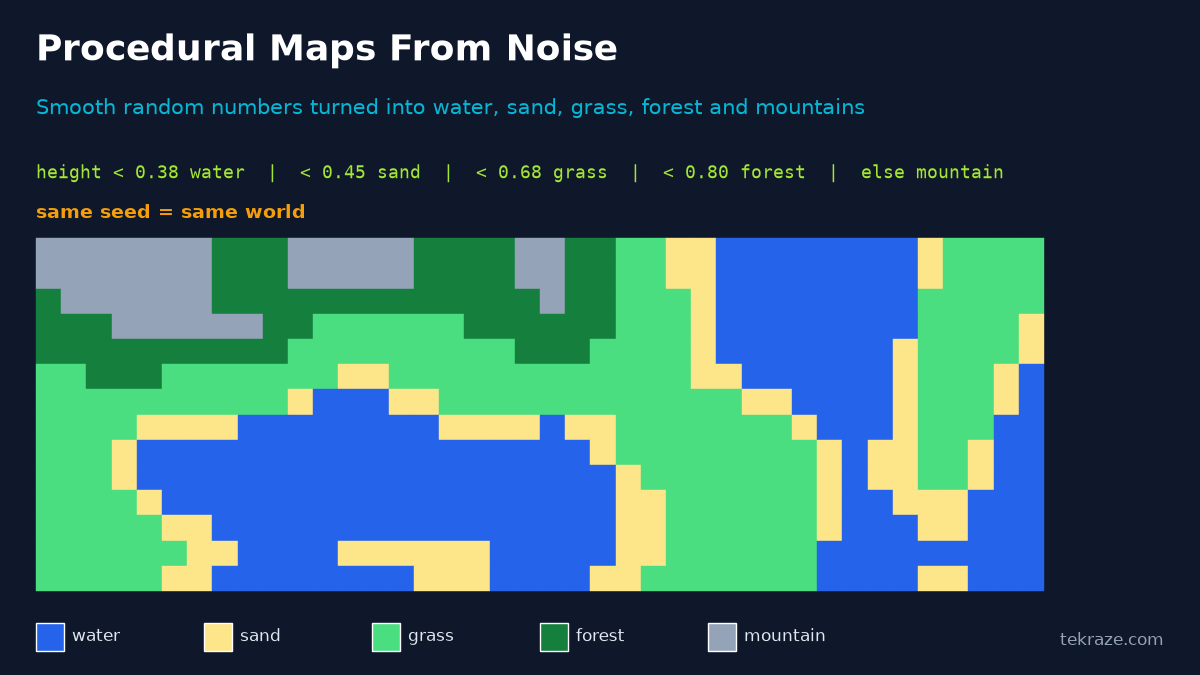
The last line of the output matters. Using the same seed gives the same world, which is how games let two players share a world by only sharing a number.
What did I learn that helps when building a map?
Here are the six lessons I would hand to my past self.
- Start with a tiny grid. A 10 by 10 game map you understand beats a 1000 by 1000 one that confuses you.
- Keep art and logic separate. Put collision, spawn points and triggers on their own layer.
- Watch your x and y. Most bugs I hit were row and column swapped, or pixel and tile positions mixed up.
- Guard the edges. Decide what happens outside the game map before the player finds out for you.
- Seed your randomness. A seed makes bugs repeatable and worlds shareable.
- Use an editor early. Typing arrays is fine for learning. Tiled saves hours the moment a game map is bigger than a screen.
What are the common game map mistakes?
- Reading
level[x][y]when the data is stored as rows first. - Mixing pixel positions and tile positions in the same calculation.
- Forgetting that negative coordinates need rounding down, not toward zero, when finding a chunk.
- Using unseeded random numbers for chunks, so the world changes every time you revisit it.
- Making the collision layer a different size from the visual layer.
What does this mean for real engines?
Engines wrap all of this in friendlier tools. They hold the array, the layers and the collision for you, and give you a visual editor on top. The ideas stay the same, which is why learning them by hand first has been useful for me. In the series we also look at engines like Unity and Godot and what they do for you.
Conclusion
A game map is a grid of numbers, a few layers, and some rules for loading and generating it. Once that clicks, every game world looks less like magic. Pick one snippet above, change a tile id or a seed, and watch what happens. In the next post of the Game Dev Series, we will look at how a game moves things around on that map.
Frequently asked questions
What is a tile map in a game?
A tile map is a grid where each cell holds a tile id. The game draws a small picture for each id, so a handful of images can build a whole level.
How do chunks help in big game worlds?
Chunks split the world into blocks so only the ones near the player are kept in memory. That keeps memory use and loading time small even when the world is huge.
What is procedural generation in games?
It is when the game builds content like maps from rules and random numbers instead of hand placing everything. Noise functions give smooth, natural looking results, and a seed makes the result repeatable.
How does a game know where the player can walk?
Most tile based games use a collision layer, which is another grid marking solid and free tiles. The game converts the player position to a tile and checks that grid before moving.
Which format should I use to store my game map?
Start with a simple array in code to learn. Move to JSON or an editor like Tiled when the map grows, because they are easier to edit and keep outside your code.