


Introduction to States and Props in Reactjs
State and props in react are essential concepts in React that enable you to manage and transfer data between your components. Grasping how they function is vital for creating dynamic and interactive user interfaces. In this blog post, we will delve into state and props, clarifying their roles, how to use them, their differences, and illustrating how they interact in parent-child component relationships. We will also introduce the idea of pure components. By the end, you’ll be comfortable using state and props in React for any component you build.
Also check our previous post about understanding React Components and JSX.
What is State in ReactJS?
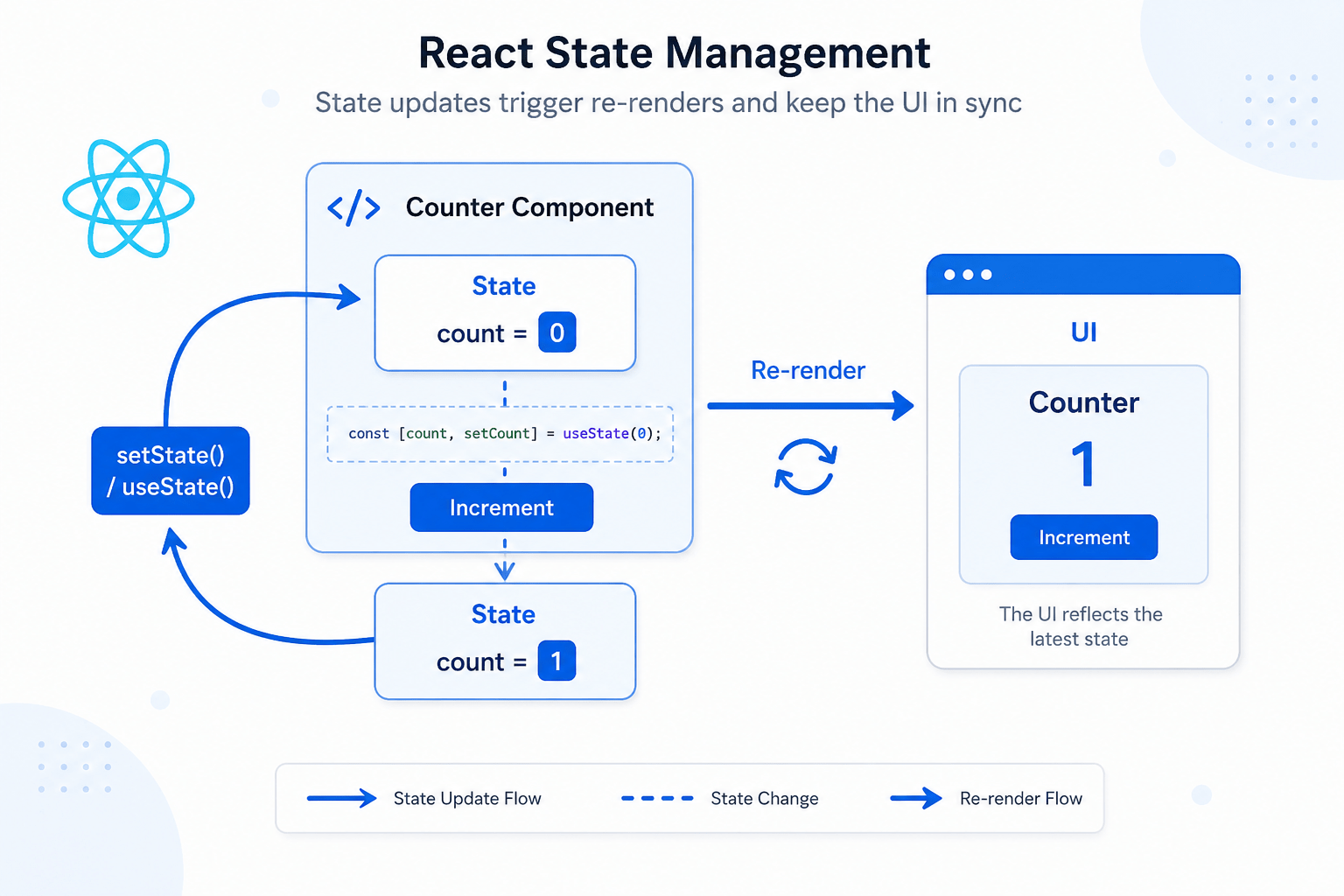
State refers to a JavaScript object that holds data unique to a component. It exists internally within the component and can change over time. When the state is updated, it triggers the component to re-render, thereby refreshing the user interface.
Key characteristics of State:
- Internal: State is managed within the component itself.
- Mutable: State can be changed using the
setState()method (oruseStatehook). - Triggers re-renders: Updating the state prompts React to automatically re-render the component to show the new changes.
Example of using State (with Hook):
import React, { useState } from 'react';

function MyComponent() {
  const [count, setCount] = useState(0);

  const incrementCount = () => {
    setCount(prevCount => prevCount + 1); // Use functional update for correct state updates
  };

  return (
    <div>
      <p>Count: {count}</p>
      <button onClick={incrementCount}>Increment</button>
    </div>
  );
}

export default MyComponent;
What are Props in ReactJS?
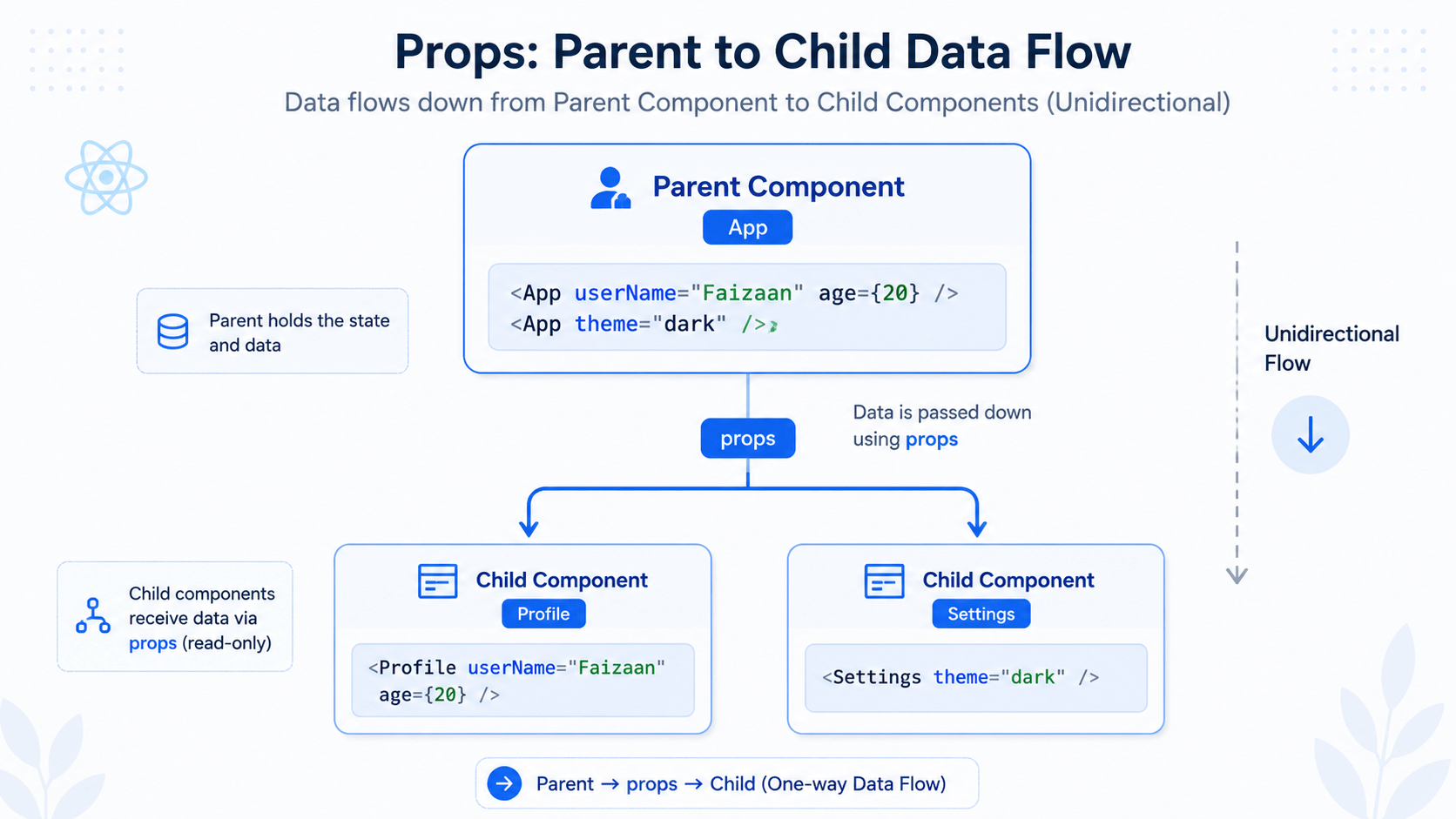
Props, short for properties, serve as a means to transfer data from a parent component to a child component. They are read-only, meaning the child component cannot alter them.
Key characteristics of Props:
- External: Props are passed from a parent component.
- Immutable: Props cannot be changed by the child component.
- Used for communication: Props are used to pass data down the component tree.
Example of using Props:
import React from 'react';

function Greeting(props) {
  return (
    <h1>Hello, {props.name}!</h1>
  );
}

function ParentComponent() {
  const name = "Alice"; // Example of data that could be dynamic
  return (
    <div>
      <Greeting name={name} />
      <Greeting name="Bob" />
    </div>
  );
}

export default ParentComponent;
Parent-Child Component Interaction with State and Props
import React, { useState } from 'react';

function ChildComponent(props) {
  return (
    <p>Message from parent: {props.message}</p>
  );
}

function ParentComponent() {
  const [parentMessage, setParentMessage] = useState("Initial message");

  const updateMessage = () => {
    setParentMessage("New message from parent!");
  };

  return (
    <div>
      <button onClick={updateMessage}>Update Message</button>
      <ChildComponent message={parentMessage} />
    </div>
  );
}

export default ParentComponent;
In this example, the ParentComponent manages the parentMessage state. It passes this state as a prop to the ChildComponent. When the button is clicked, the ParentComponent updates its state, which causes both components to re-render. The ChildComponent receives the updated message via props.
Pure Components in ReactJS
Pure components help improve the rendering efficiency of React components. They only re-render when there are changes to their props or state. React offers the React.PureComponent class and the memo higher-order component for creating these pure components.
Example of a Pure Component:
import React, { PureComponent } from 'react';

class MyPureComponent extends PureComponent {
  render() {
    return (
      <div>
        <p>Value: {this.props.value}</p>
      </div>
    );
  }
}

export default MyPureComponent;
MyPureComponent will only re-render if the value prop has changed. This can prevent unnecessary re-renders and improve performance. React.memo works similarly for functional components:
import React from 'react';

const MyMemoComponent = React.memo(function MyComponent(props) {
  return (
    <div>
      <p>Value: {props.value}</p>
    </div>
  );
});

export default MyMemoComponent;
Higher Order Components(HOC) in ReactJS
Higher-Order Components (HOCs) in React are a useful pattern for reusing component logic. Essentially, a higher-order component is a function that takes a component as an argument and returns a new, enhanced component. They don’t change the original component directly; instead, they wrap it with added functionality.
Think of it like a decorator. You have a base component, and you want to introduce some extra features without changing the component’s core logic. An HOC serves as that decorator.
Why use HOCs?
- Code Reuse: Extract common logic (like authentication, data fetching, or styling) into reusable HOCs.
- Logic Abstraction: Keep your core component focused on its primary purpose, separating concerns.
- Conditional Rendering: Easily render components based on certain conditions (e.g., user authentication).
- Prop Manipulation: Modify or add props to the wrapped component.
Example:
Imagine you have several components that need to fetch data. Instead of duplicating the data fetching logic in each component, you can create a withData HOC.
import React, { useState, useEffect } from 'react';

// The HOC
function withData(WrappedComponent, dataUrl) {
  return function WithData(props) { // Note: Capitalized inner function name
    const [data, setData] = useState(null);
    const [loading, setLoading] = useState(true);
    const [error, setError] = useState(null);

    useEffect(() => {
      const fetchData = async () => {
        try {
          const response = await fetch(dataUrl);
          if (!response.ok) {
            throw new Error(`HTTP error! status: ${response.status}`);
          }
          const json = await response.json();
          setData(json);
        } catch (err) {
          setError(err);
        } finally {
          setLoading(false);
        }
      };

      fetchData();
    }, []); // Empty dependency array means this runs only once on mount

    if (loading) {
      return <div>Loading...</div>;
    }

    if (error) {
      return <div>Error: {error.message}</div>;
    }

    return <WrappedComponent data={data} {...props} />; // Pass data and other props
  };
}


// Example component using the HOC
function MyComponent(props) {
  return (
    <div>
      <h1>Data:</h1>
      {props.data ? (
        <pre>{JSON.stringify(props.data, null, 2)}</pre>
      ) : (
        <p>No data yet.</p>
      )}
    </div>
  );
}

// Enhance MyComponent with the withData HOC
const MyComponentWithData = withData(MyComponent, 'https://jsonplaceholder.typicode.com/todos/1');

// Now use the enhanced component
function App() {
  return (
    <div className="App">
      <MyComponentWithData />
    </div>
  );
}

export default App;
Explanation:
withDataHOC: This function takes aWrappedComponentand adataUrlas arguments. It returns a new component (WithData).WithDataComponent: This component manages the data fetching logic usinguseStateanduseEffect. It then renders theWrappedComponent, passing the fetcheddataas a prop. Crucially, it also passes along any other props it receives (...props) to theWrappedComponent.MyComponent: This is the component we want to enhance with data fetching. It simply displays the data it receives as a prop.- Enhancing
MyComponent: We callwithData(MyComponent, ...)to create a new componentMyComponentWithDatathat has the data fetching capabilities. - Using the Enhanced Component: We render
MyComponentWithDatain ourApp.
This example demonstrates how HOCs can be used to extract common logic and make your components more reusable and maintainable. You can adapt this pattern to handle authentication, styling, or any other common component concern.
State and Props in React: Key Differences
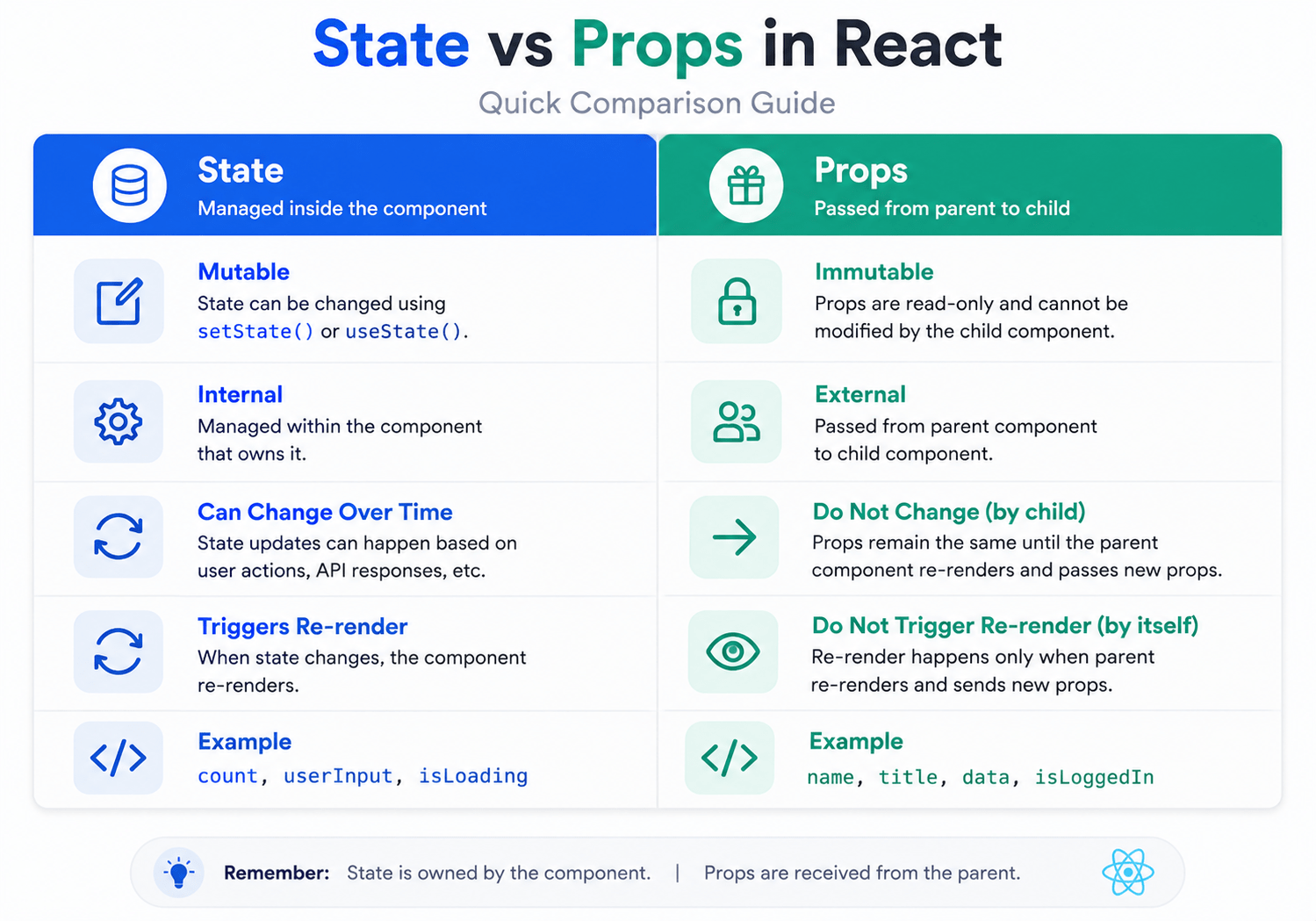
Now that you’ve seen both in action, here’s a side-by-side look at state and props in React.
| Feature | State | Props |
|---|---|---|
| Location | Internal to the component | Passed from a parent component |
| Mutability | Mutable (can be changed) | Immutable (cannot be changed) |
| Purpose | Manage data within a component | Pass data to child components |
When to use State and Props in React
- Use State: When you need to manage data that can change within a component, such as user input, API responses, or UI state.
- Use Props: When you need to pass data from a parent component to a child component, such as configuration options, data to be displayed, or callback functions.
Data Flow in ReactJS
Understanding data flow is the last piece of the puzzle for mastering state and props in React. Data in a React application generally moves in a downward direction, from parent components to child components, through the use of props. In contrast, state is handled locally within each component. This one-way data flow simplifies the process of understanding and debugging your application.
Common Mistakes with State and Props in react
Even experienced developers slip up here occasionally. A few patterns are worth watching for:
- Mutating state directly. Writing
this.state.count = 5instead of usingsetState()or the state setter fromuseStatewon’t trigger a re-render. React won’t know anything changed. - Trying to modify props inside a child component. Props are read-only by design. If a child needs to change a value, it should call a function passed down from the parent instead.
- Overusing state for values that don’t need it. Not every piece of data belongs in state. If a value can be calculated from existing props or state, calculating it during render is usually simpler than storing a duplicate copy.
- Prop drilling too deep. Passing the same prop through four or five layers of components just to reach one deeply nested child gets messy fast. This is usually the sign you need React Context or a state management library instead.
FAQs
Here are quick answers to common questions about state and props in React.
Can a component have both state and props?
Yes. A component can receive props from its parent while also managing its own internal state, and the two work independently of each other.
Why doesn’t my component re-render when I change state directly?
Because React doesn’t detect direct mutations. Always use the state setter function, like setCount() or this.setState(), instead of modifying the state variable directly.
When should I lift state up instead of using Context?
Lift state up when only a couple of nearby components need to share it. Reach for Context once the same data needs to travel through many unrelated layers of components.
Are pure components always faster than regular components?
Not always. Pure components skip unnecessary re-renders, but the comparison check itself has a small cost. For components with simple props, the difference is usually negligible.
What’s the difference between a class component and a functional component when it comes to state?
Class components use this.state and this.setState(), while functional components use the useState hook. Both manage state the same way conceptually, just with different syntax.
Conclusion
State and props in react play a crucial role in creating dynamic and interactive React applications. By grasping their purpose, how to use them, their differences, and their interaction in parent-child components, as well as the idea of pure components, you can efficiently manage data and develop reusable, high-performance components. In the upcoming blog post, we will delve into event handling in React.



