

Next.js project architecture is the line between an application surviving its first true feature request and the one crashing down under it. So far, in this series, we’ve been discussing features of Next.js separately – Server Components to fetch data, Server Actions to perform mutations, Suspense to enable streaming, and Auth.js for security. All those individual pieces were working fine on their own.
However, combining all of them into one coherent production application will require proper architectural design, and not just a collection of working pieces. And before you even start writing a single line of code for your project, you will have to come up with the plan for your database models, API boundaries, component trees, and folders structure.
In this post, we will be designing the architecture for our full stack capstone project DevPulse a collaboration platform where developers can share project updates, bookmarks, and communicate in real-time. This is the point when this series changes from explaining various features and moves into showing how they are put into one coherent product.
Also Read: New to this series? Start with our guide on Next.js Server Components for data fetching before diving into the full architecture below.
What a Solid Next.js Project Architecture Actually Looks Like
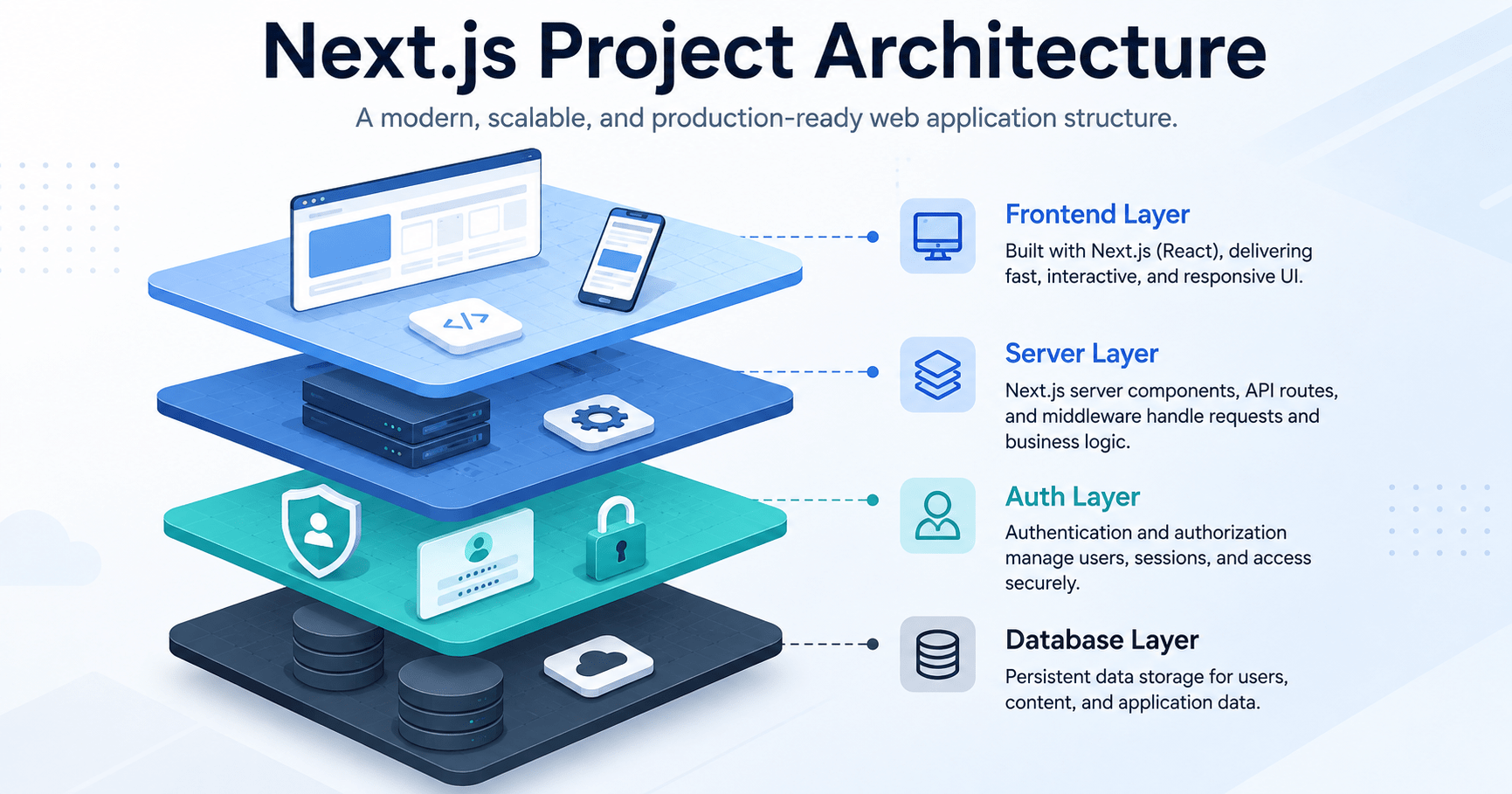
The Next.js framework structure comprises multiple layers within the current web architecture stack, and each layer has one function to do. The mixing up of functions is the number one cause why side projects become a mess in six weeks’ time.
┌──────────────────────────────────────────────────────────┐
│                   Frontend / Client UI                   │
│          Next.js App Router + React + Tailwind CSS       │
└────────────────────────────┬─────────────────────────────┘
                             │
┌────────────────────────────▼─────────────────────────────┐
│                 Full-Stack Meta-Framework                │
│         Server Components + Actions + Middleware         │
└───────┬────────────────────┬────────────────────┬────────┘
        │                    │                    │
┌───────▼─────────┐  ┌───────▼─────────┐  ┌───────▼─────────┐
│ Auth & Security │  │ Database & ORM  │  │  File Storage   │
│ Auth.js (OAuth) │  │ Prisma + PostgreSQL │ │  Uploadthing │
└─────────────────┘  └─────────────────┘  └────────────────┘
Here’s what each layer is responsible for in DevPulse:
- Framework: Next.js (App Router) handles routing, rendering, and the server/client boundary.
- Database and ORM: PostgreSQL with Prisma ORM gives you type-safe database queries instead of hand-written SQL strings.
- Authentication: Auth.js with the GitHub OAuth provider handles login without you touching a password field.
- Styling: Tailwind CSS keeps the UI layer fast to build with utility-first classes.
Once you can point at any piece of your app and say which of these four layers owns it, the rest of the architecture starts making sense on its own.
Data Modeling with Prisma
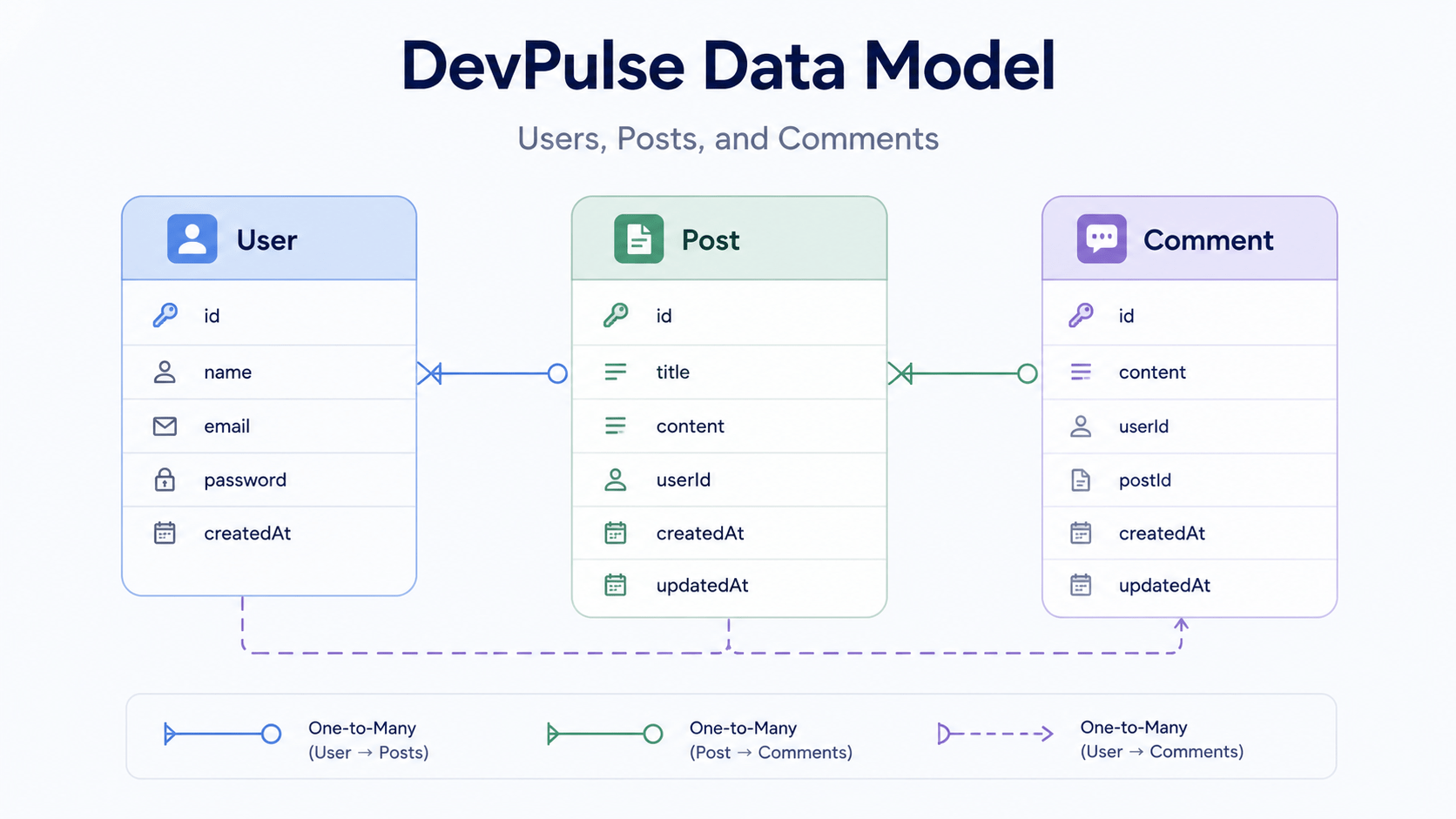
Every layer above depends on getting the data model right first, so this is where real architectural planning starts. DevPulse’s core data model requires three main entities: Users, Posts, and Comments, connected by simple one-to-many relationships.
prisma
// prisma/schema.prisma

datasource db {
  provider = "postgresql"
  url      = env("DATABASE_URL")
}

generator client {
  provider = "prisma-client-js"
}

model User {
  id        String    @id @default(cuid())
  name      String?
  email     String    @unique
  image     String?
  posts     Post[]
  comments  Comment[]
  createdAt DateTime  @default(now())
}

model Post {
  id        String    @id @default(cuid())
  title     String
  content   String
  published Boolean   @default(true)
  authorId  String
  author    User      @relation(fields: [authorId], references: [id], onDelete: Cascade)
  comments  Comment[]
  createdAt DateTime  @default(now())
}

model Comment {
  id        String   @id @default(cuid())
  text      String
  postId    String
  post      Post     @relation(fields: [postId], references: [id], onDelete: Cascade)
  authorId  String
  author    User     @relation(fields: [authorId], references: [id], onDelete: Cascade)
  createdAt DateTime @default(now())
}
Notice the onDelete: Cascade directive on both relations. If a user deletes their account, their posts and comments go with them automatically instead of leaving orphaned rows in your database. It’s a small detail, but it’s exactly the kind of decision that belongs at the data-modeling stage, not something you patch in after launch.
Why Data Modeling Comes Before Any UI Work
A classic mistake for a beginner is modeling the pages before modeling the database. This can get you into trouble since you will always have to adapt your Prisma schema according to the needs of a component, which will end up being messy migration work later on. First model your data and then consume the schema from your components.
Folder and Feature Architecture
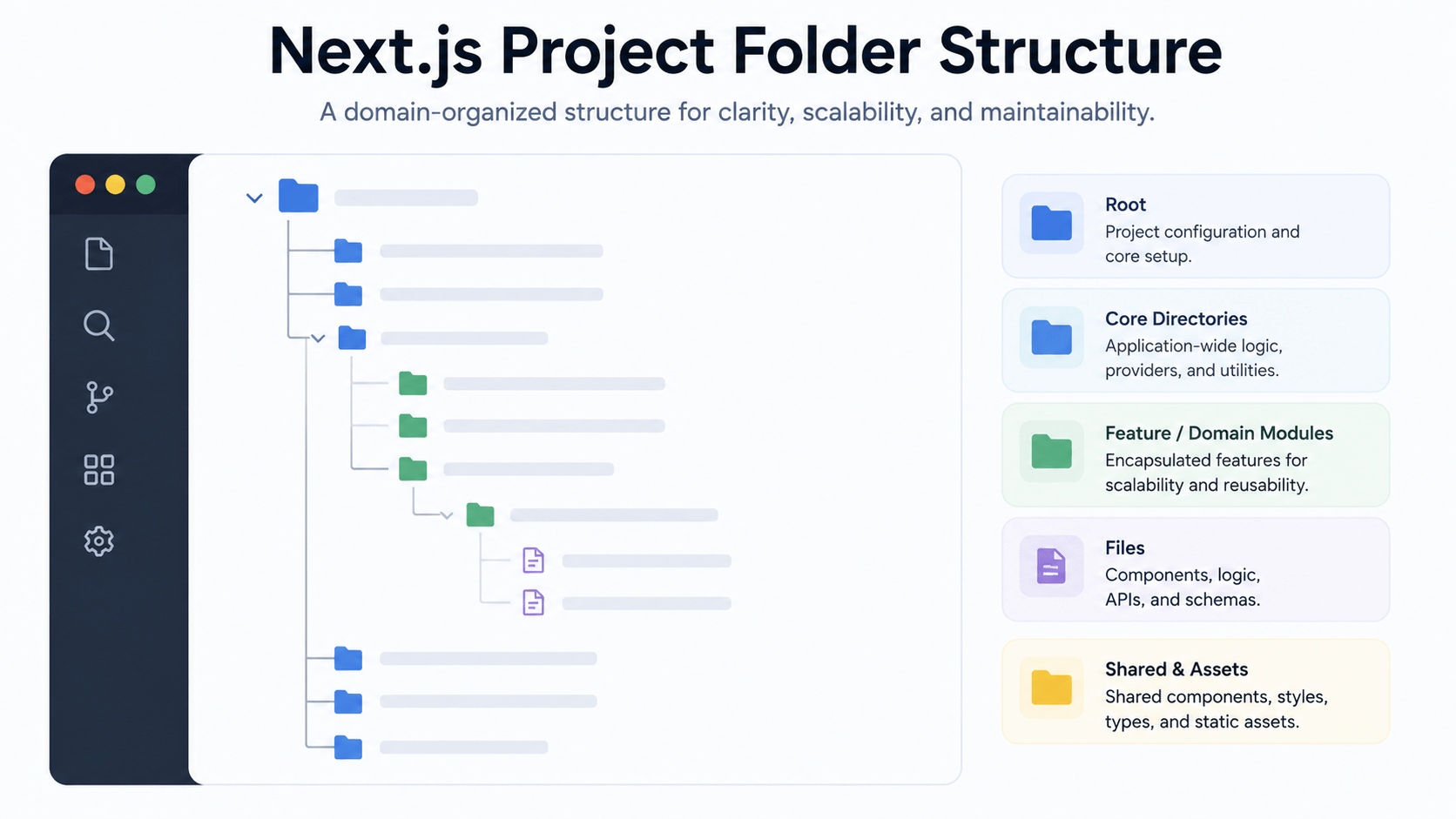
To keep a Next.js project architecture scalable past the demo stage, organize your files by domain responsibility instead of by file type. Grouping every “page” together and every “component” together feels tidy at ten files. At a hundred files, you’ll be scrolling through unrelated features just to find one button.
devpulse/
├── app/
│   ├── (auth)/             --> Grouped routes for authentication
│   │   └── login/
│   │       └── page.jsx
│   ├── dashboard/          --> Protected user dashboard
│   │   ├── loading.jsx     --> Suspense skeleton UI
│   │   ├── error.jsx       --> Route error boundary
│   │   └── page.jsx
│   ├── posts/
│   │   └── [id]/
│   │       └── page.jsx    --> Dynamic post page with streaming comments
│   ├── actions/            --> Shared Server Actions
│   │   ├── post-actions.js
│   │   └── comment-actions.js
│   ├── layout.jsx
│   └── page.jsx            --> Public landing page
├── components/             --> Reusable UI elements
│   ├── Navbar.jsx
│   └── CommentForm.jsx
├── lib/                    --> Singleton database & utility instances
│   └── db.js
├── middleware.js           --> Route protection rules
└── auth.js                 --> Auth.js setup
Why This Next.js Project Architecture Uses Route Groups
The (auth) folder above uses a route group the parentheses tell Next.js “organize this logically, but don’t add it to the URL.” That’s how /login stays clean instead of becoming /auth/login. Small conventions like this are what separate a codebase that new contributors can navigate on day one from one that needs a tour guide.
Also Read: If Server Actions are new to you, our earlier post on Next.js Server Actions for mutations covers the fundamentals this section builds on.
Core Data Flow: Creating a Post
Let us explore the interaction of these various layers when a new post is submitted on DevPulse. The walkthrough of an actual request will help to shed light on an architecture better than any diagram could.
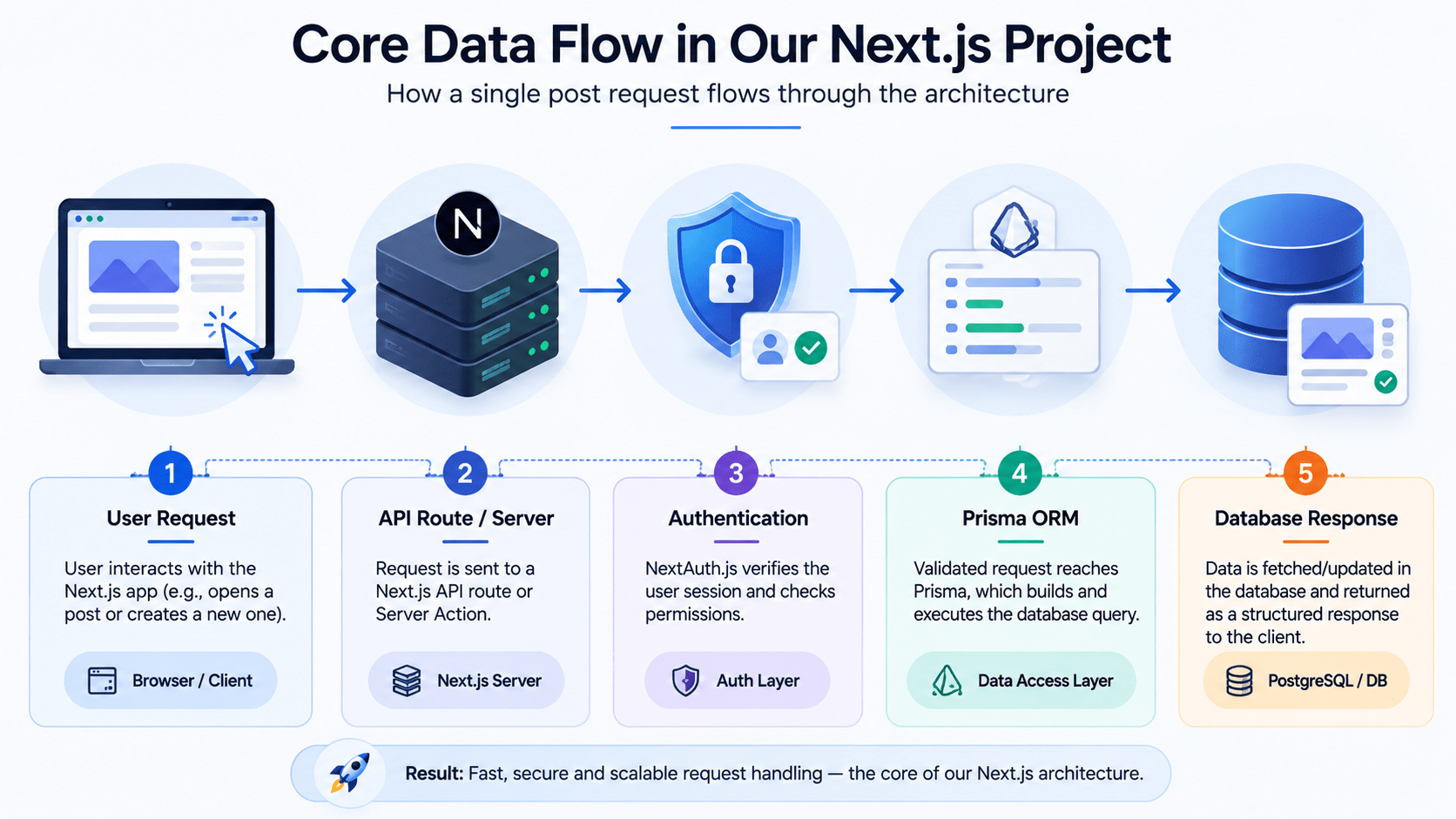
- Client Interaction (UI Event): The user enters post details into a client-side form component and hits “Publish.”
- Server Action Trigger (App Router): The form invokes a Server Action,
createPostAction, directly no separate API route needed. - Authentication Check (Security Layer): The Server Action calls
await auth()to confirm the user is logged in. If they aren’t, it throws an error before touching the database. - Database Insertion (Prisma ORM): The server executes
db.post.create(...)using the validatedFormData. - Cache Revalidation (Next.js Cache): The server calls
revalidatePath('/dashboard')and streams the updated feed back to the user instantly.
All these stages are performed at the level of the server. Communication with Prisma is never performed by the client, and it does not have to implement any fetch logic in case of a common mutation. This is precisely the advantage which is achieved with the Server Actions approach to application development.
Conclusion
Through having clean data models, separating server logic using Server Actions, and having routes protected by Middleware, DevPulse is fully architected to be used in production. But this architecture does not belong solely to a social feed app, as well. Change the Post and Comment models to any other models that your project might require, and you will have the same four-tier architecture, file structure, and data flow model.
In the following post of this series, we will take this architecture and implement an authentication flow using Auth.js and GitHub OAuth.
Frequently Asked Questions
Do I need a separate API layer if I’m using Server Actions?
For most CRUD operations, no. Server Actions replace the need for hand-built API routes for form submissions and mutations. You’ll still want traditional API routes for things like webhooks or third-party integrations that can’t call a Server Action directly.
Why use route groups like (auth) instead of a regular folder?
Route groups let you organize related pages in your file system without changing the URL structure. It keeps your app/ directory readable without forcing awkward URLs like /auth/login on your users.
Should the database schema or the UI come first when starting a new feature?
The schema. Designing your Prisma models first forces you to think through relationships and constraints before you’re locked into a UI that assumes the wrong data shape.
What happens if I skip the authentication check inside a Server Action?
Anyone who can call that action including through a crafted request could trigger it without being logged in. Always verify the session with await auth() inside the action itself, not just in the UI that calls it.
Does this architecture work for apps smaller than DevPulse?
Yes. You can drop the file-storage layer or simplify the folder structure for a smaller project, but the core separation Frontend, Server Actions, Auth, and Database holds up even for a two-page app.



