
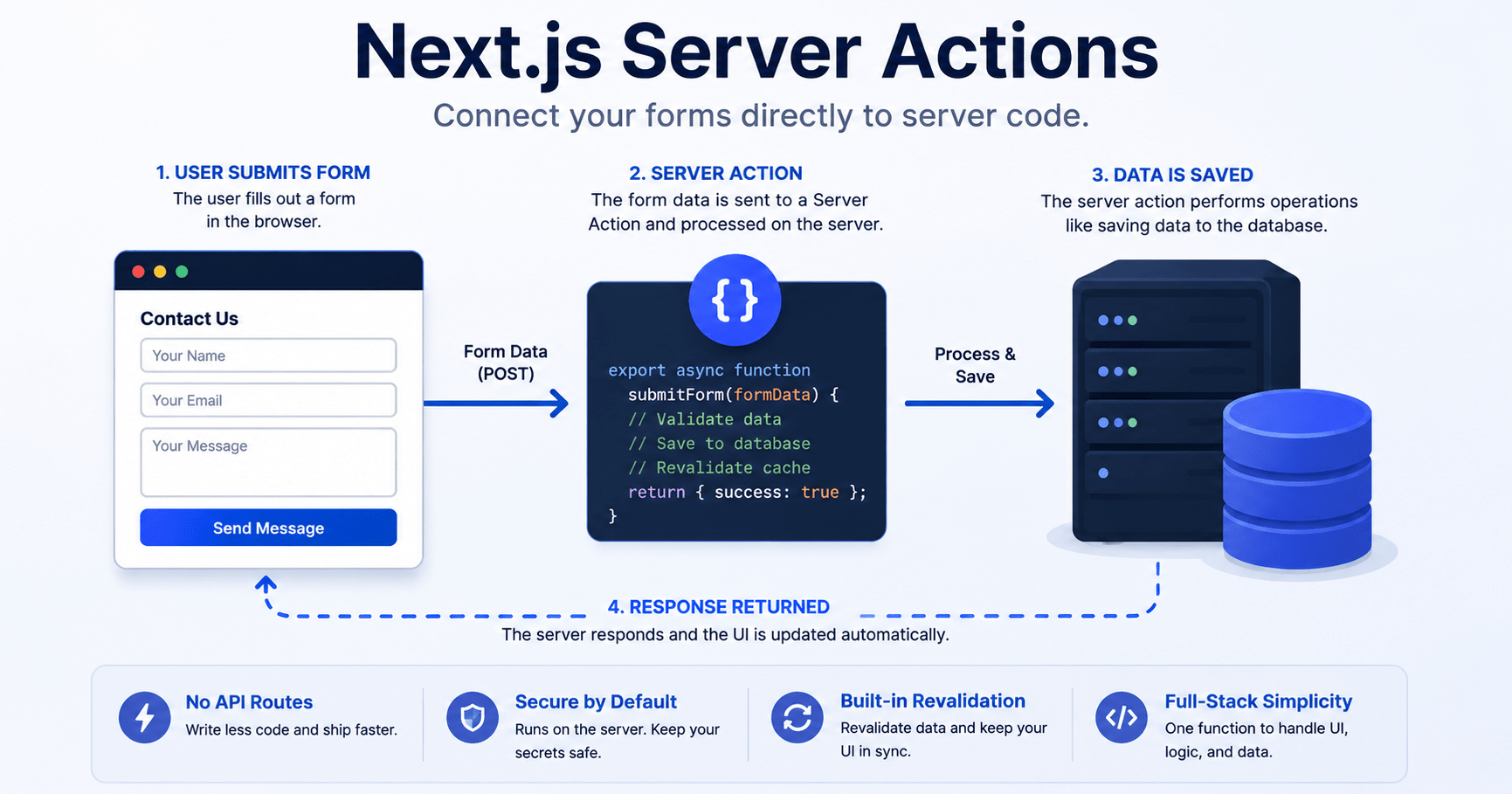

Next.js Server Actions let you execute server code right from your form or button interaction, eliminating the API route altogether. Having worked on React applications before, you already know what the traditional way of handling mutations looks like. You set up an Express/Next.js API route, have a fetch request in your client component, use useState for handling loading and error state, and manually refetch for the update.
Server Actions are built directly on top of React Server Components. They are called via forms and button click events, and perform their asynchronous actions on the server side without any fetch boilerplate code on the client side. In this tutorial, we will learn about the working of actions, dealing with pending and error state via useActionState hook and calling actions via useTransition hook.
What Are Next.js Server Actions?
They are asynchronous methods that will always execute only on the server regardless of whether you invoke them from a Client Component. They are used for writing to a database, revalidating cached data, or redirecting users upon form submission.
You mark a function as a Server Action with the "use server" directive, either at the top of the function body or at the top of a dedicated file that only exports server functions.
js
// app/actions.js
"use server";

export async function createPost(formData) {
  const title = formData.get("title");
  // 1. Run database queries directly
  // 2. Perform server-side validation
  // 3. Revalidate cache or redirect
}
This is made possible because behind the scenes, it relies on conventional HTML form mechanisms that function even before your JavaScript bundle loads up. This technique ensures that even if you have a slower 3G connection while in a coffee shop, the form will still work.
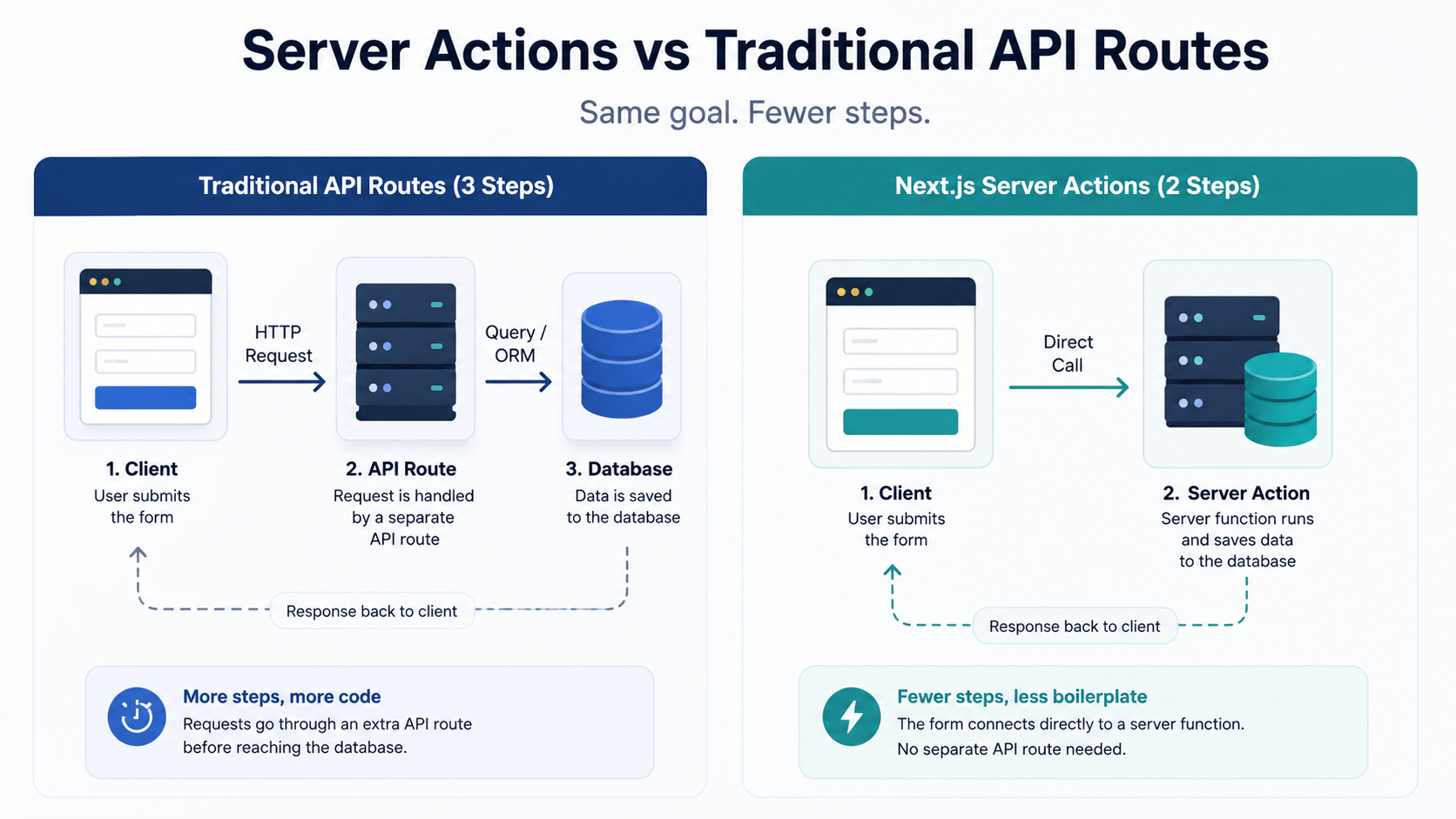
Server Actions vs Traditional API Routes
Before you rewire your data layer, it helps to see where this approach actually saves you work and where a dedicated API route still makes sense.
Data Fetching Patterns in Next.js
Server Actions vs. API Routes vs. Client-side fetch
| Approach | Setup Required | Type Safety | Best For |
|---|---|---|---|
|
01
Server Actions
|
Single function, no route file | End-to-end, no manual typing | Form mutations, internal app logic |
|
02
API Routes
|
Route handler + client fetch call | Manual, unless you add a schema layer | Public APIs, third-party webhooks |
|
03
Client-side fetch + useState
|
Route handler + loading/error state | Manual | Legacy apps, non-Next.js clients |
If you are building a public API that mobile apps or external services also call, keep the API route. If the mutation only exists to serve your own UI, this approach is almost always less code.
1. Form Mutations from Server Components
You can feed one directly into the action of an ordinary HTML form. Upon submission by the user, Next.js will take care of sending the request, running your server function, and passing the native FormData object. No need for onSubmit or JSON.stringify.
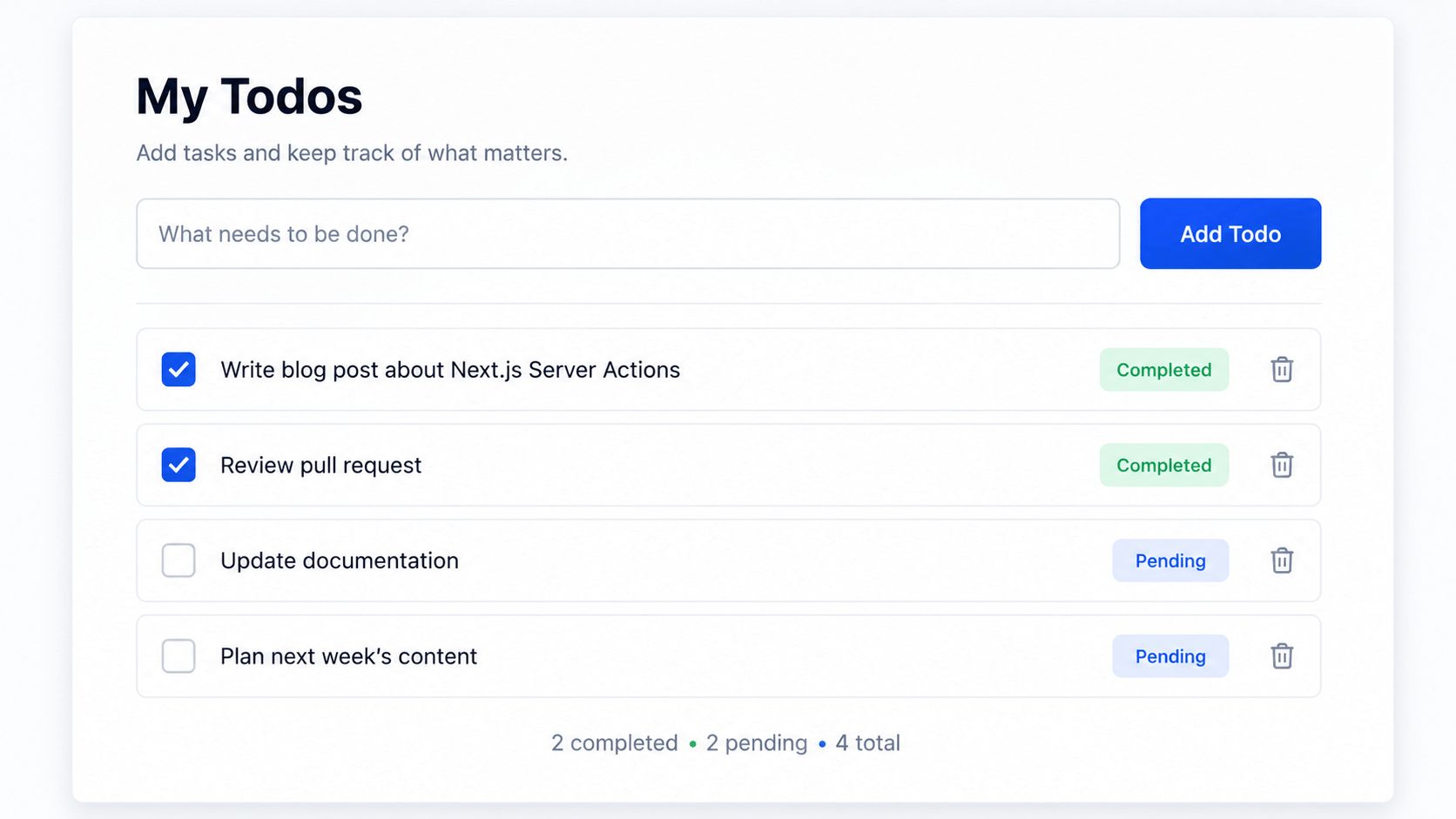
Example: A Server Action That Adds a Todo Item
Here is a todo list that reads and writes without a single API route:
jsx
// app/todos/page.jsx
import { revalidatePath } from 'next/cache';
import { db } from '@/lib/db';

export default async function TodoPage() {
  const todos = await db.todo.findMany();

  async function addTodo(formData) {
    "use server";

    const task = formData.get('task');
    if (!task) return;

    await db.todo.create({ data: { task } });
    revalidatePath('/todos');
  }

  return (
    <main style={{ padding: '20px', maxWidth: '400px' }}>
      <h1>My Tasks</h1>

      <form action={addTodo} style={{ display: 'flex', gap: '8px', marginBottom: '20px' }}>
        <input type="text" name="task" placeholder="New task..." required />
        <button type="submit">Add Task</button>
      </form>

      <ul>
        {todos.map((todo) => (
          <li key={todo.id}>{todo.task}</li>
        ))}
      </ul>
    </main>
  );
}
When revalidatePath('/todos') runs on the server, Next.js throws out the cached render for that route and streams the updated list back in the same round trip. You get a fresh UI without writing a single line of client-side state management.
2. Handling Pending States with useActionState
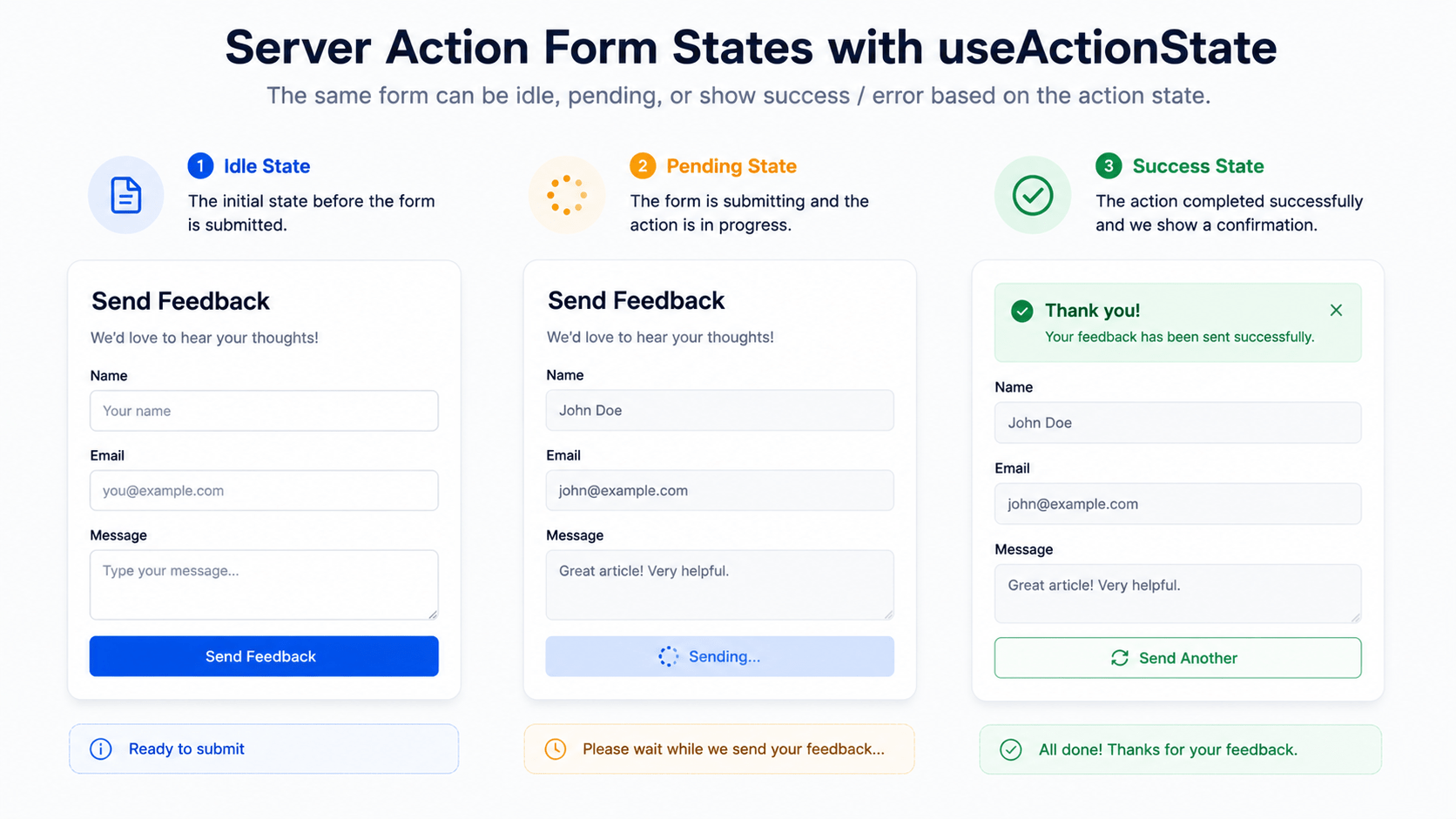
A raw call such as this one will not convey anything to your user interface in terms of load or error states. For that, you have the useActionState hook along with the useFormStatus hook inside your child components.
Example: Client Form with Loading and Validation States
Start by isolating the action in its own file so it stays reusable:
js
// app/actions.js
"use server";

export async function submitFeedback(previousState, formData) {
  const comment = formData.get("comment");

  if (!comment || comment.length < 5) {
    return { error: "Comment must be at least 5 characters long." };
  }

  await new Promise((res) => setTimeout(res, 1000));

  return { success: true, error: null };
}
Then wire it into a Client Component:
jsx
// app/components/FeedbackForm.jsx
"use client";

import { useActionState } from 'react';
import { submitFeedback } from '@/app/actions';

export default function FeedbackForm() {
  const [state, formAction, isPending] = useActionState(submitFeedback, null);

  return (
    <form action={formAction} style={{ display: 'flex', flexDirection: 'column', gap: '10px' }}>
      <textarea name="comment" placeholder="Leave your feedback..." disabled={isPending} />

      {state?.error && <p style={{ color: 'red' }}>{state.error}</p>}
      {state?.success && <p style={{ color: 'green' }}>Feedback submitted successfully!</p>}

      <button type="submit" disabled={isPending}>
        {isPending ? 'Submitting...' : 'Send Feedback'}
      </button>
    </form>
  );
}
useActionState returns the current state, a wrapped action to pass to the form, and an isPending flag you can use to disable inputs while the request is in flight. The validation error and success message both come straight from the return value of submitFeedback, so there is no separate error state to sync.
3. Programmatic Invocations Outside Forms
Not every mutation lives inside a form. Like buttons, inline toggles, and delete actions usually fire from a plain onClick handler. For those cases, wrap the call in useTransition instead:
jsx
"use client";

import { useTransition } from 'react';
import { deleteItemAction } from '@/app/actions';

export function DeleteButton({ id }) {
  const [isPending, startTransition] = useTransition();

  const handleDelete = () => {
    startTransition(async () => {
      await deleteItemAction(id);
    });
  };

  return (
    <button onClick={handleDelete} disabled={isPending}>
      {isPending ? 'Deleting...' : 'Delete'}
    </button>
  );
}
startTransition marks the update as non-urgent, so React keeps the button responsive while the delete request runs in the background. You still get the same isPending boolean you would from useActionState, just without a form wrapping it.
Best Practices for Server Actions
A few habits will save you debugging time once your app has more than one or two of these functions:
- Keep actions in dedicated files. Grouping actions in app/actions.js (or a folder per feature) makes it obvious what is server-only code and keeps client bundles from accidentally importing server logic.
- Validate on the server, not just the client. This is a public network endpoint even though it looks like a normal function call. Never trust formData without checking it server-side, the same way you would validate a REST API body.
- Call revalidatePath or revalidateTag after every write. Skipping this step is the most common reason a mutation appears to “not update the UI” during testing.
- Return structured state, not thrown errors, for form validation. Returning
{ error: "..." }from the action keeps useActionState’s error handling predictable, instead of forcing a try/catch in every component.
Key Benefits of Next.js Server Actions
- Simplified architecture. No separate REST or GraphQL route handler just to write to a database.
- End-to-end type safety. It is a regular TypeScript or JavaScript function, so argument and return types flow from server to client without a manual schema.
- Automatic revalidation. Paired with revalidatePath or revalidateTag, the cached UI updates itself without manual state juggling.
This pattern represents a real shift in how React apps handle mutations. By letting client interactions call server code directly, they cut out a large slice of boilerplate and make forms feel faster and more reliable, especially on slower connections common outside major metro areas.
Frequently Asked Questions
Are Next.js Server Actions meant to eliminate the use of API routes?
Not entirely. While they cater for mutations triggered by your own user interface, API routes will be needed for public routes, webhooks, or anything else called by a service outside your Next.js application.
Is there TypeScript support for Server Actions?
Absolutely. Being just plain asynchronous functions, there is no need for any additional configuration to infer the types of the arguments and the returned values through TypeScript.
Does it work without JavaScript?
Yes, if it’s triggered from a standard HTML form. Since Server Actions leverage the native form submission process, the mutation will take place even before the JavaScript bundle is fully loaded.
How can useActionState be distinguished from useTransition?
useActionState is made specifically for form actions, taking care of the pending state and return value (error message/success message). useTransition, on the other hand, is more generic and works great for button clicks or any non-form actions where pending state is enough.
Would I still have to call revalidatePath then?
Yes, if you are writing any new data to the database. You see, Next.js has no idea whether your database got updated or not
Also read : react state management guide



