


Best laptop for college freshers: Getting into college is stressful enough without your parents asking “so which laptop do you want” and you realizing you have no idea. I have been there. You open Amazon, type “laptop for college,” and get hit with forty tabs, half of them gaming laptops you don’t need and can’t afford, the other half so vague you still don’t know what to actually buy.
Therefore, let us make things easier. In case your choices are limited to the Asus VivoBook 15, Lenovo V15 G4, and Acer Aspire 3, congratulations – you’ve done most of the work for yourself. This is, in fact, one of the most frequently asked questions at each admission season: What laptop is the best choice for college freshmen who do not want to pay more than necessary or end up regretting their purchase in three months?
Well, these laptops belong to almost the same price category, they all have similar pictures and provide you with exactly the same thing: a trustworthy laptop to take notes on, complete assignments and occasionally watch some Netflix during exam period. Let me tell you what is the difference between those.
Also Read: 10 Best Free AI Tools for Content Creators in India
What a College Fresher Actually Needs From a Laptop
Before we start comparing specifications, let us get real about what your first year truly requires. You want a device that will work well with Google Docs, PDFs, PowerPoint, multiple tabs on your browser, perhaps an IDE if you are pursuing a technical field of study, and online meetings. You don’t want a graphics card for gaming. You don’t need 32 GB of memory.
What you need is something dependable, portable enough to carry to and from classes every day, and cheap enough that you won’t be eating instant ramen for the whole semester just to afford it.
All three laptops here fit the bill perfectly. Differences are much smaller than what the marketing tries to tell you, but there is one thing, in particular, you should know before handing over your credit card.
The Quick Comparison
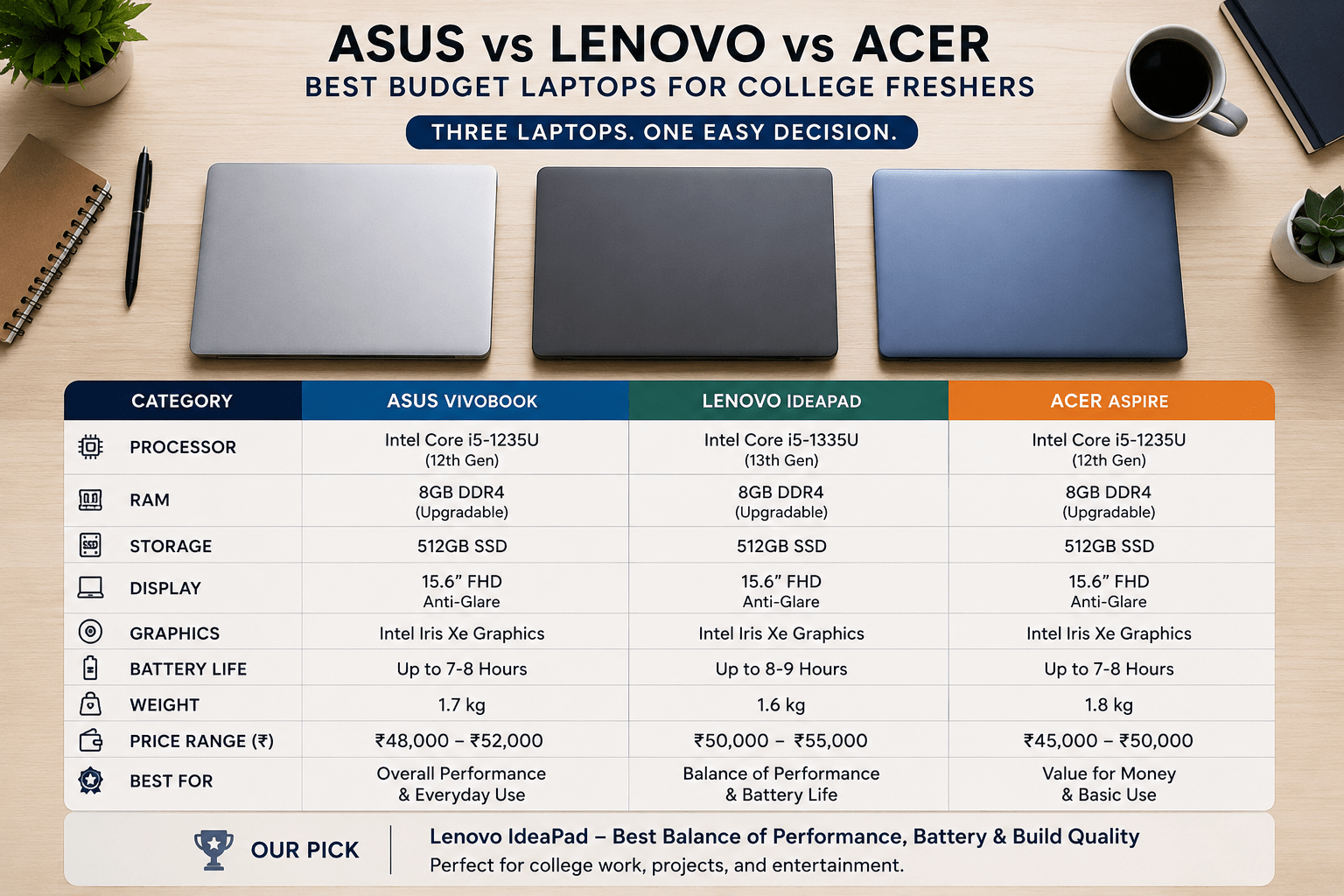
Here’s the best laptop for college freshers breakdown at a glance, before we get into why each column matters:
Asus VivoBook 15 vs Lenovo V15 G4 vs Acer Aspire 3
Side-by-side comparison of the best budget laptops under ₹45,000 in India. Compare processor, RAM, storage, display, and price to find your perfect student or work laptop.
| What You’re Buying | Asus VivoBook 15 | Lenovo V15 G4 | Acer Aspire 3 |
|---|---|---|---|
| Processor | Intel Core i3-1315U (6 cores) | AMD Ryzen 3 7320U (4 cores) | AMD Ryzen 3 7320U (4 cores) |
| RAM | 8GB | 8GB | 8GB |
| Storage | 512GB SSD | 512GB SSD | 512GB SSD |
| Screen | IPS, standard | TN on the cheapest SKU, IPS on pricier ones | IPS, standard |
| Starting Price (India) | ₹34,990–₹45,990 | ₹27,490 (TN version) | ₹31,490–₹41,999 |
| Best For | Heavy multitaskers, coding students | Tightest budgets | Most freshers, balanced pick |
Prices move around a lot depending on the sale and the exact model code, so treat these as ballpark figures, not fixed numbers. Always double-check the live listing before you buy.
The One Thing That Actually Matters: The Screen
And here is something that no one tells people purchasing their first laptop: you are going to spend more time staring at your laptop’s screen this year than nearly any other piece of equipment you own. You cannot brush that specification under the rug.
Both the Acer Aspire 3 and the Asus VivoBook 15 ship with standard IPS displays. This means that if you find yourself sitting over your laptop at 2 AM trying to finish an assignment, or if your roommate is taking a quick glance at your screen, the colors and contrast won’t change with an angle. Things are not quite as clear with the Lenovo V15 G4.
Its basic and widely advertised version comes with a TN panel an older type of display where colors and contrast become distorted when you slightly turn the screen even a bit. But Lenovo sells a version of the same laptop with an IPS display; only it comes for a steeper price and it can be very difficult to realize that you are buying the TN version from the pictures provided in the listings.
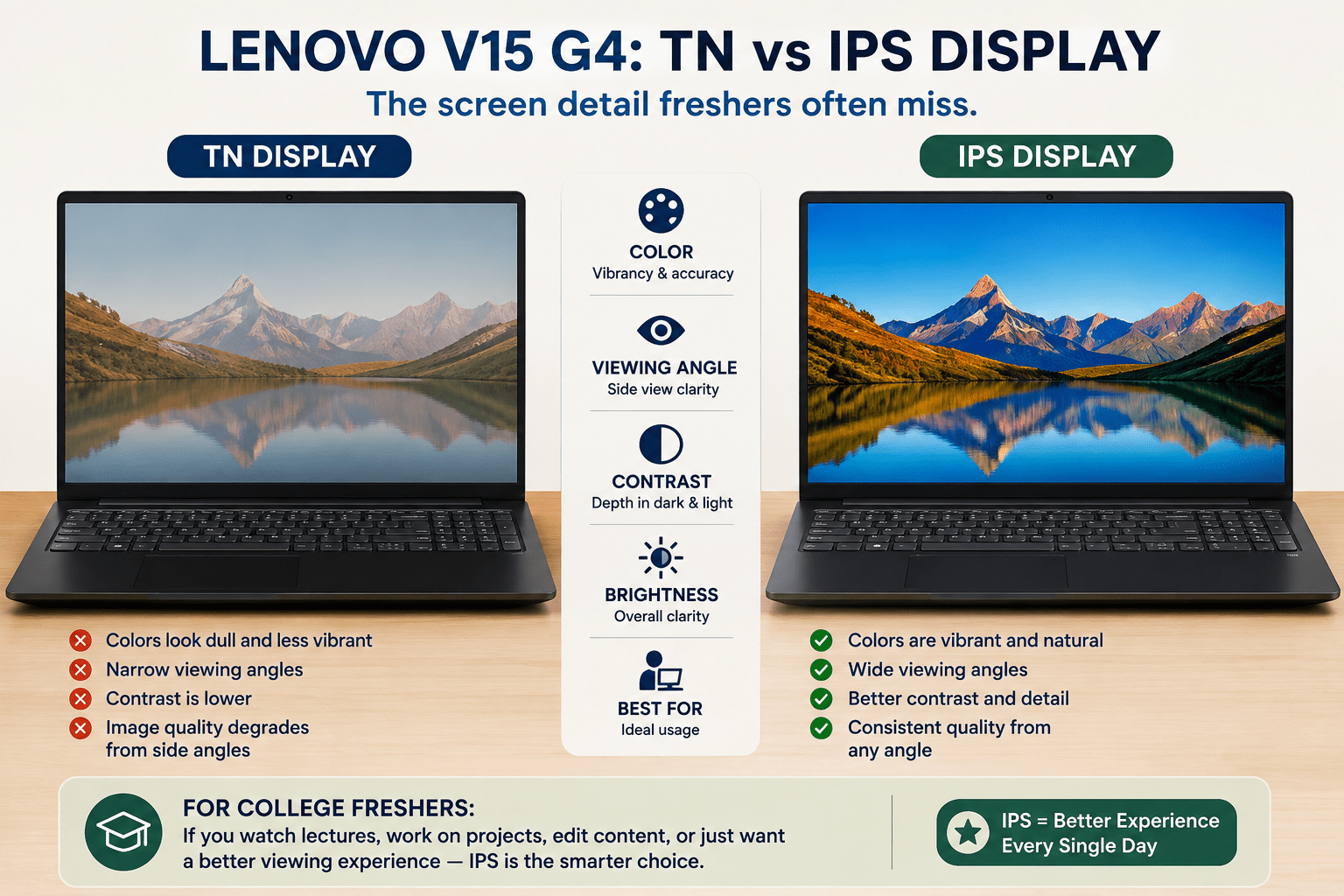
So if you are someone who will notice dull and washed out screen every day, then this is much more important to consider than any other specifications listed above. If you simply don’t mind, then TN V15 G4 will still serve its purpose well enough.
Processor: Does It Actually Matter for College Work?
The VivoBook 15 has a core i3-1315U which is a 6-core processor from Intel. In contrast, the V15 G4 and the Aspire 3 have the Ryzen 3 7320U, a 4-core processor from AMD. The specifications of the former sound more impressive and, in reality, it does support multitasking better, opening multiple tabs and applications without lagging too much.
However, that’s how it looks on paper. Truth to tell, for the writing assignments, watching video lectures, surfing across 15 tabs, as well as light programming during your first year, all the processors work perfectly fine. If you study at a university majoring in Computer Science and Engineering and understand that you will have to run an IDE, a browser, and even a virtual machine within one year, the VivoBook 15 processor would be the better choice.
RAM and Storage: All Three Get This Right
The good news is that all three come with 8GB RAM and 512GB SSD, which should definitely be sufficient storage capacity for college coursework in 2026. You would not run out of storage space when your textbooks are in PDF format, along with your project files and, of course, the obligatory folder of memes that will pile up until December.
Build and Portability: Will It Survive Being Thrown in a Backpack?
They are all in the ballpark of 1.7 kilograms, which is fairly easy to carry around from class to class, although none of them are those super lightweight laptops that you’ll find in premium lines.
They aren’t made of any fancy materials either; no aluminum, only plastic which is common and to be expected at this price point. The thing that really counts here is the feel of the keyboard because you will be typing a lot of assignments on it, and the consensus among all three is that the keyboard works just fine.
What Actual Buyers Say
Scouring for opinions from both Flipkart and Amazon, there emerges a pattern that correlates very well with all of the above. Reviews of Acer Aspire 3 reveal satisfaction regarding the screen for the price point.
There are divided opinions on Lenovo V15 G4 and these opinions correlate nearly exactly with the type of screen they got – further validating the significance of the TN vs IPS discussion. Users of the VivoBook 15 report better performance of the processor in multitasking, as well as some additional Asus software included. No official information about which brand is better at lasting over time. Review scores are based on different SKUs of the same model.
Talking to Your Parents About Budget and EMI
However, if your parents are paying for the laptop, then the following practical advice might come in handy: all three of these laptops can easily be bought without any cost under EMI schemes from Amazon, Flipkart, and Bajaj Finserv during admission sale seasons, making the cost range of ₹35,000-₹45,000 much more bearable over a few months.

It is always helpful to present the above-mentioned comparison table along with the price while convincing your parents that this is the best laptop for college freshers, as it makes it clear that you have considered the screen size, processor, and application of the laptop rather than simply pointing out its popularity online. There are usually instant discounts offered by banks of a few thousands of rupees for card payments during such sale seasons.
My Honest Recommendation for Freshers
If you just want the safe, no-regrets choice: Get the Acer Aspire 3. You get a guaranteed IPS screen without needing to decode SKU numbers, a reliable processor, and a price that won’t hurt too much. This is the pick if you want to stop researching and go do something else with your day.
If you’re in a technical program and know you’ll multitask hard: Get the Asus VivoBook 15. The extra cores in that Intel chip will age better as your workload gets heavier through the semesters.
If your budget is the tightest it can possibly be: The Lenovo V15 G4 can still work, but specifically hunt for the IPS variant if you can find it anywhere near the same price. If you can only get the TN version, know what you’re trading for the lower price it’ll do the job, just don’t expect the screen to impress anyone.
Quick Decision Flow
- Confused and just want it decided for you? Go with the Acer Aspire 3.
- Doing CS, engineering, or anything with heavy multitasking? Go with the Asus VivoBook 15.
- Budget is genuinely the deciding factor above everything else? Go with the Lenovo V15 G4 just check the display type first.
- Screen quality is a dealbreaker for you personally? Avoid the base Lenovo V15 G4 listing without confirming the panel.
Frequently Asked Questions
Which laptop is best for a college fresher on a tight budget? The Lenovo V15 G4 is usually the cheapest of the three, especially in its TN display configuration. If you can find the IPS version at a similar price, that becomes an even better deal. Whichever you pick, this is really the core question behind finding the best laptop for college freshers: not the highest specs, but the best fit for what you’ll actually use it for.
Do I need more than 8GB RAM for college? For most first-year coursework, 8GB is enough. If you know you’ll be running heavier software like video editing tools, data analysis programs, or several virtual machines, consider a laptop with 16GB instead none of these three ship with more than 8GB standard.
Is the Lenovo V15 G4’s TN screen really that noticeable? Yes, especially compared to an IPS screen sitting next to it. Colors look flatter and contrast drops when you’re not looking at it dead-on. It won’t stop you from getting work done, but it’s a real difference you’ll notice daily.
Should I prioritize processor or screen quality as a fresher? For most students, screen quality has a bigger day-to-day impact since you’re looking at it constantly. Processor differences at this budget level are smaller than they sound on a spec sheet, unless you know you’ll be running demanding software.
Can I game on any of these laptops? Not seriously. All three use integrated graphics meant for everyday tasks, not gaming. You can run older or lighter games, but don’t expect to play anything recent at good settings on any of these three.
Conclusion
Choosing the perfect laptop for your freshman year does not have to be an exhausting research exercise as it seems at this time. Comparing the Asus VivoBook 15, Lenovo V15 G4, and Acer Aspire 3, the Acer Aspire 3 wins by default thanks to the built-in IPS screen.
No matter what you take away from this article, keep this fact in mind always: The best laptop for a college freshman should be chosen based on its compatibility with how you plan to use it and not on how it stacks up against its competitors in terms of features. Choose the VivoBook 15 if you know you will need to juggle multiple tasks while studying. Get the V15 G4 if price is the priority, but verify the screen before purchase.



