

MCP security is the next job once your first Model Context Protocol (MCP) server works. In Part 3 of our Full-Stack AI series you built one in Node.js, and your AI assistant could call your tools. Nice! But there’s a harder question waiting. What stops that assistant, or someone tricking it, from calling those tools in ways you never meant?
MCP servers sit between a language model and real systems like files, databases, APIs and email. That makes them a juicy target, and MCP security a real job. In this guide we’ll walk through the main MCP security risks and the fixes that actually work, with code you can drop straight into a Node.js server.
Also Read: The Full-Stack AI Developer Roadmap: From REST APIs to MCP Servers in 2026
Why Does MCP Security Need Extra Care?
A normal API gets called by code you wrote. An MCP tool gets called by a model that decides what to do based on text, and some of that text might come from an attacker. That changes things a lot.
The OWASP MCP Security Cheat Sheet lists the big risks. Here they are in plain words:
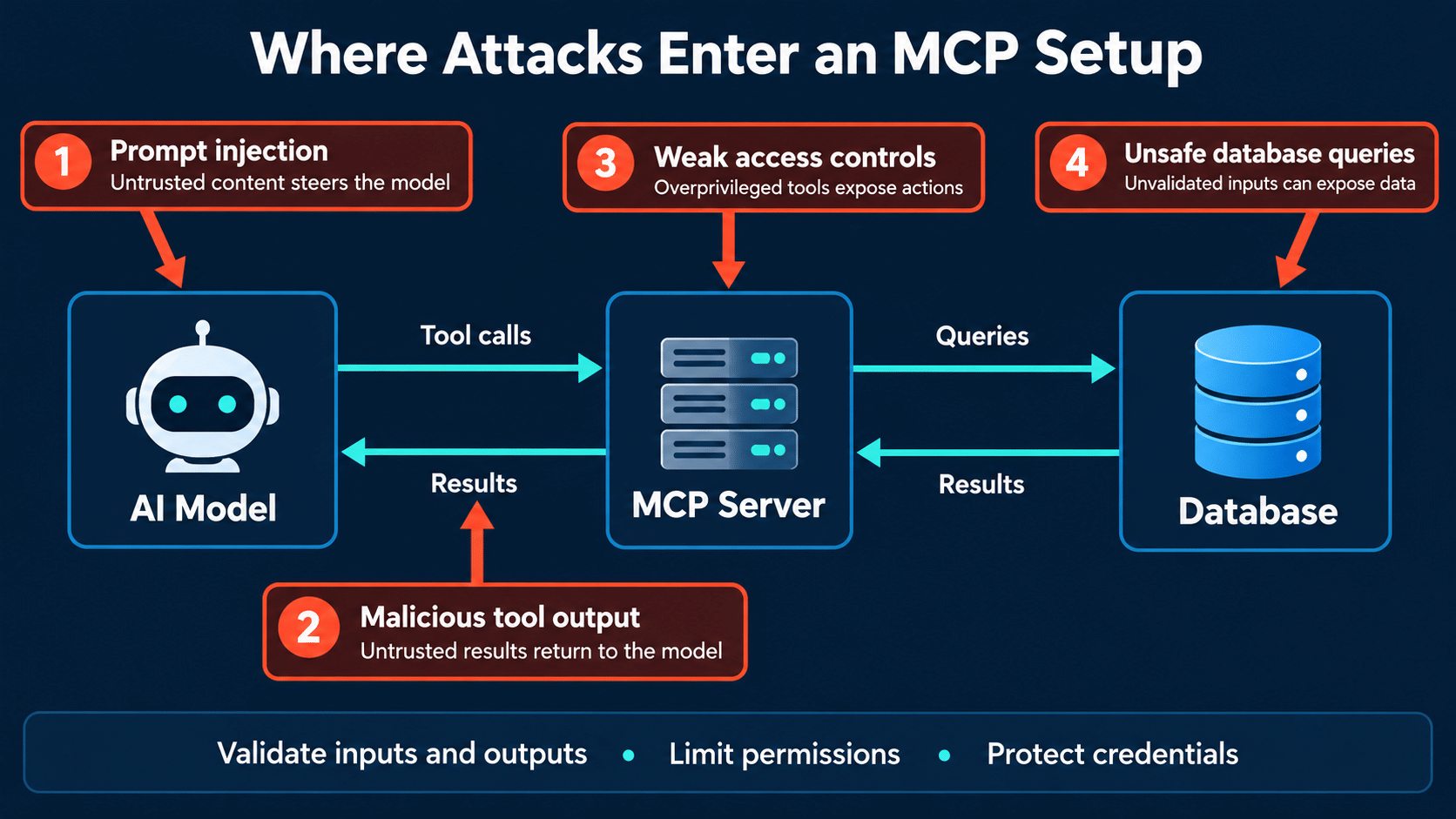
- Tool poisoning: someone hides malicious instructions in tool descriptions, parameter schemas or return values, so the model gets steered off course.
- Rug pull: a server quietly changes its tool definitions after you’ve already approved them.
- Tool shadowing: one bad server’s descriptions change how the agent uses tools from your other, trusted servers.
- Confused deputy: your server acts with its own broad privileges instead of the permissions of the person asking.
- Data exfiltration: secrets sneak out through normal-looking tool calls, tucked into a search query or an email subject.
- Over-scoped tokens and supply chain attacks: servers you shouldn’t have trusted in the first place.
If you’ve read our post on prompt injection attacks on AI agents, you’ll spot the pattern. The model can’t reliably tell instructions apart from data. That’s why MCP security has to live in your code, not in your prompt.
MCP Security Fix 1: Authenticate Every Remote Connection
Running your server only on your own machine? OWASP suggests the stdio transport, since it doesn’t open a listening network endpoint. Just remember it isn’t a sandbox. The process can still reach your files, the network and your credentials, so keep reading. Good MCP security starts at the front door.
Once your server talks over HTTP, every single request needs to be authenticated. MCP uses OAuth for this. The official MCP Security Best Practices recommend starting small. Hand out a minimal set of scopes that only covers low-risk discovery and read operations. Then ask for more through a targeted WWW-Authenticate challenge the first time someone tries something privileged.
Two rules really matter here:
- Only accept tokens that were issued for your server, which means checking the audience.
- Never pass the client’s token along to another API. If your server needs to call something upstream, give it its own credentials.
Here’s a small Express middleware sketch that uses the jose library to verify a JWT access token. Swap in your own issuer, audience and JWKS URL.
javascript
import { createRemoteJWKSet, jwtVerify } from "jose";

const JWKS = createRemoteJWKSet(new URL("https://auth.example.com/.well-known/jwks.json"));

export async function requireAuth(req, res, next) {
  const header = req.headers.authorization || "";
  const token = header.startsWith("Bearer ") ? header.slice(7) : null;
  if (!token) return res.status(401).json({ error: "missing token" });

  try {
    const { payload } = await jwtVerify(token, JWKS, {
      issuer: "https://auth.example.com",
      audience: "https://mcp.example.com", // tokens for other services are rejected
    });
    req.user = { id: payload.sub, scopes: String(payload.scope || "").split(" ") };
    next();
  } catch {
    res.status(401).json({ error: "invalid token" });
  }
}
Microsoft’s free MCP for Beginners security chapter points out a couple of recent changes too. The 2026-07-28 spec requires clients to validate the iss parameter on authorization responses (RFC 9207). Dynamic Client Registration is deprecated in favour of Client ID Metadata Documents. If you use an SDK, keep it updated and you’ll pick these up for free.
MCP Security Fix 2: Give Every Tool the Least Privilege It Needs
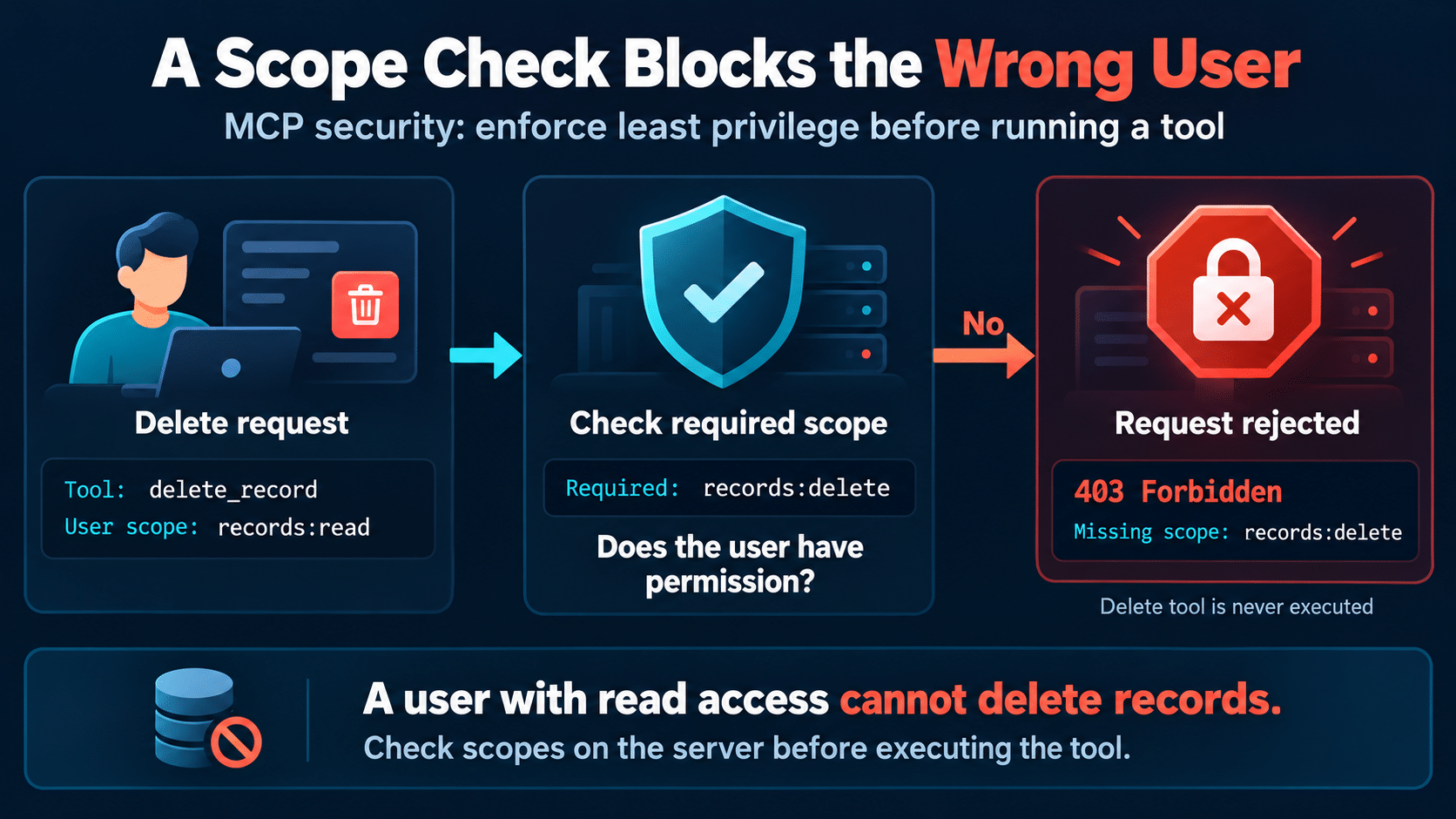
Authentication tells you who is calling. Authorization decides what they’re allowed to do. OWASP’s very first principle of MCP security is least privilege. Give each server only the permissions it needs and use separate credentials per server. Ask for narrow scopes like read-only mail instead of full access, and prefer short-lived tokens over long-lived personal access tokens.
In practice, check permissions inside the tool handler using the signed-in user’s scopes. Don’t lean on a server-wide admin key.
javascript
function requireScope(user, scope) {
  if (!user?.scopes.includes(scope)) {
    throw new Error(`Forbidden: missing scope ${scope}`);
  }
}

server.tool("delete_note", { id: z.string().uuid() }, async ({ id }, ctx) => {
  const user = ctx.user;            // attached by your auth layer
  requireScope(user, "notes:write");
  await db.notes.delete({ id, ownerId: user.id }); // only the user's own notes
  return { content: [{ type: "text", text: "Deleted." }] };
});
See that ownerId filter? Even if a manipulated model asks to delete somebody else’s note, the query simply can’t touch it. That’s how you dodge the confused deputy problem.
MCP Security Fix 3: Validate Inputs With Strict Schemas
Treat every tool argument as untrusted, because the model may have been tricked into writing it. OWASP recommends strict JSON Schemas with additionalProperties: false and patterns on string fields. That way only the parameters you declared, in the format you expect, get through. With Zod, which the official TypeScript SDK uses, it looks like this:
javascript
import path from "node:path";
import { z } from "zod";

const ALLOWED_ROOT = "/srv/notes";

const ReadFileArgs = z.object({
  path: z.string()
    .regex(/^[\w-]+(\/[\w-]+)*\.(md|txt)$/)   // simple relative .md/.txt paths only
    .refine(p => !p.includes(".."), "No path traversal"),
}).strict();                                   // rejects unknown keys

function safeResolve(p) {
  const full = path.resolve(ALLOWED_ROOT, p);
  if (!full.startsWith(ALLOWED_ROOT + path.sep)) throw new Error("Path escapes allowed folder");
  return full;
}
The regex blocks the obvious tricks, and safeResolve is the second lock on the door. Strict schemas are the cheapest MCP security win you’ll get. Run both, because one check alone is easy to slip past.
Validation works best alongside sandboxing. OWASP advises running local servers with minimal privileges and limiting file access to the folders they need. Turn off network access unless it’s required, and keep sensitive servers for payments, auth or personal data apart from general ones. A container with a read-only mount of a single folder is an easy start. This matters even more if you’re running models on your own hardware, like the setup in our local LLM capstone project.
MCP Security Fix 4: How Do You Defend Against Prompt Injection and Tool Poisoning?
The OWASP page on MCP tool poisoning explains the root cause really well. Tool descriptions get reviewed once when you connect, but tool responses flow straight into the model’s context with no such check. A rule in your system prompt like “don’t read files outside /tmp” is only as strong as the model’s willingness to follow it. Injected text can talk it out of that.
So what can you actually do for MCP security? OWASP suggests a handful of things:
- Enforce restrictions on the server, in the tool execution layer, just like the examples above.
- Return structured JSON with a fixed shape wherever you can, and reject anything that doesn’t match. OWASP is honest that spotting injected instructions in free text is still an open problem, but schema checks catch the obvious stuff.
- Isolate privileged tools for files, databases and internal APIs in a separate context that outside servers can’t reach.
- Allowlist servers rather than letting anyone point the agent at any URL.
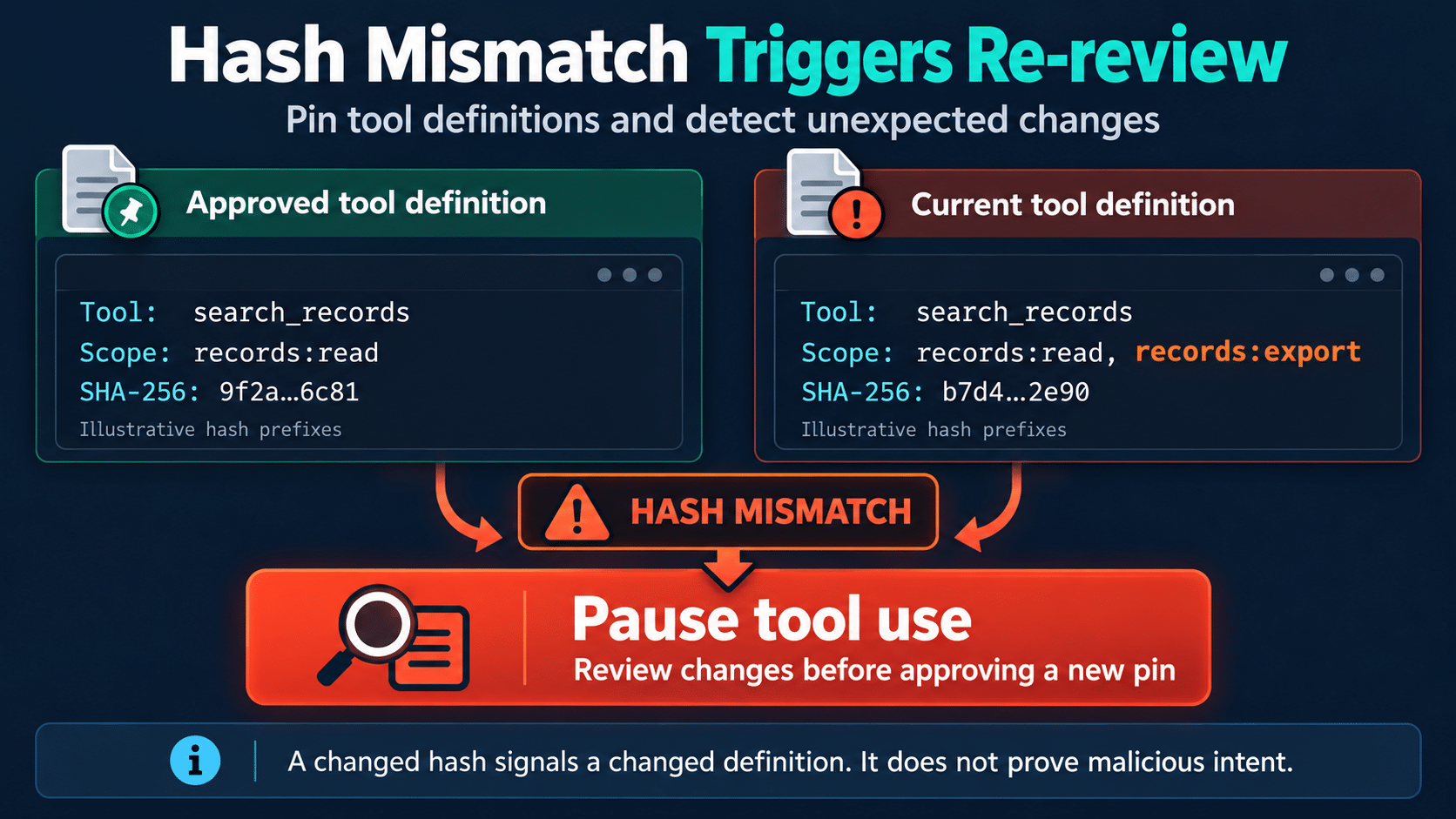
- Pin reviewed tool definitions and re-review when they change.\
How Does Pinning Improve MCP Security?
Pinning means hashing the whole tool definition you reviewed, including inputSchema, outputSchema and annotations. If the hash changes later, you re-review before using the tool again. That catches rug pulls in the metadata. OWASP also mentions tools such as mcp-scan for spotting poisoned descriptions.
Here’s a tiny pinning helper you could use in a client or gateway. Serialize tools the same way every time, since JSON.stringify depends on key order.
javascript
import { createHash } from "node:crypto";

const hashTool = t => createHash("sha256").update(JSON.stringify(t)).digest("hex");

function checkPinned(tools, pinned) {
  for (const t of tools) {
    if (pinned[t.name] !== hashTool(t)) {
      throw new Error(`Tool "${t.name}" changed since review. Re-approve before use.`);
    }
  }
}
One more heads-up from OWASP. Annotations like readOnlyHint are hints, not enforcement, so treat them as untrusted unless they come from a server you trust. Supply chain hygiene matters here too, and our look at how Anthropic wants to make open-source security smarter is a nice read on that side of things.
MCP Security Fix 5: Keep a Human in the Loop
The MCP spec says hosts must get explicit user consent before invoking tools, and a person should always be able to say no. For anything destructive, financial or data-sharing, show the user the full tool call parameters, not just the tool’s name. Never auto-approve calls, especially with several servers connected. Make sure model-generated text can’t skip the confirmation step.
If you built the chat interface in Part 4, the React UI with MCP and Vercel AI, that’s the natural spot to add an approval prompt before a risky tool runs. It’s the same idea we dug into in the hidden risks of autonomous AI agents. Autonomy is handy, but irreversible actions deserve a human check. That approval step is the last layer of MCP security.
Quick MCP Security Checklist
- If it’s local only, use stdio and still sandbox the process.
- If it’s remote, require OAuth, check the issuer and audience, and never forward client tokens.
- Start with minimal scopes and step up only when needed.
- Check permissions and ownership inside every tool handler.
- Use strict schemas with no unknown keys and tight string patterns.
- Treat tool descriptions and responses as untrusted, and pin and re-review definitions.
- Allowlist servers and keep privileged tools isolated.
- Ask a human before anything sensitive happens.
Wrapping Up
MCP makes it really easy to give AI assistants real powers, and that’s exactly why MCP security matters. The big lesson from both the MCP project and OWASP is simple. Never trust the model to enforce your rules. Treat MCP security as part of the build, not a patch you add after launch. Authenticate every request, give each tool only what it needs, validate every input, treat tool content as untrusted, and keep a person in charge of risky actions.
Want a next step for your MCP security? Add the auth middleware and a scope check to the server you built in Part 3, then throw a deliberately sneaky prompt at it and watch your defences hold. To automate those checks, our guide to Playwright best practices for AI-assisted QA shows how to build tests around AI features.
FAQ
Is MCP security built in by default?
Not really. The spec says hosts must get user consent before calling tools, but OWASP notes that clients usually pass tool responses into the model as they are, and the spec doesn’t require checking them first. How safe your setup is depends on the auth, permissions and validation you build in.
What is tool poisoning in MCP?
It’s a kind of indirect prompt injection where a malicious server hides instructions in its tool descriptions, schemas or responses. The model reads that text as trusted and may call restricted tools, leak data or ignore its own rules. OWASP calls it out as one of the top MCP security risks.
Does MCP security require OAuth for a local server?
Usually not. OAuth in MCP is meant for servers you reach over HTTP, and OWASP suggests the stdio transport for local servers since it doesn’t open a network endpoint. You should still sandbox the process, because stdio doesn’t limit what it can touch on your machine.
How do I stop prompt injection through MCP tools?
There’s no perfect fix yet, and OWASP admits that spotting injected text in free-form responses is still an open problem. What works is enforcing permissions on the server, returning structured output, isolating privileged tools, allowlisting servers and asking a human before risky actions. Never rely on your system prompt alone.
What is an MCP rug pull?
It’s when a server changes its tool definitions after you’ve approved them, so a trusted tool quietly turns harmful. You can catch it by hashing the full definitions you reviewed and asking for a fresh review whenever the hash changes.
Can I share one access token across my MCP servers?
Please don’t. OWASP recommends separate, narrowly scoped credentials for each server and short-lived tokens where you can. Your server also shouldn’t pass a client’s token on to other APIs.
Sources for This MCP Security Guide
- Microsoft MCP for Beginners: Security chapter
- OWASP MCP Security Cheat Sheet
- Model Context Protocol Security Best Practices
- OWASP MCP Tool Poisoning



