
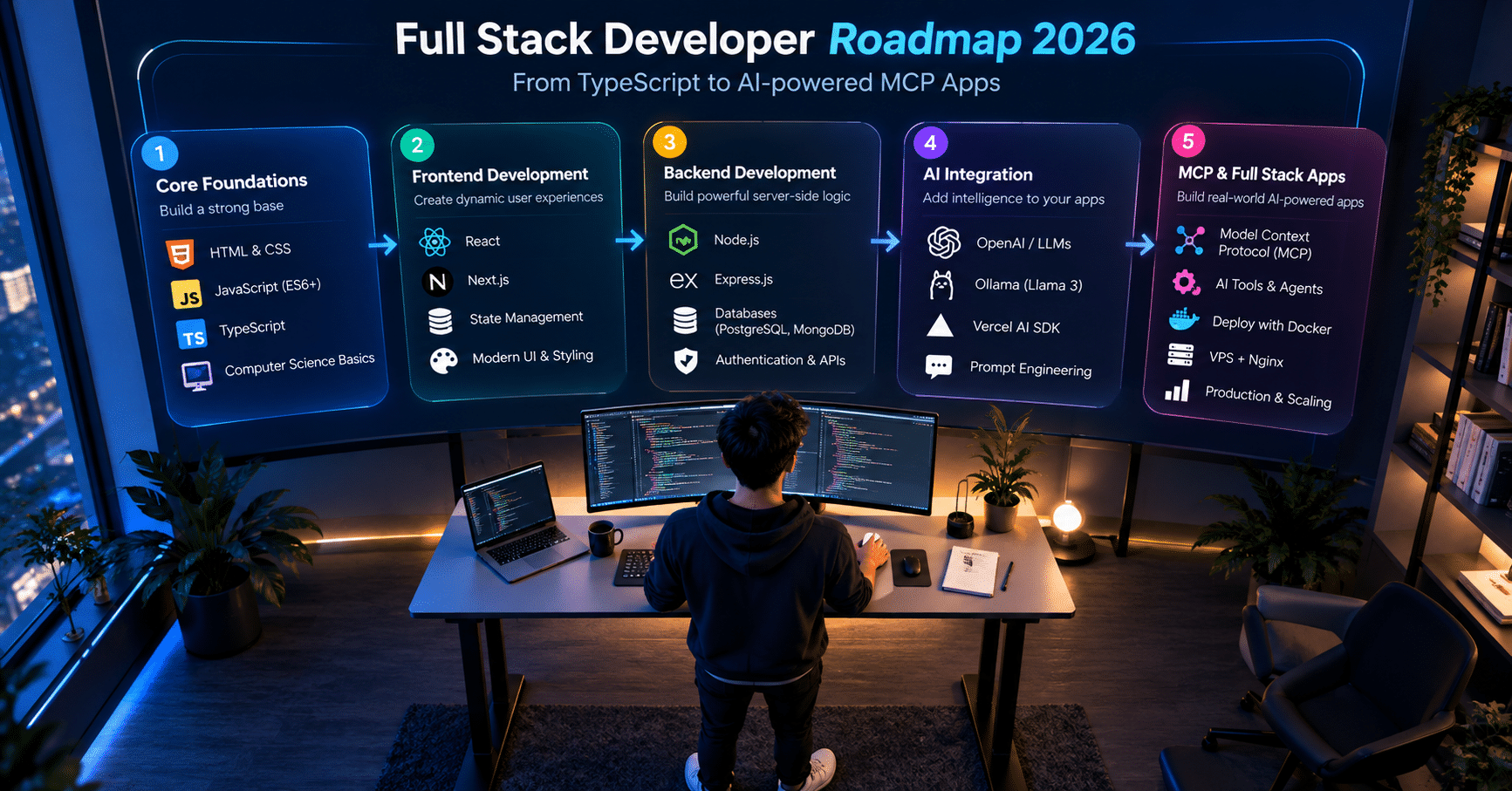

The web ecosystem is evolving faster than most developers can keep up with. If you are looking for the right full stack developer roadmap 2026, you need to think beyond “knowing some frontend and backend.” Today, the real demand is for developers who can build scalable, production-ready applications that use artificial intelligence as a core feature, not an afterthought.
The roadmap covers five structured phases: prerequisites, open-source AI with Ollama, the Model Context Protocol, React frontend integration, and a production capstone project.
Whether you are a fresher entering the field or an experienced developer looking to upgrade your career, this guide gives you a clear, month-by-month path to follow.
Also Read: What Are Tokens in Large Language Models? Simple Explanation with Examples
Why This Full Stack Developer Roadmap 2026 Puts AI at the Core
Right now, every company building a web application is asking the same question: how do we integrate AI without breaking what already works? The answer starts with hiring developers who understand both sides.
What This Full Stack Developer Roadmap 2026 Covers
The biggest mistake developers make right now is treating AI as a layer to add on top of good software. It is not. It is a fundamental shift in how applications are architected.
For freshers entering the market: companies are not looking for developers who can copy-paste an OpenAI API call into a React component. They want developers who can handle OAuth flows, manage complex state, and build clean REST APIs, then integrate AI on top of a solid foundation.
For experienced developers: the gap that separates mid-level and senior in 2026 is your ability to design AI-ready architectures. That means secure data exposure, streaming responses, and tools like the Model Context Protocol to standardize how AI agents talk to your backend.
Phase 1: The Non-Negotiable Prerequisites (Months 1 to 3)
Before touching any AI framework, your fundamentals must be solid. An AI layer cannot fix bad architecture underneath it.
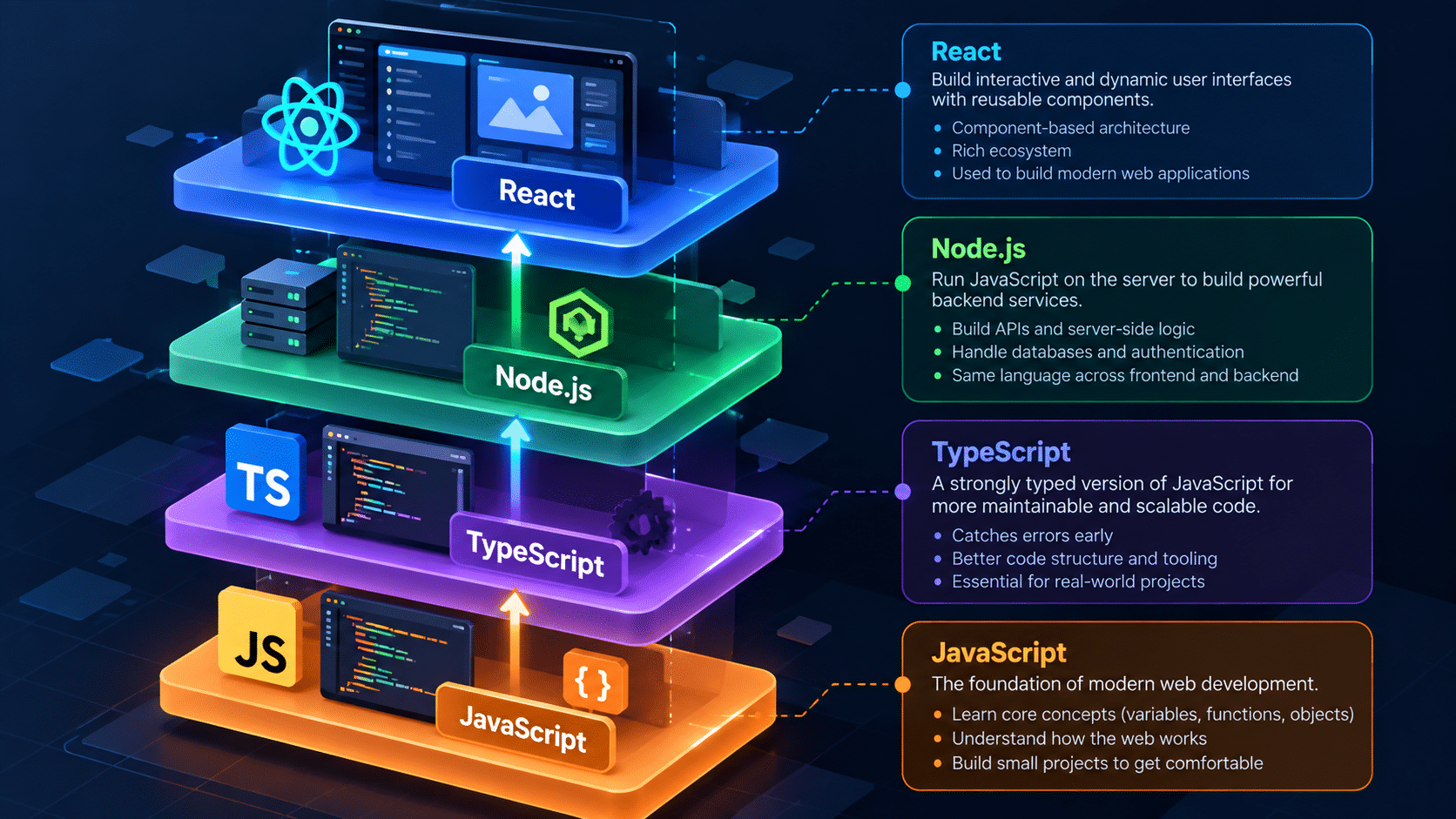
Advanced JavaScript and TypeScript
TypeScript is not optional in 2026. Every serious production codebase uses it. Focus on:
- The Event Loop and asynchronous programming (Promises, async/await) you will need this to stream AI responses without freezing the UI
- Generics, interfaces, and strict typing in TypeScript
- Type-safe API responses with proper error handling
Also Read: TypeScript for JavaScript Developers: What You Actually Need to Know
Backend Architecture: Node.js, Express, or Fastify
Pick one backend framework and go deep. Build at least three real APIs before moving forward:
- Design versioned, clean REST APIs
- Handle middleware, structured logging, and error boundaries properly
- Implement authentication: JWT for stateless apps, OAuth for social login
Frontend Mastery: React and Next.js
React remains the dominant frontend choice heading into 2027. For advanced React state management, the key areas are:
- Context API, Zustand, or Redux depending on app complexity
- The React rendering lifecycle and when to use
useMemoanduseCallback - Real-time data via WebSockets or Server-Sent Events (SSE) you will use SSE heavily for streaming AI responses
Phase 1 outcome: You can build, secure, and deploy a standard CRUD application end-to-end.
Phase 2: Harnessing Free and Open-Source AI (Months 4 to 5)
Stop paying massive API bills while you learn. The open-source AI ecosystem in 2026 is mature enough to run professional-grade models on your own hardware.
The AI Vocabulary You Need First
Before writing any AI code, understand these terms clearly:
- Context window: The maximum amount of text an AI model can process in one request
- Tokens: How models measure and price text (words, punctuation, and spaces split into fragments)
- Embeddings: Numeric representations of text that let you do semantic search
- Fine-tuning: Adapting a base model on your own data for specialized tasks
Running Local Models With Ollama
Ollama lets you run models like Llama 3, Mistral, and DeepSeek directly on your laptop or VPS, with no API key required. This is especially practical if you are on a slower or metered internet connection you do the inference locally and pay nothing per token.
Install Ollama, pull a model, and get a response from it via CLI. That first local inference will make the whole AI stack feel tangible.
Cloud APIs and Aggregators for When You Need More
Platforms like Groq (extremely fast inference) and OpenRouter (multi-model routing) give you access to dozens of models through a single endpoint. Most have generous free tiers.
The Vercel AI SDK
The Vercel AI SDK is the most practical tool a Node.js developer can learn right now for AI work. It unifies calls across OpenAI, Anthropic, Ollama, Groq, and others behind a single API. More importantly, it handles streaming responses to your React frontend cleanly, which is otherwise painful to implement from scratch.
Phase 2 outcome: You can build an app that talks to different LLMs and streams responses to a React frontend.
Phase 3: The Model Context Protocol (Month 6)
This is where the roadmap separates from the generic tutorials you will find everywhere else.
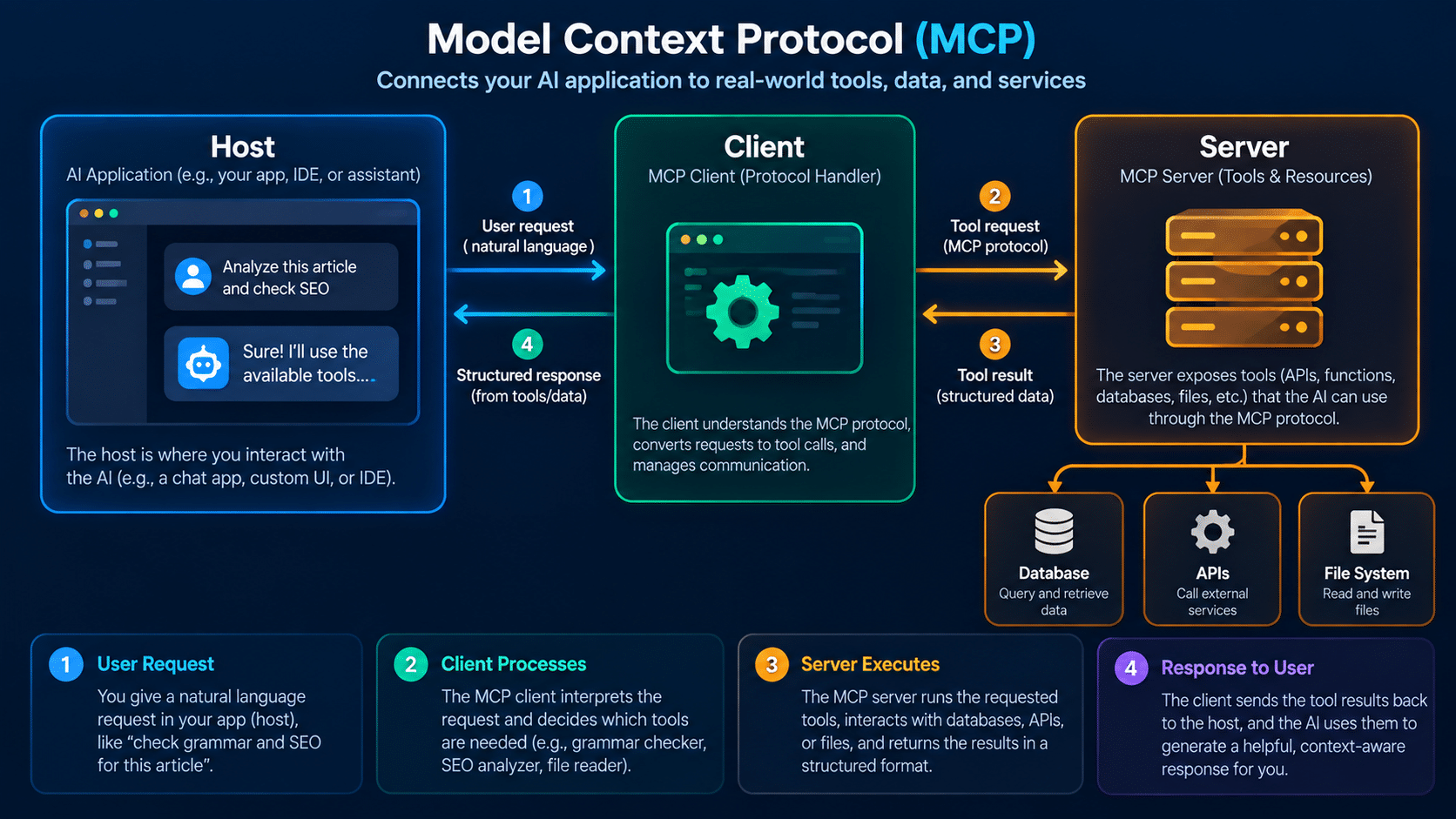
Writing custom API glue code for every AI agent is not scalable. The Model Context Protocol (MCP), pioneered by Anthropic, solves this. Think of it as a USB standard for AI: a normalized way for language models to talk to your databases, tools, and backend services without you writing one-off integrations each time.
Also Read: How to Set Up Ollama and Run LLMs Locally on Your PC (No API Key Needed)
The MCP Architecture
MCP has three parts:
- Host: The application that initiates requests (Claude Desktop, your custom app, or an IDE plugin)
- Client: The component that formulates requests on the host’s behalf
- Server: Your Node.js backend that provides data or executes actions
Building an MCP Server in Node.js
Use the @modelcontextprotocol/sdk to get started. The two things you define in an MCP server are:
- Tools: Actions the AI can trigger (run a query, send an email, update a record)
- Resources: Data the AI can read (a user profile, a document, a database row)
Use Zod for strict parameter validation on every tool definition. If the AI sends malformed input, Zod rejects it cleanly before it touches your database.
Transport options: Stdio works for local agent integrations. HTTP with SSE is what you use for remote, web-accessible MCP servers.
Phase 3 outcome: You can turn a standard Node.js REST API into an AI-ready MCP server that any compatible agent can consume.
Phase 4: React Meets MCP (Month 7)
Your backend is now AI-ready. The frontend side is where the user experience lives, and AI UX has patterns you need to learn deliberately.
Managing Complex AI State in React
AI responses introduce new state types that a standard CRUD app never has: loading states while the model “thinks,” streaming chunks arriving word by word, and tool-call interruptions when the model decides to fetch data mid-response.
For advanced React state management in this context:
- Handle each state type explicitly (idle, loading, streaming, tool-calling, error)
- Render streaming chunks incrementally rather than waiting for the full response
- Show visual feedback whenever the AI is executing a tool users need to know something is happening
Implementing an MCP Client
You can implement an MCP client directly in the browser or, more cleanly, as a Next.js API route that acts as an intermediary between the React frontend and the MCP server. The Next.js approach keeps your backend credentials server-side and gives you more control over error handling.
One genuinely useful pattern: dynamic tool discovery. Your frontend reads the list of tools the MCP server exposes and renders UI elements dynamically based on what is available, rather than hardcoding buttons. This lets you add new backend capabilities without shipping a new frontend build.
Phase 4 outcome: You can build a ChatGPT-style interface that triggers real backend actions securely through MCP.
Phase 5: Capstone Project (Month 8)
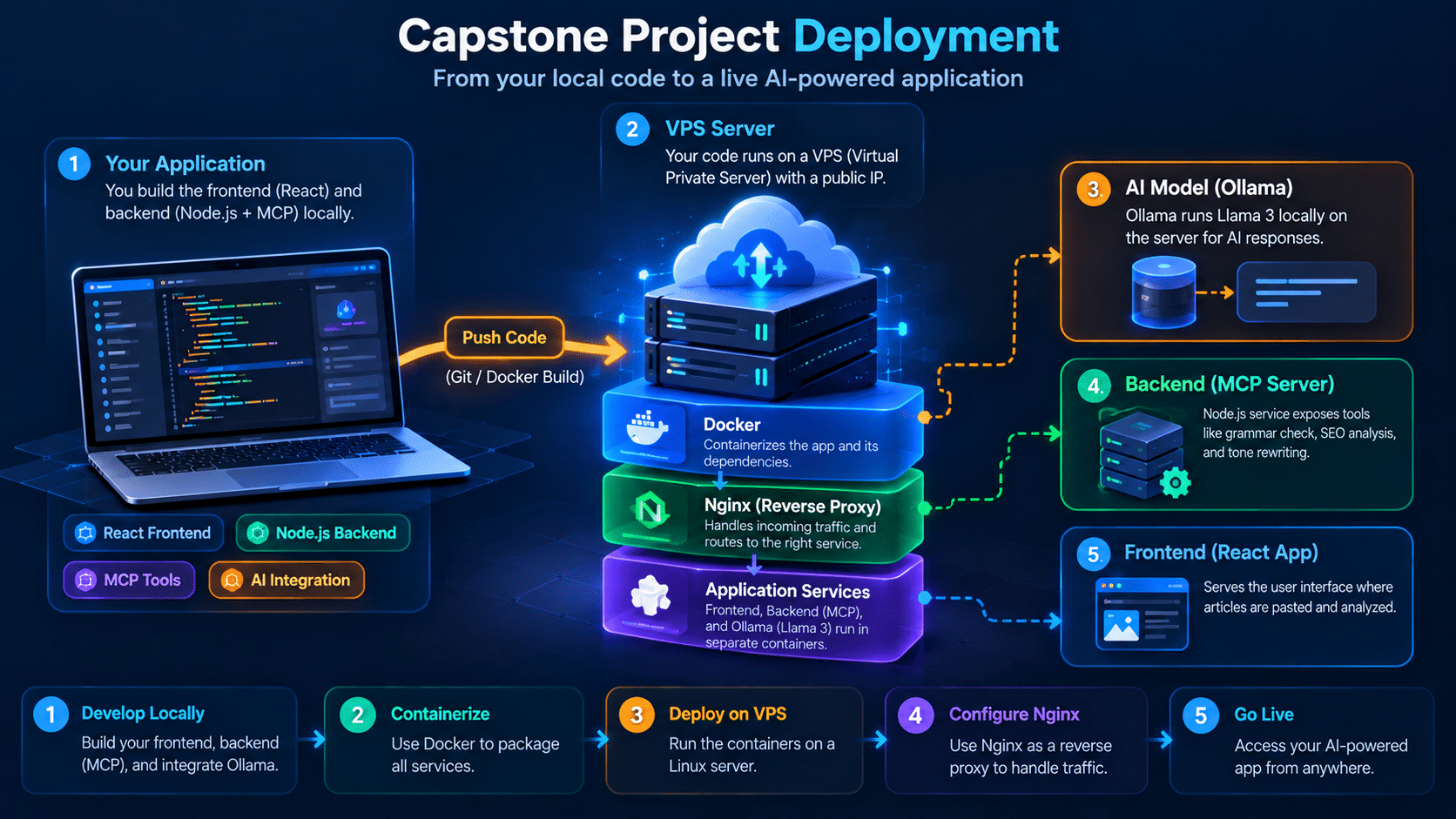
The best proof of your skills is a deployed, working system. Here is the capstone project this full stack developer roadmap 2026 recommends:
Project: Local LLM Content Optimizer
Technology Stack
| Layer | Tech |
|---|---|
| Frontend | React app where users paste articles for analysis |
| Backend (MCP Server) | Node.js service exposing tools: Check Grammar, Analyze SEO, Rewrite Tone |
| AI Engine | Ollama running Llama 3 locally, connected via the Vercel AI SDK |
| Deployment | Docker + VPS + Nginx reverse proxy |
This project proves you can architect a full-stack AI application, work with local models cost-effectively, and ship to a real server.
For the CI/CD pipelines and deployment automation, learning GitHub Actions at this stage pays off immediately.
Also Read: How to Use GitHub Actions to Automate Your Deployment (Beginner’s Guide)
Phase 5 outcome: A production-ready, portfolio-worthy AI application demonstrating the full stack.
Frequently Asked Questions
Do I need to know Python for this full stack developer roadmap? No. This roadmap is entirely JavaScript and TypeScript based, from Node.js on the backend to React on the frontend. Python is valuable for AI/ML research, but for integrating AI into web apps, the JS ecosystem now has everything you need.
Is the Model Context Protocol only for Claude? MCP was pioneered by Anthropic for Claude, but the protocol is open and multiple AI clients now support it. Building an MCP server makes your backend compatible with a growing ecosystem of agents and IDEs, not just Claude.
How long does this roadmap actually take if I work part-time? The 8-month timeline assumes roughly 15 to 20 hours per week of focused practice. Part-time at 8 to 10 hours per week would push it to 12 to 14 months. The phases are sequential, so do not skip Phase 1 regardless of how experienced you feel.
What is the difference between an MCP Tool and an MCP Resource? A Tool is an action the AI can take (like querying your database or sending a notification). A Resource is data the AI can read passively (like a user profile or a document). Most real MCP servers expose both.
Do I need a powerful machine to run Ollama locally? A reasonably modern machine with 8 GB of RAM can run smaller models like Mistral 7B. For larger models like Llama 3 70B, you need 16 to 32 GB of RAM. Alternatively, run the AI engine on a cloud VPS and interact with it via API.
Conclusion
This full stack developer roadmap 2026 is built around one idea: the developers who get hired and promoted in the next three years will not just know JavaScript and React. They will know how to build AI-powered applications that are secure, scalable, and well-architected from the ground up.
Start with Phase 1 even if you feel you already know some of it. The foundation is what everything else stands on.
In the next post in this series, we will set up your Node.js environment with the Vercel AI SDK and run your first local model with Ollama. Practical code examples, nothing theoretical.



