
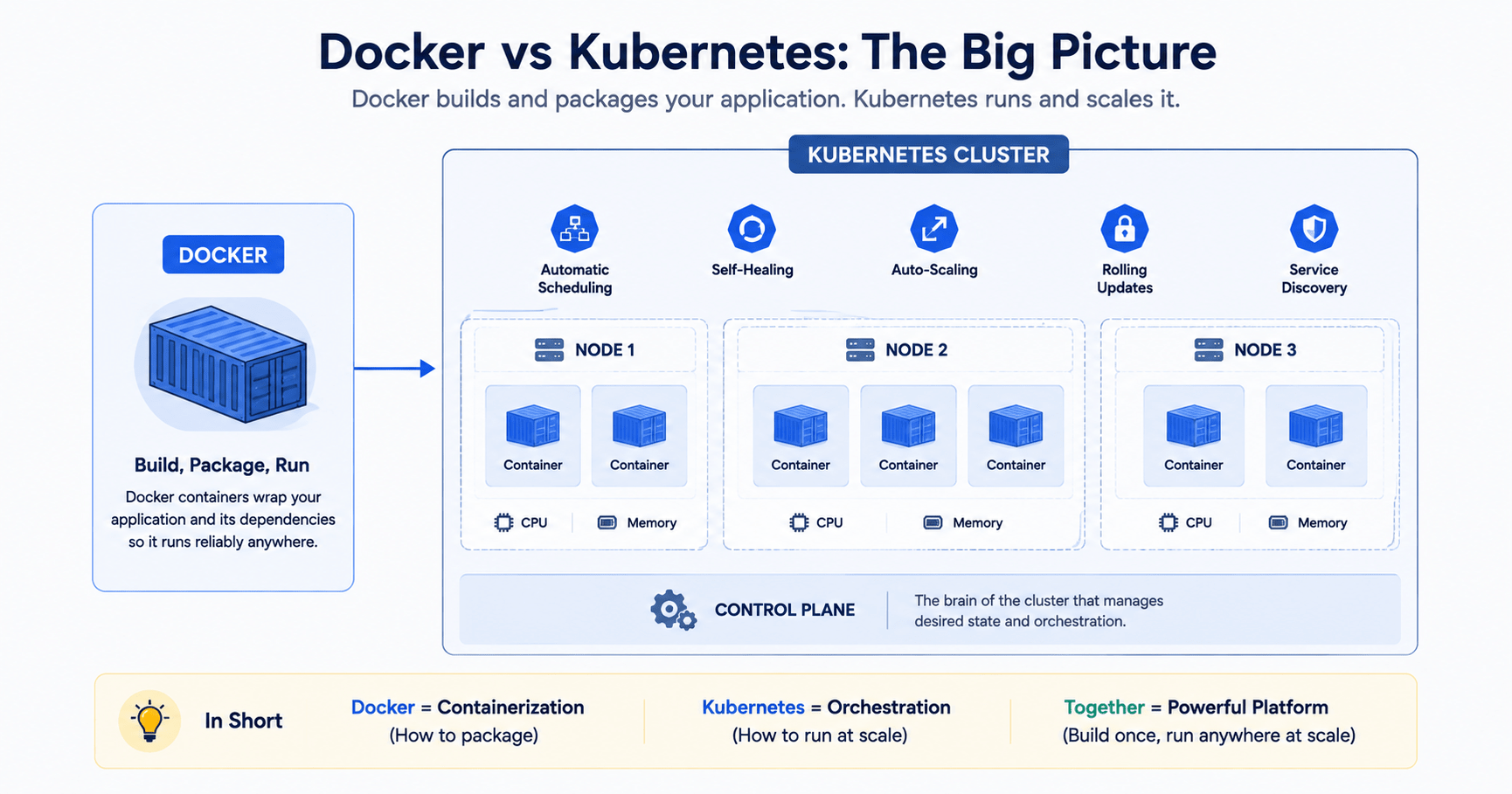

Docker vs Kubernetes is one of the first confusions any developer runs into once an app grows past a single machine. As web applications scale beyond local development, shipping code reliably becomes just as important as writing it. In traditional hosting environments, developers routinely hit the infamous “it works on my machine” problem subtle differences in operating system versions, Node.js runtimes, or system dependencies between local laptops and staging or production servers caused deployment failures that were hard to reproduce.
With the advent of cloud-based engineering, there are two fundamental tools that help solve this problem: Docker and Kubernetes. Since they fall under the same category of “containerization,” many novices perceive them as rivaling products. But this is not true. In this guide, we’ll explain the fundamental difference between containerization and orchestration and discuss the architecture of these products and how to use them in practice.
Also Read: our guide to micro-frontends architecture if you’re deploying independently owned frontend micro-apps, this Docker vs Kubernetes breakdown is the natural next step for shipping them reliably.
Core Distinction: Containerization vs. Orchestration
The fundamental difference in any Docker vs Kubernetes comparison comes down to scope and responsibility.
Docker (containerization) packages an application and all of its dependencies runtime, system tools, libraries into a single lightweight, portable unit called a container. Docker makes sure your app runs identically on Linux, macOS, Windows, or any cloud provider.
Kubernetes (orchestration) manages, coordinates, and automates clusters of running containers across multiple virtual or physical servers. It handles networking, traffic routing, automatic scaling, health checks, and self-healing.
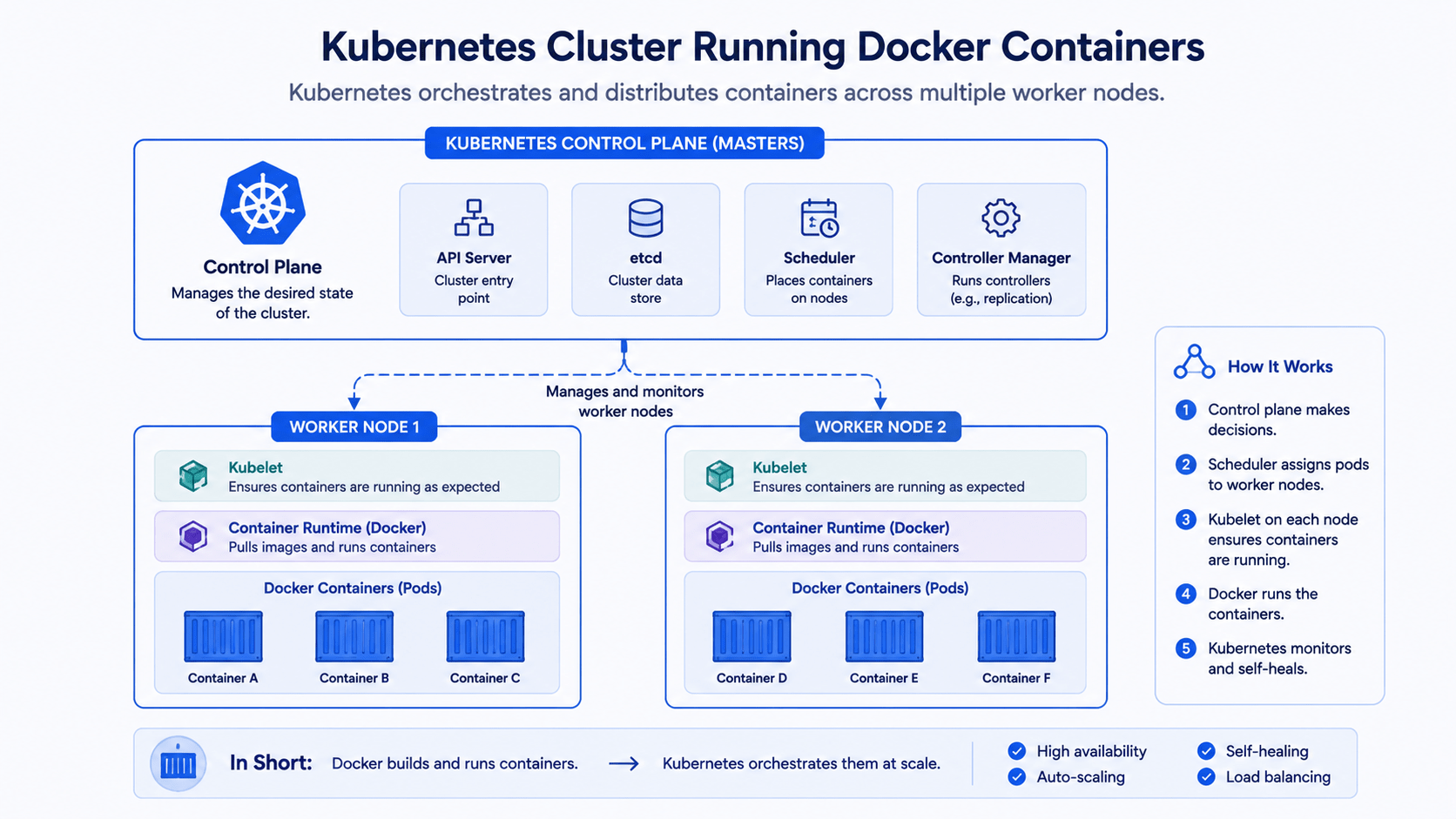
A shipping-container analogy makes this easier to hold onto. Docker is like building standardized shipping containers that fit onto any cargo ship. Kubernetes is the port manager, crane operator, and logistics director making sure thousands of those containers get loaded, balanced, routed, and repaired without anyone standing on the dock micromanaging each box.
Part 1: A Closer Look at Docker
Key concepts you’ll run into constantly:
- Dockerfile. A plain-text configuration script with step-by-step instructions for building a container image.
- Docker image. An immutable, read-only template containing your compiled application code, runtime environment, and file system dependencies.
- Docker container. A running instance of a Docker image. Containers share the host machine’s OS kernel, which makes them far lighter and faster to boot than a traditional virtual machine.
- Docker Compose. A tool for defining and running multi-container applications locally with a single YAML file running a Next.js app, a NestJS API, and a PostgreSQL database together, for example.
Here’s a Dockerfile for a typical Next.js application:
dockerfile
# Step 1: Base image
FROM node:20-alpine AS base

# Step 2: Set working directory
WORKDIR /app

# Step 3: Install dependencies
COPY package*.json ./
RUN npm ci

# Step 4: Copy source code & build
COPY . .
RUN npm run build

# Step 5: Expose application port
EXPOSE 3000

# Step 6: Start application
CMD ["npm", "run", "start"]
And a Docker Compose file to run that app alongside a database locally:
yaml
# docker-compose.yml
version: '3.8'

services:
  web:
    build: .
    ports:
      - "3000:3000"
    environment:
      - DATABASE_URL=postgresql://user:password@db:5432/mydb
    depends_on:
      - db

  db:
    image: postgres:16-alpine
    environment:
      POSTGRES_USER: user
      POSTGRES_PASSWORD: password
      POSTGRES_DB: mydb
    ports:
      - "5432:5432"
    volumes:
      - postgres_data:/var/lib/postgresql/data

volumes:
  postgres_data:
Part 2: A Closer Look at Kubernetes (K8s)
Docker Compose works brilliantly for running a multi-container stack on a single developer machine or a small VPS. But running a production system on one server introduces real risk. What happens if that server crashes? How do you absorb a sudden traffic spike without someone manually spinning up containers at 2 a.m.? How do you ship a code update with zero downtime?
Kubernetes often shortened to K8s was built at Google to solve exactly these production infrastructure problems at scale.
Core building blocks:
- Cluster. A collection of control-plane nodes and worker machines that run your containerized workloads.
- Pod. The smallest deployable unit in Kubernetes. A pod wraps one or more co-located containers usually just one sharing a network IP address and storage volumes.
- Deployment. A controller that defines the desired state of your app, such as “always keep 3 identical replicas of the Next.js frontend running.”
- Service. A stable network endpoint (IP address or DNS name) that load-balances traffic across a shifting set of pods.
- Ingress controller. An API gateway that manages external HTTP/HTTPS traffic entering the cluster and routes requests to the right internal service.
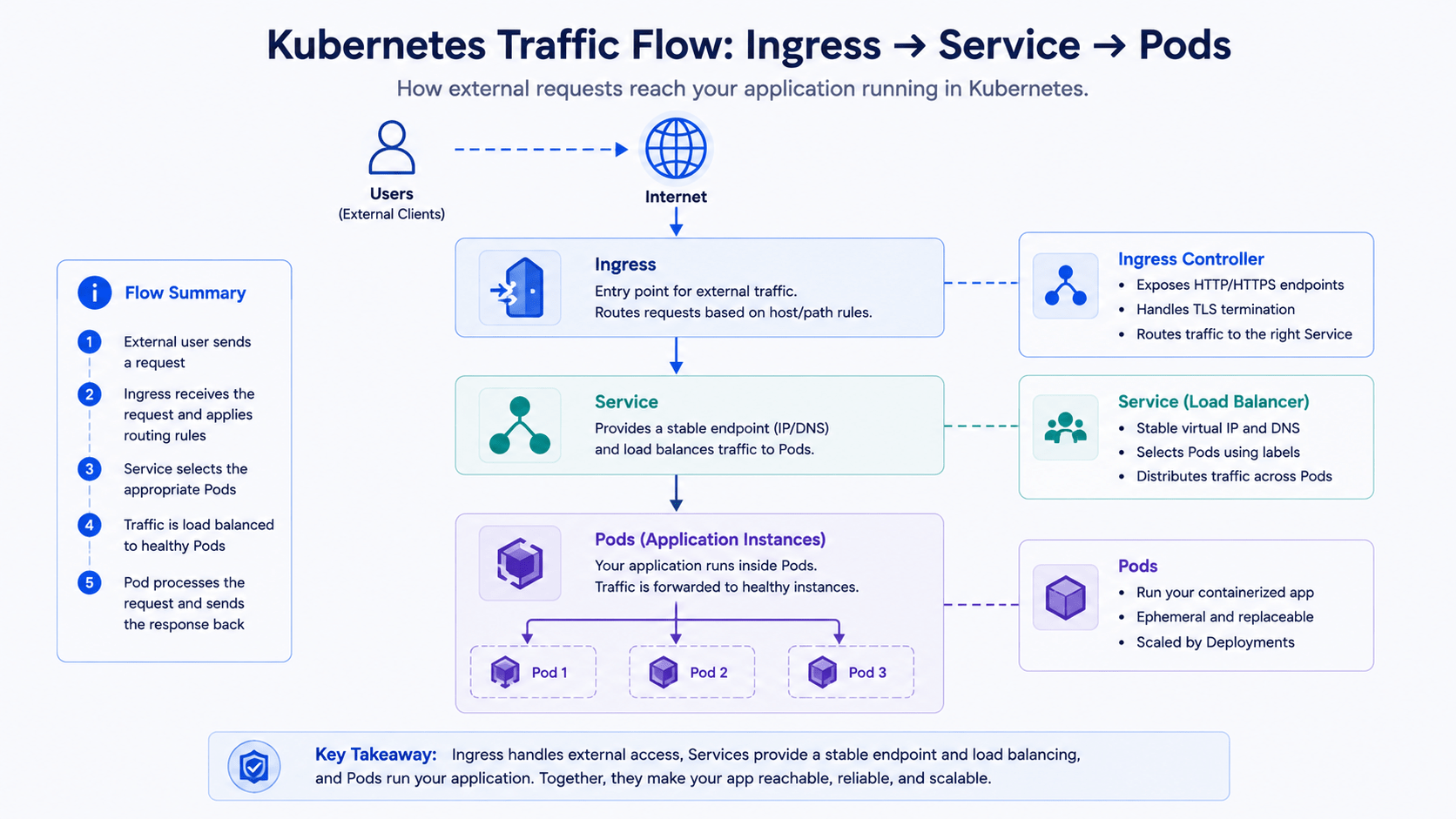
Three capabilities that make Kubernetes worth the setup cost:
- Auto-healing. If a container or node crashes, Kubernetes restarts or reschedules the pod onto a healthy machine within seconds.
- Horizontal Pod Autoscaling (HPA). Automatically increases or decreases the number of running pod replicas based on CPU, memory, or request-volume metrics.
- Rolling updates and rollbacks. New code ships gradually across pods with zero downtime, and Kubernetes automatically rolls back if health checks fail.
Docker vs Kubernetes: Side-by-Side Comparison
| Metric | Docker / Docker Compose | Kubernetes (K8s) |
|---|---|---|
| Primary goal | Package and run applications predictably anywhere | Manage, scale, and automate containerized applications at scale |
| Operational scale | Single machine / local development | Multi-node, distributed production clusters |
| Setup complexity | Very low installed in minutes | High usually needs dedicated DevOps/SRE expertise |
| Self-healing | Basic restart policies | Automated pod replacement and node reallocation |
| Load balancing | Basic host-port mapping | Built-in cluster-wide load balancing and ingress rules |
| Auto-scaling | Manual container spin-up | Dynamic horizontal/vertical auto-scaling based on live telemetry |
This table is really the heart of the Docker vs Kubernetes question: one tool packages your app, the other keeps hundreds of copies of it healthy and reachable.
When to Use Docker vs Kubernetes
Reach for Docker (and Docker Compose) when:
- You’re standardizing local development so every engineer runs identical database versions and runtimes.
- You’re hosting a low-to-medium traffic SaaS product on a single cloud server (AWS EC2, DigitalOcean Droplet, Hetzner) with Docker Compose or CapRover.
- You’re running CI/CD pipelines automated tests and immutable build artifacts inside isolated, disposable containers.
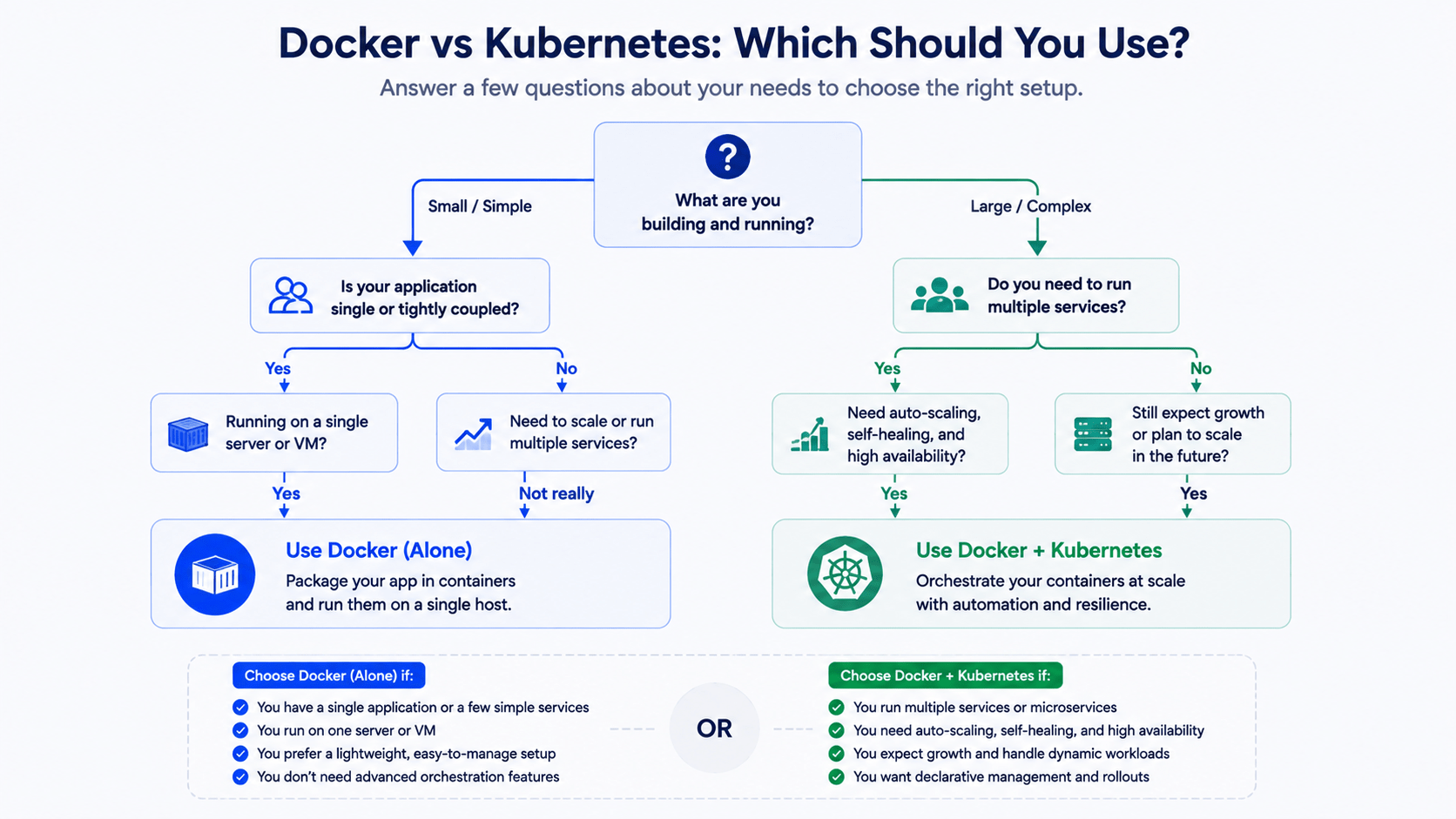
Reach for Kubernetes when:
- You’re running mission-critical systems with heavy, unpredictable traffic where zero downtime and high availability actually matter.
- You’re managing dozens or hundreds of independent microservices that need internal DNS, service discovery, and fine-grained resource quotas the same organizational scaling problem micro-frontends solve on the UI side, just on the backend.
- You need multi-region fault tolerance spreading an app across availability zones or multiple clouds so a single data-center outage doesn’t take you down.
Frequently Asked Questions
Is Kubernetes a replacement for Docker?
No. This is the most common misconception in any Docker vs Kubernetes discussion. Kubernetes actually runs Docker (or another container runtime) underneath it it doesn’t replace containers, it orchestrates them across many machines.
Do I need Kubernetes for a small project?
Usually not. If your app runs comfortably on one or two servers with Docker Compose, adding Kubernetes just adds operational overhead without a matching benefit. Most solo developers and small teams should wait until scaling problems actually show up.
What’s the difference between a Docker container and a Kubernetes pod?
A Docker container is a single running instance of an image. A Kubernetes pod is a wrapper around one or more containers that share networking and storage in most setups, a pod holds exactly one container.
Can I run Kubernetes without Docker?
Yes. Kubernetes supports multiple container runtimes through the Container Runtime Interface (containerd is the modern default), but Docker-built images still work the same way regardless of which runtime executes them.
What should I learn first, Docker or Kubernetes?
Docker. Kubernetes assumes you already understand images, containers, and Dockerfiles trying to learn orchestration before containerization usually just adds confusion.
Conclusion
Docker and Kubernetes aren’t rivals they’re synergistic technologies that form the foundation of modern cloud-native engineering. Docker containerizes your application into a portable, reproducible unit, while Kubernetes orchestrates those units reliably across a distributed network. Once you understand where containerization ends and orchestration begins, choosing the right operational baseline for your app’s current size becomes a much easier call start with Docker, and reach for Kubernetes only once real scaling pain shows up.



