
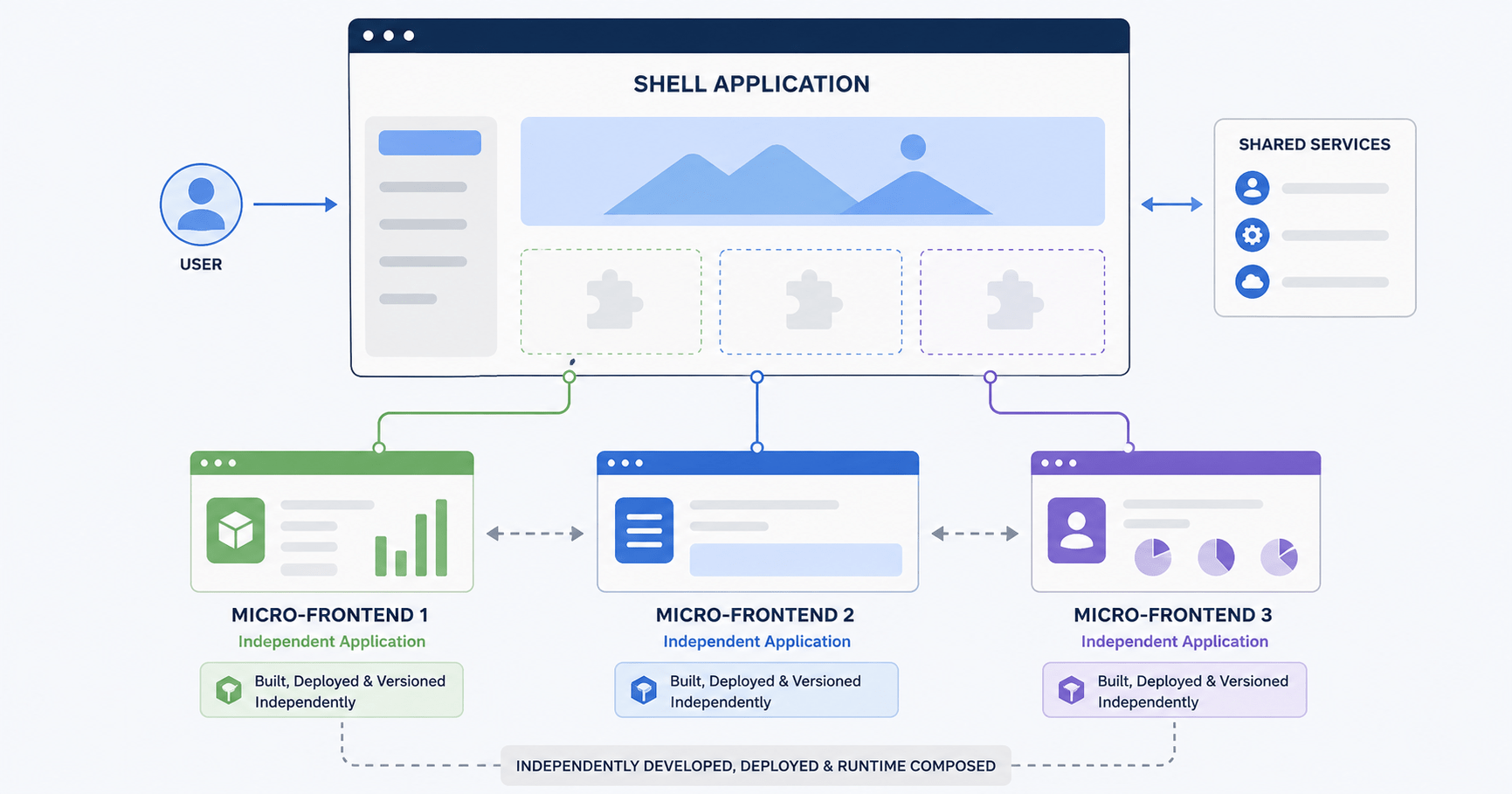

Micro-frontends architecture is how large engineering organizations break one unwieldy frontend codebase into smaller, independently deployable pieces, the same way backend microservices broke apart giant monolithic APIs years ago. If you have ever waited on a release manager to merge a queue of forty pull requests before your feature could ship, you already understand the problem micro-frontends were built to solve.
With the scaling up of software companies, backend teams always end up breaking apart the monolithic API into multiple microservices that are loosely coupled with each other. This way, each team is free to work and deliver its product independently. However, for the front-end developers, they normally work on building a large, centralized single-page application. As more members are added to the team, problems arise in the form of a “frontend monolith.”
Here is what that cracking looks like in practice:
- Deployment bottlenecks. A bug in the checkout component delays the search team from shipping its own updates.
- Slow CI/CD pipelines. Rebuilding and re-testing a single 500,000-line React application on every pull request can take 30 minutes or more.
- Dependency locking. Upgrading React, Next.js, or a major UI library forces every team in the company to refactor at the same time.
Also Read: our guide to Next.js project architecture if you’re still deciding how to structure a growing Next.js codebase before jumping to micro-frontends, start there.
The concept of micro-frontends addresses these problems by giving each team the autonomy to own, create and release their component of the UI. This article will explore what micro-frontends really are, analyze the key integration patterns, explore module federation and discuss when using this pattern makes sense and when not.
What Is Micro-Frontends Architecture?
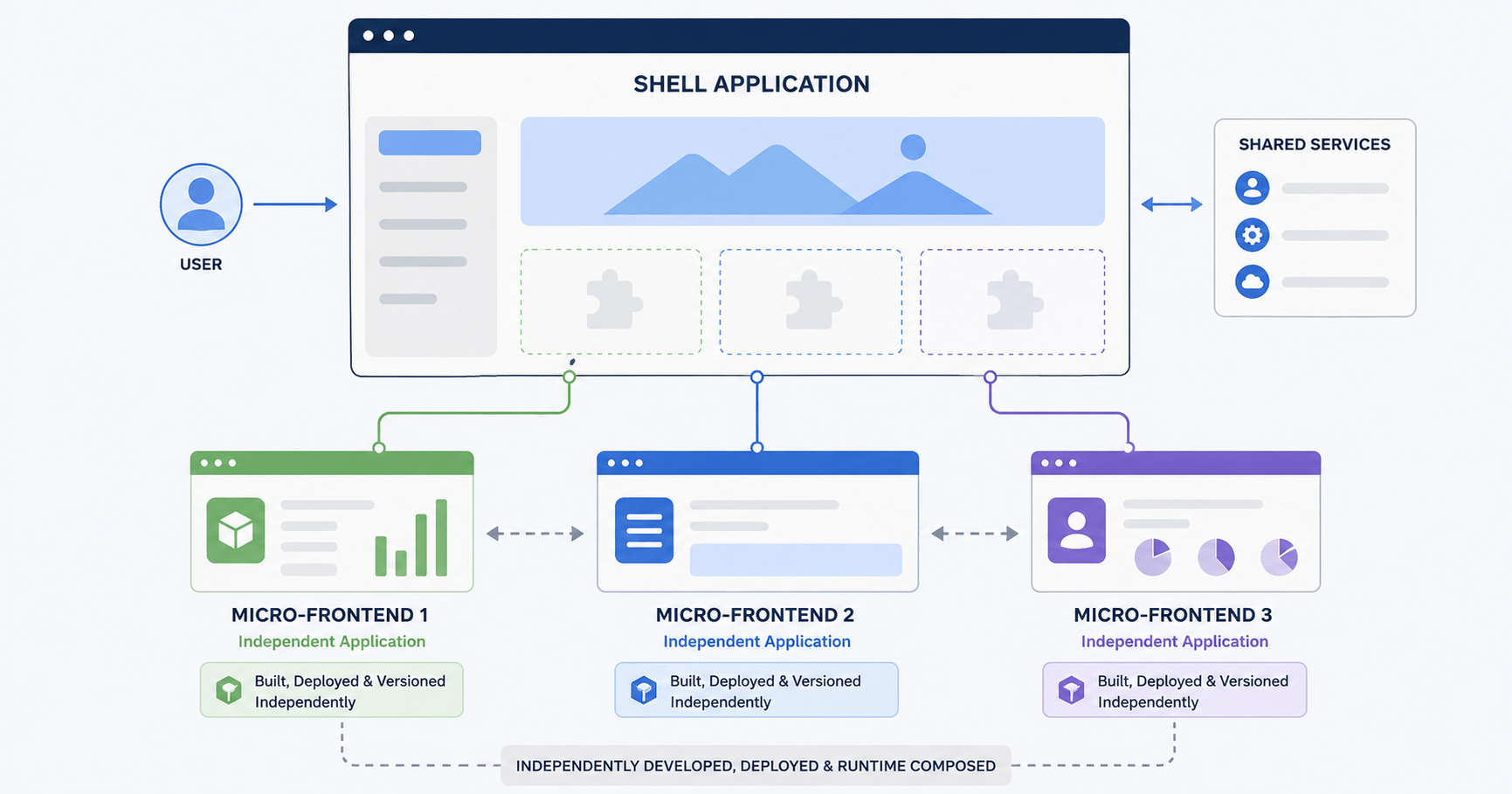
The micro-frontends design pattern represents an application of the ideas of backend microservices to the front end realm. While instead of one big team operating in one big codebase, a large web application would be decomposed into multiple small micro-applications which are domain-oriented and have their own autonomous teams.
Here is a picture of a container (or shell) application that takes care of the global navigation and layout. Then the shell loads the various micro-applications which belong to different domains a Catalog micro-app developed and managed by the search team, a Checkout micro-app developed and managed by the payments team, and an Account micro-app developed and managed by the user-profile team.
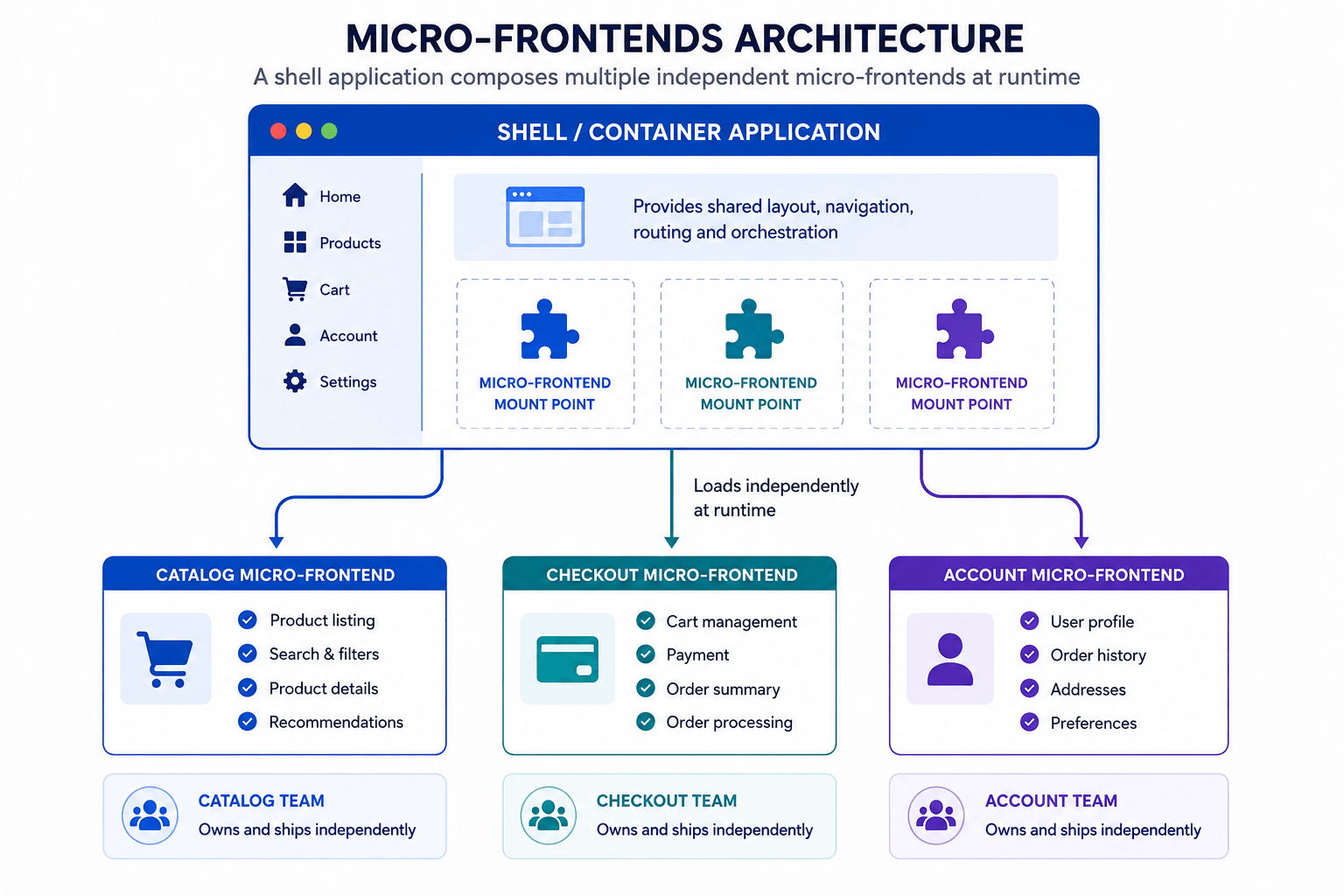
In a micro-frontends architecture, three things are generally true:
- Each micro-app represents a distinct business vertical — search, checkout, or profile, for example.
- Teams choose their own internal structure, release schedule, and deployment pipeline.
- Micro-apps are composed together at runtime so the end user experiences one unified application, with no visible seams.
Build-Time vs. Runtime: How Micro-Frontends Get Stitched Together
The central challenge in any micro-frontends setup is how to combine multiple independently built applications into one cohesive browser experience. There are four common strategies, and they trade off isolation, complexity, and true independence very differently.
Micro-Frontend Strategies Compared
Side-by-side comparison of four micro-frontend integration approaches. Compare build-time packages, iFrames, Web Components, and Module Federation to choose the right architecture for your team.
| Strategy | How It Works | Pros | Cons |
|---|---|---|---|
| Build-time (npm packages / monorepos) | Micro-apps published as npm packages, imported at build time | Easy setup; type safety out of the box | Not a true micro-frontend — redeploying still requires rebuilding the whole container |
| iFrames (legacy) | Each micro-app runs inside an <iframe> |
Full CSS/JS isolation; zero variable leaking | Poor accessibility, awkward routing, layout headaches, heavy memory use |
| Web Components | Micro-apps exported as custom HTML elements (<checkout-widget>) |
Framework-agnostic — React, Vue, Svelte can coexist | Complex global state sharing; Shadow DOM adds styling overhead |
| Module Federation (modern standard) | Code loaded dynamically over the network at runtime via Webpack 5, Rspack, or Vite | True independent deployments; shared dependencies like one React instance in memory | Adds network routing complexity; needs careful async boundary handling |
For most teams building a genuine micro-frontends architecture today, Module Federation is the default choice — which is worth its own closer look.
Module Federation for Micro-Frontends (Webpack 5 / Rspack)
Module Federation was released in Webpack 5 and has been natively supported by newer bundlers such as Rspack and Vite, and it remains the state-of-the-art way to implement micro-frontends. This method enables a JavaScript application to dynamically fetch a piece of code from another deployed target build over the internet without a package publishing step or rebuilding the container.
Three terms come up constantly once you start working with Module Federation:
- Host (shell). The main container app that loads the layout, global navigation, and pulls in micro-apps dynamically.
- Remote. An independent micro-app that exposes specific components or utilities to the host.
- Shared dependencies. Frameworks like
reactorreact-domthat the host and remotes share in memory, so the browser never downloads duplicate copies.
Also Read: our guide to Server Components and Server Actions useful background if you’re deciding how much of a given micro-app should render on the server.
Here is a conceptual configuration for a remote app owned by a checkout team:
javascript
// Remote App Configuration (Checkout Team — Webpack/Rspack config)
const { ModuleFederationPlugin } = require('webpack').container;

module.exports = {
  plugins: [
    new ModuleFederationPlugin({
      name: 'checkout', // Unique remote identifier
      filename: 'remoteEntry.js', // Manifest generated at build time
      exposes: {
        './CartWidget': './src/components/CartWidget.jsx', // Component exposed to others
      },
      shared: { react: { singleton: true }, 'react-dom': { singleton: true } },
    }),
  ],
};
And the corresponding host configuration, owned by the shell team:
javascript
// Host Application Configuration (Shell Team)
module.exports = {
  plugins: [
    new ModuleFederationPlugin({
      name: 'host',
      remotes: {
        // Points dynamically to the remote manifest hosted on a CDN or server
        checkout: 'checkout@https://checkout.mycompany.com/remoteEntry.js',
      },
      shared: { react: { singleton: true }, 'react-dom': { singleton: true } },
    }),
  ],
};
With that wiring in place, calling the remote component from React looks almost like calling a local one:
jsx
import React, { Suspense } from 'react';

// Lazy-load the remote component over the network
const CartWidget = React.lazy(() => import('checkout/CartWidget'));

export default function Header() {
  return (
    <header>
      <Logo />
      {/* Suspense handles the micro-frontend's network load time */}
      <Suspense fallback={<div>Loading Cart...</div>}>
        <CartWidget />
      </Suspense>
    </header>
  );
}
The Suspense boundary is doing real work here. Because CartWidget is fetched over the network instead of bundled locally, the host needs a fallback UI for the moment between the request firing and the remote code arriving.
When Should You Actually Use Micro-Frontends Architecture?
Micro-frontends solve real organizational scaling problems, but they add genuine architectural complexity. The right call depends heavily on team size and release cadence, not just on how large the codebase has gotten.
Micro-frontends architecture is worth it when:
- Your engineering org has 50+ engineers split across multiple product teams blocked by one shared build pipeline.
- Teams need independent release cadences — the checkout team wants to ship ten times a day without waiting on the marketing team’s weekly test cycle.
- You are migrating a legacy application (AngularJS or jQuery, for example) to modern React or Next.js incrementally, piece by piece.
Micro-frontends architecture is usually overkill when:
- Your team is under 20–30 engineers. The overhead of managing multiple repositories, CI/CD pipelines, and Module Federation configs will slow you down more than it helps.
- You can already get team independence from a Turborepo or Nx monorepo with isolated packages inside a single Next.js codebase. A well-organized monorepo delivers most of the organizational benefit with none of the runtime complexity.
Micro-Frontends vs. Monorepo: Which Should You Choose?
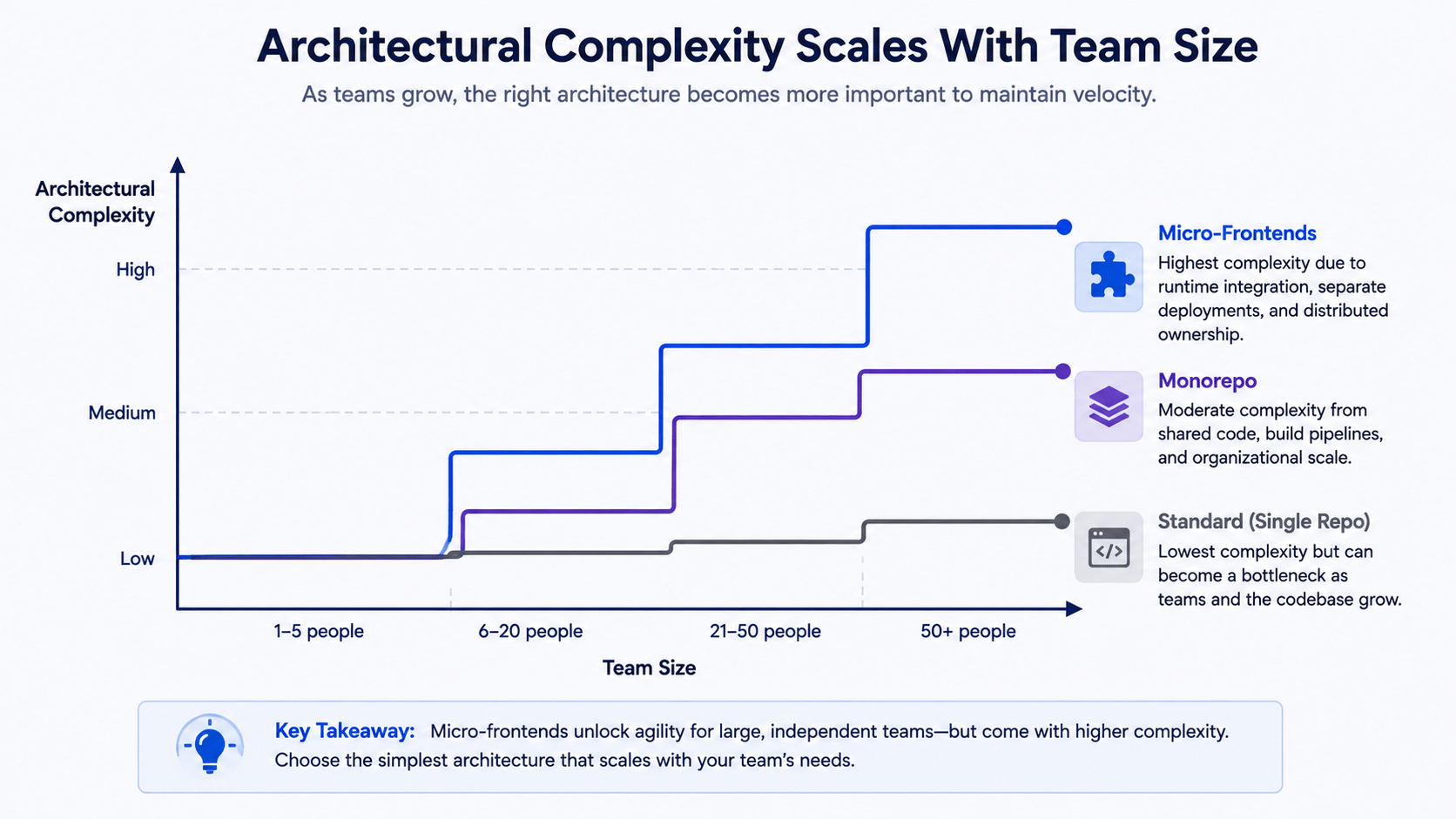
The complexity cost rises based on the number of people on the team rather than only lines of code. A single React application built in a well-designed way will be enough for a small team. When the team starts scaling up and implements technologies such as Turborepo or Nx, the monorepos should suffice for the next level of the system common packages, separate builds, fast CI, everything in a single Next.js codebase. The use of the micro-frontends architecture with Module Federation should only become justified when dozens of autonomous teams work in parallel and have truly different release schedules.
How can you define the current stage? You can apply this simple check point — are the teams actually blocked by release schedules of each other right now or does it only feel like a codebase is “getting big”?
Frequently Asked Questions
Is micro-frontends architecture the same thing as microservices?
No. Microservices split backend logic into independent services. Micro-frontends apply that same independent-ownership idea to the UI layer, so separate teams can build, test, and deploy their part of the frontend on their own schedule.
Do micro-frontends slow down page performance?
They can, if shared dependencies aren’t configured correctly. Module Federation’s shared dependency system is designed to prevent this by loading one shared copy of React instead of one per micro-app, but it still needs careful setup and monitoring.
Can I mix React and Vue in a micro-frontends architecture?
Yes, if you use Web Components or Module Federation with careful shared-dependency configuration. Framework mixing is technically possible but adds real coordination overhead, so most teams standardize on one framework across micro-apps anyway.
Is Module Federation only available in Webpack?
No. It launched as a Webpack 5 feature but is now natively supported in Rspack and available in Vite through community plugins, so you aren’t locked into one bundler.
What’s a good first step before adopting micro-frontends architecture?
Try a monorepo first. Tools like Turborepo or Nx solve most team-independence problems with far less operational overhead, and they make it easier to tell whether you actually need runtime micro-frontends later.
Conclusion
Micro-frontends architecture is designed to solve people and organizational scaling problems, not purely technical ones. By using Module Federation to decouple team codebases, large engineering organizations can deploy independent UI domains safely at scale — without forcing every team to rebuild and redeploy together. If your team is still under 30 engineers, start with a monorepo instead; you can always graduate to full micro-frontends architecture once release schedules, not codebase size, become the real bottleneck.
In our next post, we will shift focus to infrastructure and DevOps foundations: Docker vs. Kubernetes, containerization versus orchestration explained.



