
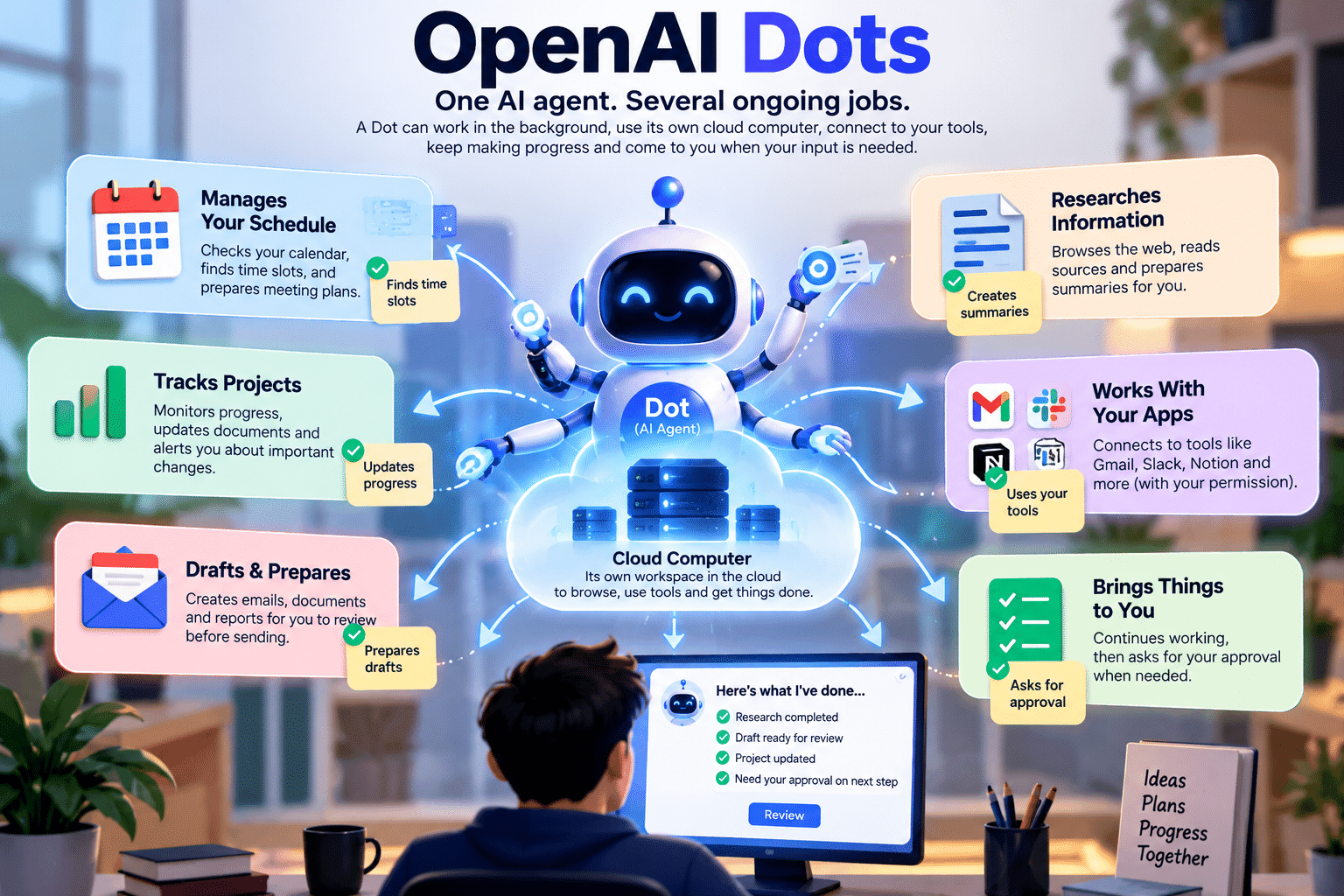

OpenAI Dots are built to fix one annoying thing about ChatGPT: it only works while you keep typing. Close the tab and the job stops. OpenAI Dots are different. Each one is an always-on AI agent that can keep working on a goal between your conversations.
That sounds like a big claim, so let us slow down. This guide explains what OpenAI Dots are, how they work, how it differs from normal chat, where it could help you, and where it can go wrong.
Last verified: October 4, 2026. Everything here comes from OpenAI’s own documentation. We have not tested OpenAI Dots hands-on, so every example marked “illustrative” is a scenario, not a result.
Also Read: GPT-6 Astra review: the model that powers every Dot.
What Are OpenAI Dots?
In plain English: OpenAI Dots are AI agents inside ChatGPT that you give a goal to. Each one works on that goal using its own computer, even when you are not chatting. Think of it as a digital teammate with a job, not a chatbot waiting for your next question.
Now the technical version. OpenAI describes a Dot as an always-on agent that takes ongoing responsibility and keeps making progress between conversations. Here are the terms you will see:
- Always-on agent: an AI that can work toward a goal without you typing every step.
- Persistent agent: an AI that keeps context and continues the job instead of forgetting it when a chat ends.
- Cloud computer: a computer that runs in OpenAI’s cloud, not on your laptop.
- GPT-6 Astra: the AI model that acts as the Dot’s brain.
- Connected apps (plugins): the tools a Dot can use. OpenAI says plugins reach over 4,000 apps.
- Approvals: moments where the Dot stops and asks you before doing something sensitive.
Each term gets its own explanation later. For now, hold on to one idea: OpenAI Dots come with a goal, a workspace, tools, and rules.
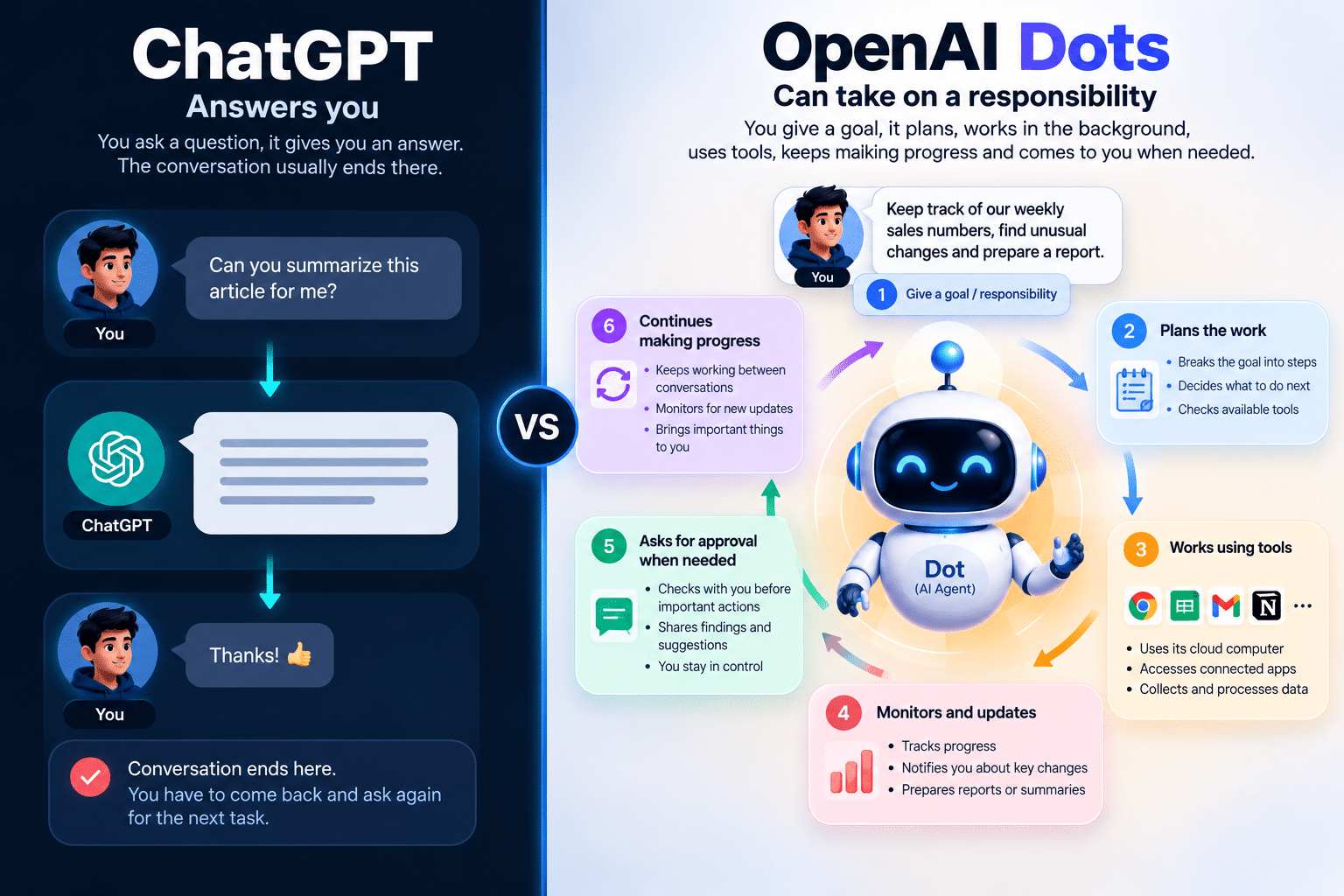
ChatGPT Answers You. A Dot Can Be Given Responsibility.
This is the most important idea in the article, so let us do it carefully.
With normal ChatGPT, you might write: “Check these sales numbers and summarize them.” ChatGPT reads the numbers and returns an answer. The job ends there.
Now imagine you tell a Dot: “Keep track of our weekly sales performance. Check the latest numbers, spot unusual changes, update our report, and bring anything important to me.” (This is a hypothetical instruction, not an OpenAI example.)
With OpenAI Dots, the difference is not a better answer. The difference is that the task becomes an ongoing responsibility instead of a one-time prompt. OpenAI’s help center frames it the same way: you give the Dot a goal and define what it can do on its own.
Here is the analogy we will use for OpenAI Dots through the article:
- Regular ChatGPT is a knowledgeable colleague you ask for help. Every request starts with you.
- A Dot is a digital teammate who owns an ongoing job. You set the goal and the boundaries, and it comes back with results and questions.
Say you are organizing a college tech event. With regular ChatGPT, you ask again and again: draft the sponsor email, build the registration sheet, summarize the responses, remind me what is pending. With a Dot, you hand over the whole job and say which steps need your approval.
Why OpenAI Dots Exist: The Problem With Prompt-by-Prompt Chat
A chatbot follows a simple loop: prompt, response, next prompt. It waits for you at every step. That is fine for questions, but it is tiring for work that runs for days.
OpenAI Dots, as an always-on AI agent, move toward a different loop: goal, plan, work, check progress, continue, ask for approval when needed, report results. You stop being the engine that pushes every step forward.
We cannot read OpenAI’s mind, so we will stick to what it says publicly. OpenAI describes Dots as a way to take important work off your plate and to make ambitious projects feel achievable when you lack the time or support. It also says it plans to move toward teams of Dots working together. That is a stated direction, not something you can use today.
How OpenAI Dots Work: A Simple Flow
Here is a simplified picture of how OpenAI Dots handle one task:
text
You give the Dot a responsibility
        ↓
Dot understands the goal and the context it has
        ↓
Dot works out possible next steps
        ↓
Dot uses connected apps, only where you permit it
        ↓
Dot works from its own cloud computer
        ↓
Dot keeps making progress
        ↓
Dot asks for approval when a step needs it
        ↓
Dot reports results back to you
This is a conceptual model of OpenAI Dots, not OpenAI’s internal architecture. OpenAI has not published a step-by-step design, and we will not invent one. Still, each step matches something the documentation describes.
Understands the goal and context. A Dot receives memories from ChatGPT and can create its own, so it can reuse context in ongoing work.
Works out next steps. OpenAI says a Dot can figure out what needs to happen next and bring results back for review.
Uses connected apps. You choose which apps to connect, and you manage them in ChatGPT’s Plugins settings.
Asks for approval. A separate safety check called Auto-review looks at certain planned actions before they run.
Reports back. OpenAI Dots can message you with progress, questions, or decisions through ChatGPT, Slack, or Teams.
What Does “Always-On” Actually Mean?
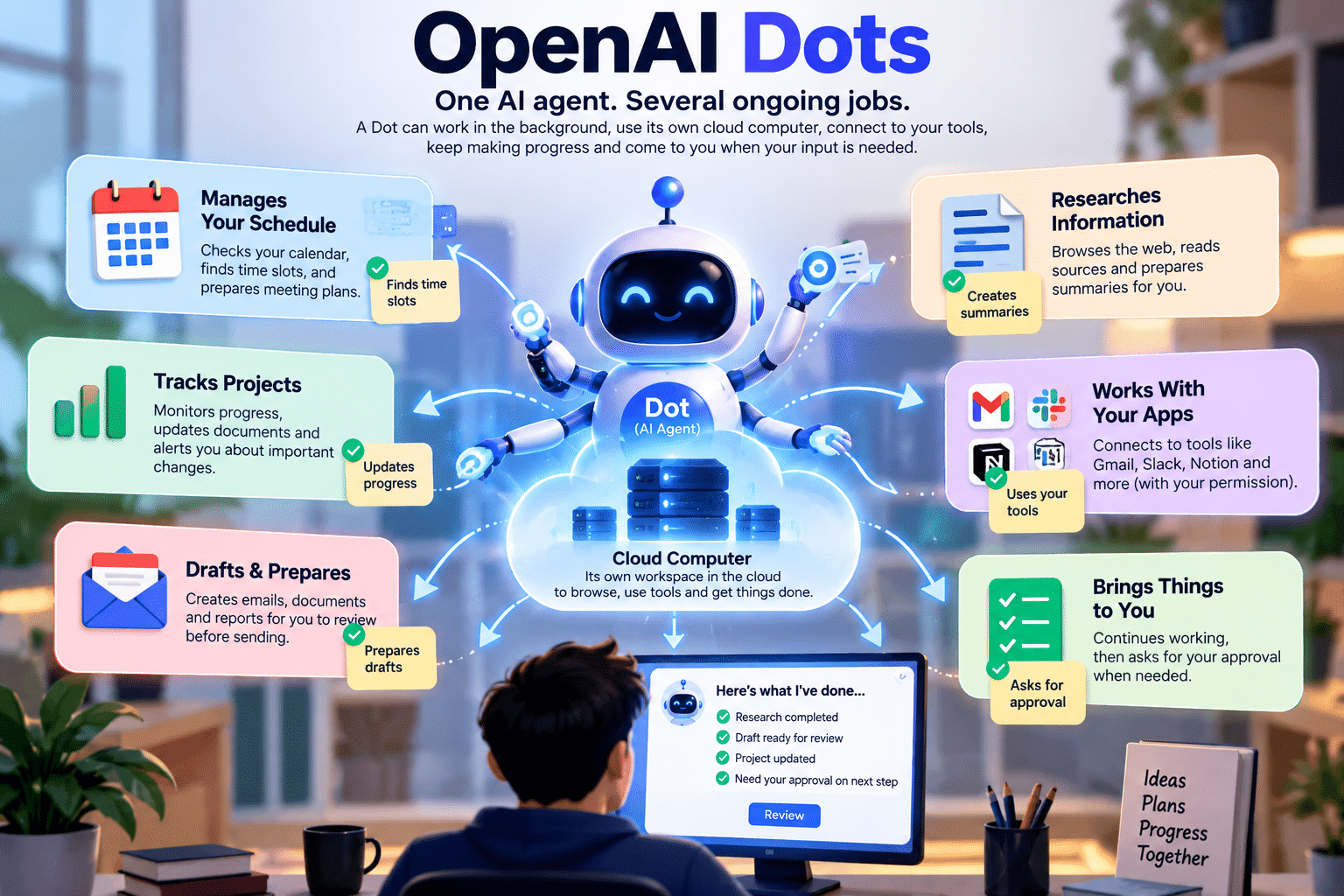
“Always-on” in OpenAI Dots does not mean the AI wanders around doing unlimited things forever. It means OpenAI Dots can start or continue work without a fresh message from you, inside limits. OpenAI’s help center names three situations:
- Background research. The Dot looks over connected information and suggests ways to help.
- Scheduled or recurring tasks. You can ask it to review your calendar each morning, for example.
- Tasks you already authorized that continue in the background.
What OpenAI Dots Can Do Without Asking You
Background research has a hard limit. OpenAI calls it proactive research, and its tools are read-only. They cannot send messages, change content in connected apps, or control a browser or computer. If the Dot wants to act on what it found, the normal approval rules apply.
You can also stop the always-on part at any time. Open the Dot’s profile and choose Pause.
Illustrative example: watching a software migration. Suppose you ask a Dot to check your migration branch and test results every morning and summarize what changed. The scheduled check runs by itself. If it then wants to message your team about a failing test, that is a new action, and the sending rules decide whether it asks you first.
The Cloud Computer Explained Like You’re 10
Why would OpenAI Dots need their own computer? Here is an analogy. Imagine you hire a remote assistant. Being smart is not enough. They also need a desk, a browser, and the tools for the job.
- The AI model is the brain.
- The cloud computer is the desk and workspace.
- Connected apps are the tools on the desk.
- Permissions decide which drawers and rooms the assistant may open.
This is an analogy, not a literal description of how OpenAI built it.
Now the accurate version. OpenAI says OpenAI Dots each get their own cloud computer, where they can browse, analyze information, create files, and run tools. Sandboxing restricts what code and tools it can reach, and users’ cloud environments are isolated from one another. Your own computer stays separate unless you choose to connect it. That access starts turned off.
Why does this matter? A chatbot mostly produces text. A computer lets the Dot open websites, run code, and create files. You can also open the Dot’s computer from its profile to see what it is doing.
OpenAI Dots vs Regular ChatGPT
| Area | Regular ChatGPT Conversation | OpenAI Dots |
|---|---|---|
| Interaction style | You send a prompt, you get a response | You give a goal, it works and reports back |
| One-time vs ongoing | Usually one request at a time | Built for ongoing responsibility |
| Own cloud computer | Not described for plain chat | Yes, one per Dot |
| Background work | Waits for you | Proactive research, scheduled tasks, authorized tasks |
| Where you reach it | ChatGPT apps | ChatGPT, Slack, Microsoft Teams |
| Human approval | You review each answer | Rules for acting alone, asking, or handing back |
| Usage limits | Normal plan limits | Dot conversations do not count toward limits |
| Best for | Questions, drafts, quick help |
Best use Long-running projects with repeating steps |
One caution: regular ChatGPT also has memory and plugins, and plugin permissions are shared across ChatGPT and Dots. The big differences are the dedicated computer, the ongoing responsibility, and the background work.
OpenAI Dots vs ChatGPT Work and Codex
A fair question: “ChatGPT can already use tools and complete tasks. Why would I need a Dot?”
OpenAI describes ChatGPT Work as an agent for longer, more involved tasks. It can run in the cloud and use scheduled tasks that repeat or monitor for changes. Codex handles coding tasks. So task execution and scheduling already exist outside OpenAI Dots.
The clearest line for OpenAI Dots is task execution versus ongoing responsibility. With Work, you start a task and review the result. With a Dot, you hand over a standing job, and it carries its own memory, workspace, and background research across channels.
They also connect. A Dot can create Work or Codex tasks, and those count toward your usage limits as usual. OpenAI has not published a feature-by-feature comparison, so treat our line as a way to think about it, not an official rule.
Also Read: react tutrial
5 Real-World Examples of OpenAI Dots
Examples 2, 3 and 4 follow scenarios OpenAI itself describes for OpenAI Dots. Examples 1 and 5 are our own illustrations. In every case, we separate what the Dot handles from what you still decide.
Example 1: A Student Organizing a College Event (illustrative)
You connect your calendar, email, Slack and a registration sheet. You ask the Dot to track registrations, sponsor replies and deadlines, and to prepare an update each morning.
What the Dot handles: reading the connected information, listing pending tasks, drafting sponsor follow-ups, and flagging deadlines. What you still decide: which sponsors to approach, what you promise them, the budget, and whether a drafted email gets sent.
Example 2: A Developer With a Deprecated API (illustrative)
Your app depends on an API that will shut down. Instead of checking migration progress yourself, you ask a Dot to help. OpenAI describes a similar flow for feedback-driven fixes: the Dot builds and tests changes and returns pull requests for review.
- The Dot lists where the old API is used.
- It prepares changes and tests, using a Codex cloud environment you created first.
- It opens work for review and flags what is still unfinished.
What you still decide: whether the code is correct, what gets merged, and how to trade speed against risk.
Example 3: A Podcast Creator
OpenAI’s own example: when a new interview transcript arrives, the Dot finds clip moments, prepares show notes, and drafts social posts for approval. It carries your edits across the materials.
What the Dot handles: first drafts and repeated formatting. What you still decide: your voice, which clips represent you, and when to publish.
Example 4: A Sales Team Before a Big Deal
OpenAI describes a sales lead whose Dot checks customer requirements against product docs, finds what needs testing, builds a proof of concept, and updates the proposal as things change.
What the Dot handles: comparing information from sources it can access and preparing material. What you still decide: pricing, commitments, and the conversations with the customer.
Example 5: Personal Life, Dinner Plans (illustrative)
OpenAI’s help center suggests asking a Dot to review your calendar each morning. Extend that: it notices you have two plans on Friday evening and drafts a message to reschedule one.
What the Dot handles: spotting the conflict and drafting the message. What you still decide: which plan to keep, whether to send the message, and any payment. Purchases need your approval.
A Day With a Dot (Illustrative Scenario)
This is a made-up day with OpenAI Dots to show what “persistent agent” means. It is not a benchmark or a guaranteed behavior.
- 9:00 AM: a scheduled check reviews the project information you connected.
- 10:30 AM: it notices a deadline moved.
- 10:35 AM: it prepares a short update for you.
- 1:00 PM: new information arrives through a connected app.
- 1:15 PM: it adjusts its draft plan.
- 4:00 PM: it asks you to choose between two options.
- 4:10 PM: you approve one and change the other.
- 5:00 PM: it continues with your direction and reports tomorrow’s plan.
Notice the pattern. The Dot did the checking and preparing. You made the one real decision.
Permissions, Control and Safety for OpenAI Dots
Here is the trade-off: the more useful an autonomous agent becomes, the more important permissions and oversight become. OpenAI is open about this. It says a mistake by an agent can have consequences beyond a conversation, such as changing the wrong file or sharing private information.
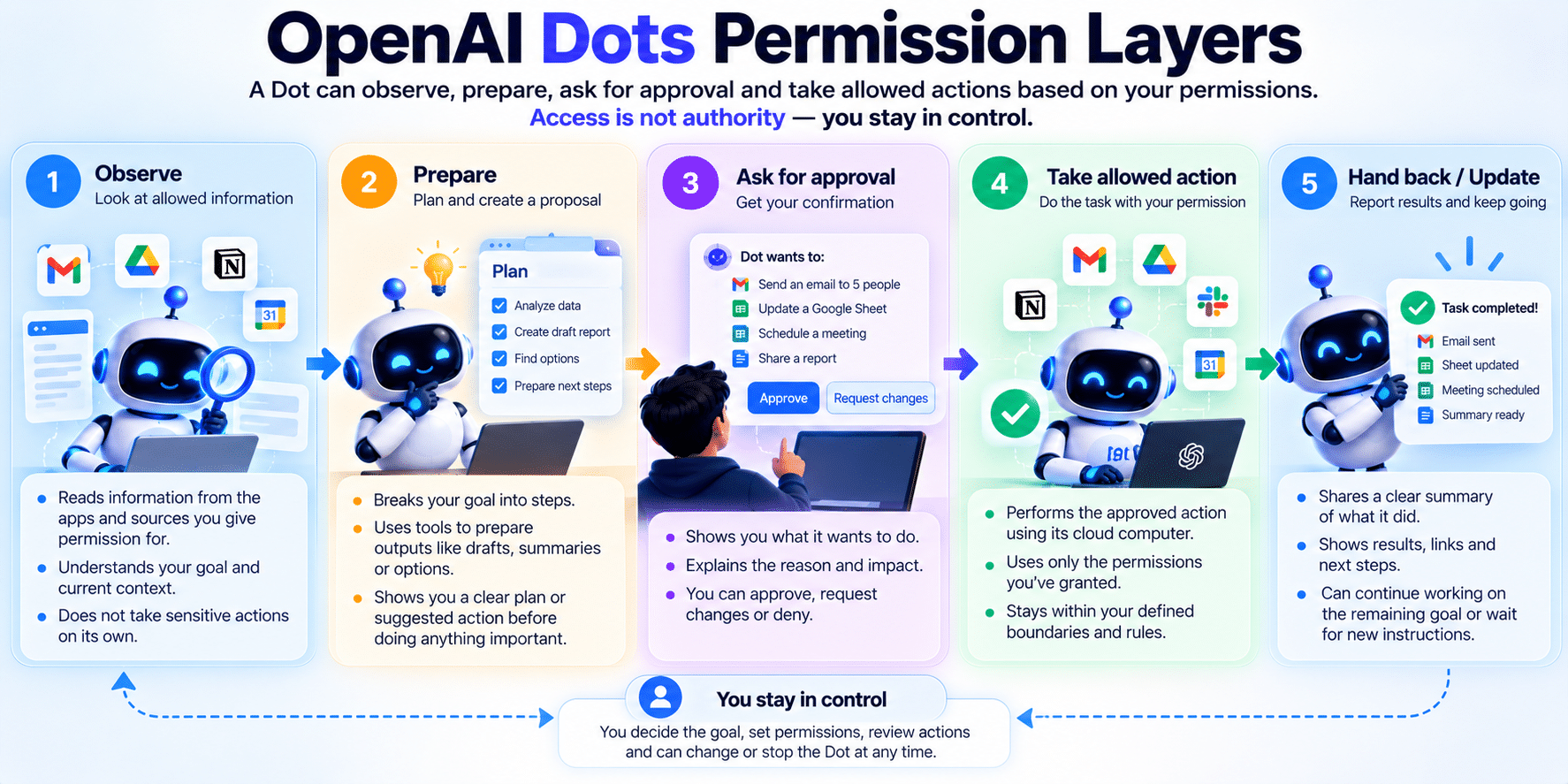
Access Is Not Authority
Giving an assistant access to your calendar is different from letting them cancel meetings. Access means the Dot can read something. Authority means it can act. Dots keep these separate, and the next layers show how.
What OpenAI Dots Do Alone, Ask About, or Hand Back
OpenAI’s help center describes three groups:
- Hand back to you: the most sensitive steps, such as changing a password or transferring money.
- Ask each time: actions such as permanently deleting data or installing software. Purchases with a card saved on a merchant’s site also need your approval.
- Pre-approved or automatic: some actions, such as recurring messages, can be approved in advance.
Custom Rules let you set behavior for supported actions: take action without asking, take action if pre-approved, ask before acting, or hand off to you. They cannot switch off core safety requirements. Be specific when you approve something. Approving one message does not grant ongoing permission to contact people.
The Safety Layers Behind OpenAI Dots
OpenAI lists several layers:
- Model safeguards in GPT-6 Astra
- Plugin permissions that limit access
- Custom Rules you set
- Auto-review, a separate check before certain actions
- Safety monitoring that can pause a Dot’s work
Prompt Injection and Privacy
A webpage, email or document can hide instructions meant to trick an agent. This is called prompt injection. OpenAI says ChatGPT Dots are designed to treat such content as information, not as permission. It also says these protections reduce the risk but do not eliminate it.
On privacy, note a few documented details:
- A Dot shares memory with ChatGPT, and turning ChatGPT Memory off stops that sharing.
- You cannot currently view or edit individual Dot memories. Deleting the Dot deletes its context.
- Disconnecting an app stops new access but does not erase what the Dot already learned.
- On personal plans, your “Improve the model for everyone” setting controls training use.
- Limited human review can still happen in some cases, such as safety.
What OpenAI Dots Cannot Reliably Replace
OpenAI Dots are neither magic nor useless. OpenAI itself says it can still make mistakes, including when following your rules, and tells you to review consequential work. Realistic limits:
- Judgment on ambiguous or high-stakes decisions. Money, hiring, legal and safety choices stay with you.
- Wrong reasoning or wrong actions. Some actions cannot be undone, depending on the app.
- Tasks that need your hands. Password changes and money transfers are handed back.
- Integrations you have not connected. Connecting an app also does not give it unlimited reach.
- Limited rollout. Access is gradual, regional, and plan-based. One Dot per user at launch.
- Some missing features. At launch it has no standalone email address, cannot start calls to you, and cannot be created on mobile.
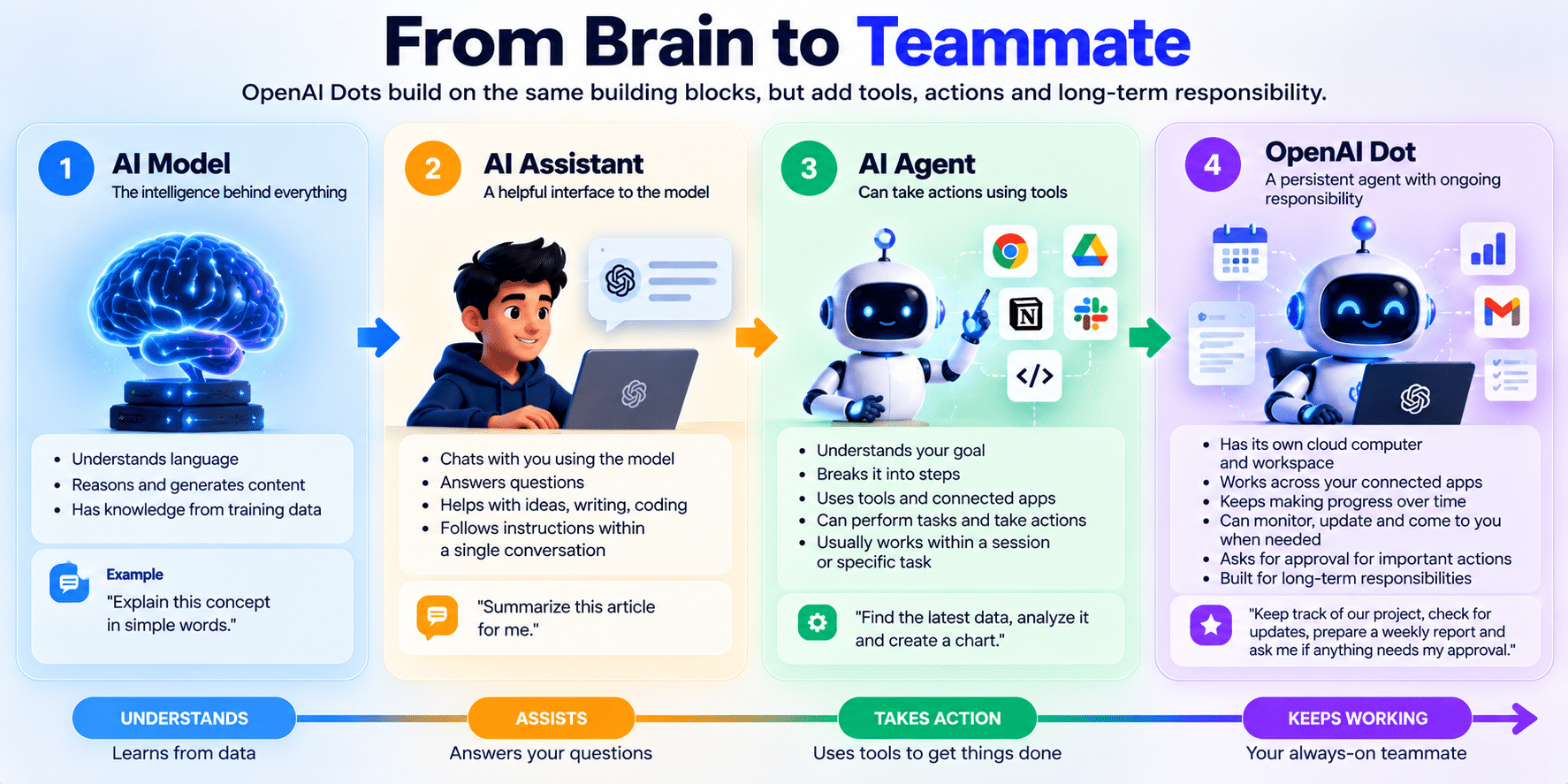
AI Model vs AI Assistant vs AI Agent vs Dot
People mix these terms up. Definitions vary across the industry, so treat this as a helpful map, not a standard.
| Term | What it is | Analogy | Example |
|---|---|---|---|
| AI model | The reasoning system | A brain | GPT-6 Astra |
| AI assistant | An interface for talking to AI | A helpful colleague | Regular ChatGPT chat |
| AI agent | A system that pursues goals and uses tools | A worker with a task | ChatGPT Work |
| Persistent agent (Dot) | An agent that keeps responsibility over time | A teammate with an ongoing job | An OpenAI Dot |
Why OpenAI Dots Matter
The path often described is chatbots, then assistants, then agents, then persistent digital teammates. Nothing says that path is guaranteed. But OpenAI Dots show a real change in the interface.
With OpenAI Dots in the picture, the old question was: “What should I ask AI?” The new question is: “What responsibility can I safely delegate to AI?”
For developers, that means handing over repeating work such as preparing fixes for review. For knowledge workers, it means updating reports as data changes. For personal life, it means fewer small admin tasks. In all three, the skill that grows is clear delegation: stating the goal, the boundaries and what needs your approval.
OpenAI Dots Availability, Plans and Cost
Last verified: October 4, 2026. Based on OpenAI’s announcement and help center.
- Plans: OpenAI Dots come with ChatGPT Pro and Business Premium. Enterprise (including Edu and Healthcare) can try a beta when the workspace admin turns it on. It is off by default.
- Regions: Pro is available in markets excluding the European Economic Area, Switzerland and the UK. Business Premium is available across all supported ChatGPT regions. Rollout is gradual, so access may take several days.
- India: India is not on the excluded list, but confirm inside your account.
- Age: not available to users under 18.
- Devices: create your Dot in the ChatGPT desktop app or desktop web. Mobile chat arrives “when mobile access is available”, and mobile web is not supported.
- Texting: a limited beta for Pro users in the US only.
- Cost: OpenAI Dots have no listed separate price. Your first Dot is included at no extra cost, with an allowance for deeper work and extended limits for the first month. Later add-ons are unpriced. Third-party trackers list Pro from $100 per month, so confirm on OpenAI’s pricing page.
- Admins: workspace owners control who can use Dots.
FAQ
Is OpenAI Dots free?
OpenAI Dots carry no separate fee in OpenAI’s docs, but you need ChatGPT Pro or a Business Premium seat. Your first Dot is included in those plans.
Can OpenAI Dots work while my computer is off?
Yes. OpenAI Dots keep working on their own cloud computer. Work on your local computer needs your computer connected, and that access starts turned off.
Can OpenAI Dots change my passwords or move my money?
No. Those steps are handed back to you. Card purchases on merchant sites need your approval.
Is OpenAI Dots available in India?
India is not listed among the excluded regions for Pro, and Business Premium covers all supported regions. Check your account, since rollout is gradual.
Do OpenAI Dots replace ChatGPT Work or Codex?
No. A Dot can create Work and Codex tasks, and those count toward your usage limits.
Are ChatGPT Dots safe to connect to my email?
They have layered safeguards, but OpenAI says mistakes and prompt injection risks remain. Start with read-only, low-stakes work.
Conclusion
OpenAI Dots turn ChatGPT from something that answers you into something that can hold a job, within rules you set. They are useful for ongoing work you can review, and risky for anything you would not delegate to a new teammate. Start with one small, low-stakes responsibility, set Custom Rules, and read the official OpenAI Dots announcement for updates. Next, we will look at how to write clear instructions for any AI agent.



