

Playwright testing is how a growing number of QA teams are keeping up with code that now ships faster than any human can manually click through it. If you have watched a teammate use an AI coding assistant to generate a whole feature in an afternoon, you already know the problem this creates. Someone still has to check that the feature actually works, on real browsers, every time the code changes.
That is the gap Playwright testing fills. It is not an AI tool by itself, and it will not replace your QA team. It is a browser automation framework that gives developers and testers a fast, reliable way to verify that a web app still behaves correctly after every change, including changes written by AI.
This guide breaks down what Playwright testing actually is, how it stacks up against Selenium and Cypress, and why AI-assisted development is making automated browser testing more important, not less.
What Is Playwright Testing?
Playwright is an open-source browser automation framework built by Microsoft. It lets you write code that opens a real browser, clicks buttons, fills forms, and checks that the page behaves the way it should. Playwright testing specifically refers to using this framework to write and run automated end-to-end tests, rather than using it only for scraping or general automation.
Playwright drives three browser engines through one API: Chromium, Firefox, and WebKit (the engine behind Safari). It also supports the branded Google Chrome and Microsoft Edge browsers. You can write tests in JavaScript, TypeScript, Python, Java, or .NET (C#), so teams don’t have to abandon their existing stack to adopt it.
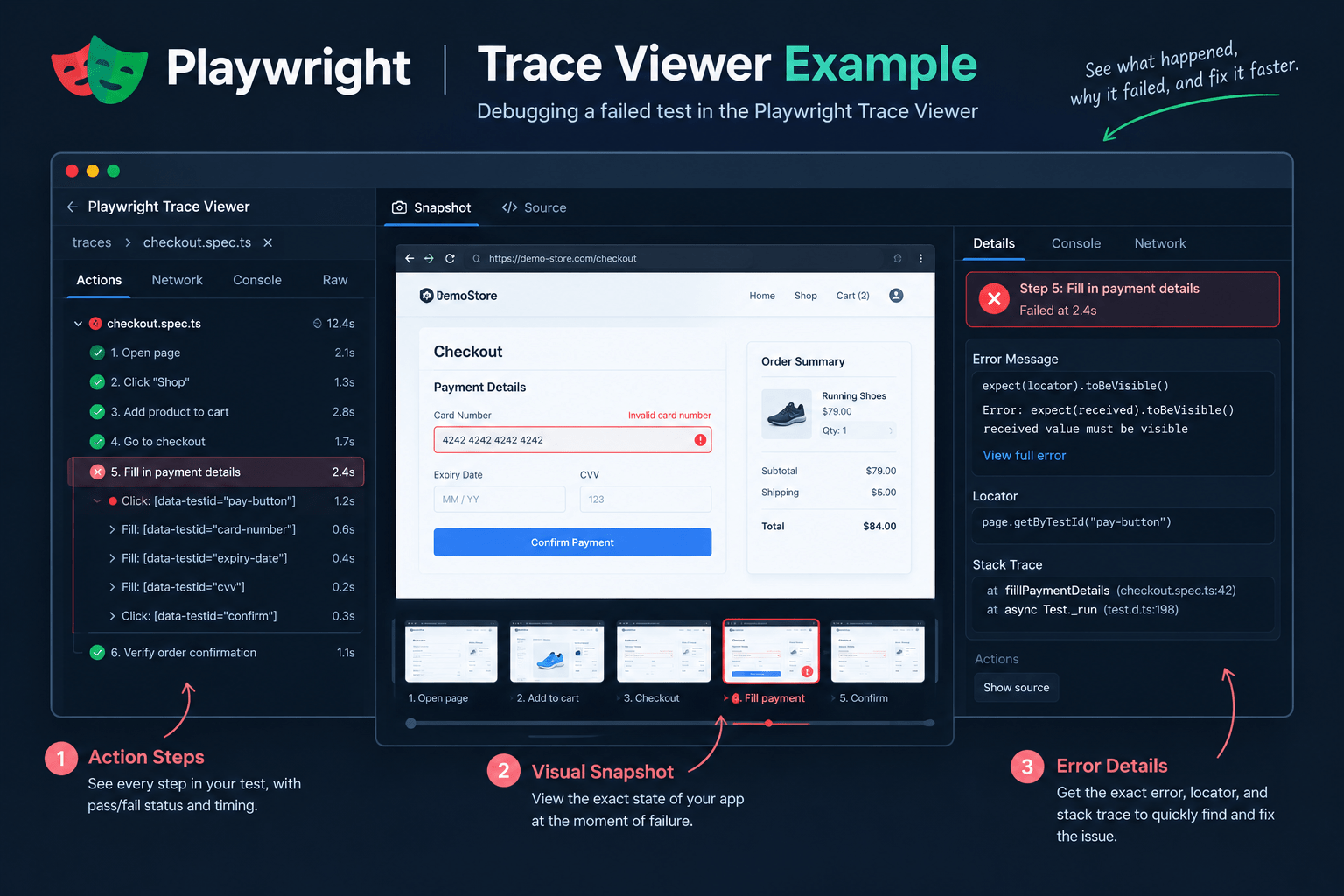
Two features explain most of its popularity. First, auto-waiting: Playwright waits for an element to actually be ready before clicking or typing into it, instead of relying on fixed timeouts that cause flaky tests. Second, the Trace Viewer, which records a full timeline of a test run, including DOM snapshots, network requests, and console logs, so you can see exactly where and why a test failed.
Also Read: Python Frameworks: 3 Best Picks vs Node.js
Why Modern QA Teams Are Adopting Playwright Testing
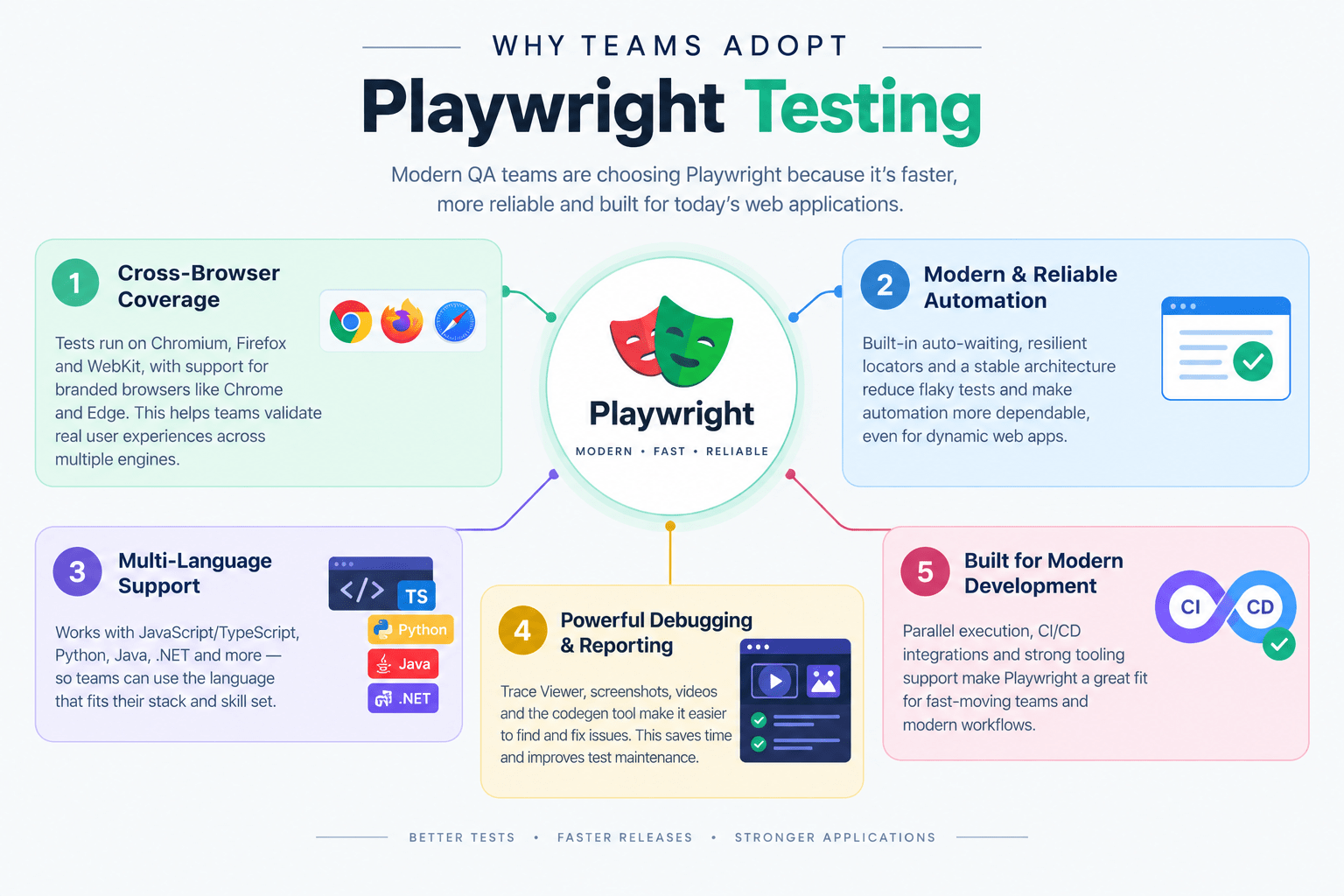
Teams aren’t switching to Playwright because of hype. A few concrete reasons keep showing up in engineering write-ups and official documentation:
- Fewer flaky tests. Auto-waiting and web-first assertions remove most of the timing bugs that plague older Selenium suites.
- Real cross-browser coverage. One test file runs against Chromium, Firefox, and WebKit without rewriting anything.
- Fast parallel execution. Playwright’s test runner isolates each test in its own browser context, so suites run in parallel by default instead of one test at a time.
- Debugging that doesn’t waste your afternoon. The Trace Viewer and the VS Code extension let you replay a failed test step by step instead of guessing.
- CI/CD friendliness. Playwright generates a working GitHub Actions workflow file during setup and integrates with Jenkins, CircleCI, GitLab, and Azure Pipelines.
None of this makes Playwright an “AI testing tool.” It’s a browser automation and test framework. The AI angle comes from how it fits into a workflow, which we’ll get to shortly.
Playwright Testing vs Selenium vs Cypress
Playwright testing, Selenium, and Cypress each solve browser automation differently, and the differences actually matter when you’re picking one.
| Factor | Playwright | Selenium | Cypress |
|---|---|---|---|
| Browser automation | Direct browser protocols (CDP and equivalents) | W3C WebDriver standard | Runs inside the browser’s own execution loop |
| Supported browsers | Chromium, Firefox, WebKit, plus branded Chrome/Edge | Chrome, Firefox, Edge, Safari, and others via WebDriver | Chrome-family browsers, Firefox, and WebKit |
| Languages | JavaScript/TypeScript, Python, Java, .NET (C#) | Java, Python, C#, Ruby, JavaScript, Kotlin, and more | JavaScript/TypeScript only |
| Architecture | Single API automates multiple browser engines directly | Client library talks to a browser-specific driver | Test code runs in the same run loop as the app |
| Parallel testing | Built into the test runner by default | Requires Selenium Grid or a third-party runner | Available on paid Cypress Cloud plans or custom setup |
| Auto-waiting | Built in for actions and assertions | Requires explicit or implicit waits you configure | Built in, but scoped to the current page |
| Debugging | Trace Viewer, codegen, VS Code extension | Depends on the IDE and reporting tools you add | Time-travel debugging in the interactive runner |
| Best suited for | Cross-browser E2E testing, teams on mixed language stacks | Legacy suites, teams needing the widest driver/browser matrix | Fast feedback on Chromium-based apps in a JS-only stack |
| Learning curve | Moderate, gentler than Selenium | Steeper, more manual configuration | Easiest to start, harder to scale to multi-tab flows |
A fair way to put it: Selenium is the long-standing W3C standard with the broadest official browser and language support. Cypress is excellent for fast feedback inside a JavaScript app but does not test multiple browser tabs or windows in the same test and has no native Safari/WebKit-engine testing outside its own browser list. Playwright testing sits between them, with modern architecture and genuine cross-browser and cross-language support in one framework.
A Real Playwright Testing Example
Here is a runnable Playwright testing example using the official @playwright/test runner. It opens a page, interacts with it, and makes an assertion.
javascript
import { test, expect } from '@playwright/test';

test('homepage search leads to results', async ({ page }) => {
  // Navigate to the page under test
  await page.goto('https://example.com');

  // Locate an element by its accessible role and name, then click it
  await page.getByRole('link', { name: 'Search' }).click();

  // Type into the search field
  await page.getByPlaceholder('Search products').fill('running shoes');
  await page.keyboard.press('Enter');

  // Assert the results heading becomes visible
  await expect(page.getByRole('heading', { name: /results/i })).toBeVisible();
});
A few things worth explaining. getByRole locates elements the way a screen reader would, by their accessible role and label, which tends to break less often than a raw CSS selector when a developer restyles the page. expect(...).toBeVisible() is a web-first assertion: Playwright will retry it automatically for a short window instead of failing the instant the element isn’t there yet. That single behavior removes a large share of the flaky tests teams normally blame on “the app is just slow.”
Why AI-Assisted Development Makes Playwright Testing More Important
Here’s the actual chain of cause and effect, not a marketing claim: AI-assisted development is increasing the speed at which software can be produced and modified, which makes repeatable automated validation more valuable.
Think about the old workflow. A developer writes code, tests it manually, a bug shows up, it gets fixed, and someone manually re-checks the related features. That loop was already slow before AI coding assistants existed.
Now compare it with a modern workflow. A developer or an AI assistant generates or modifies code. Automated tests run immediately. Playwright opens real browsers and checks the behavior that actually matters to users. Failures come back with evidence: a trace, a screenshot, a video, instead of a vague bug report. A human investigates the failure and still performs exploratory testing on anything the automation doesn’t cover.
Notice what didn’t happen: humans didn’t get removed from the loop. Automation handles repeatability. AI helps with speed. People still handle judgment, product context, and the situations nobody wrote a test for yet.
Can AI Write Playwright Testing Scripts?
Yes, with real caveats. AI coding assistants can generate Playwright testing scripts, but “AI can generate a test” and “AI-generated tests are reliable” are two different claims, and only the first one is safely true today.
AI-Generated Test Code
Coding assistants can turn a user story, an existing page’s markup, or a written bug report into a first draft of a Playwright test. This is genuinely useful for scaffolding, especially for the long tail of small flows that teams know they should cover but never get around to writing by hand.
The catch: generated selectors sometimes target the wrong element, generated assertions sometimes check something trivial instead of the behavior that matters, and generated tests can pass for the wrong reason (for example, asserting a page loaded instead of asserting the actual feature worked). Every AI-generated test still needs a human to read it and confirm it tests the right thing before it goes into the suite.
AI-Assisted Test Maintenance
AI can help flag broken selectors after a UI change, spot repeated patterns across a test file that could be extracted into a shared step, and suggest likely causes when a trace shows a failure. This is assistance, not autonomous repair. Unless a specific tool explicitly documents self-healing test maintenance, treat AI suggestions here as a starting point for a human review, not an automatic fix.
AI-Assisted Test Planning
Given a plain requirement, AI is genuinely good at generating a list of candidate scenarios. Take “users should be able to reset their password” as an example. An AI assistant might reasonably suggest testing a valid reset request, an invalid email, an expired reset link, a weak new password, a reused reset link, rate limiting on repeated attempts, and mobile browser behavior.
That list is a starting point, not a finished test plan. A QA engineer still has to decide which of those scenarios are worth automating, which are better covered by exploratory testing, and which don’t matter for this particular app.
The Core Problem AI-Generated Code Creates
The faster AI produces code, the faster incorrect code can also be produced. That’s the whole argument for pairing AI-assisted development with automated testing. Automated testing becomes a safety net for speed, not a replacement for engineering judgment.
A Practical Playwright Testing and AI Workflow
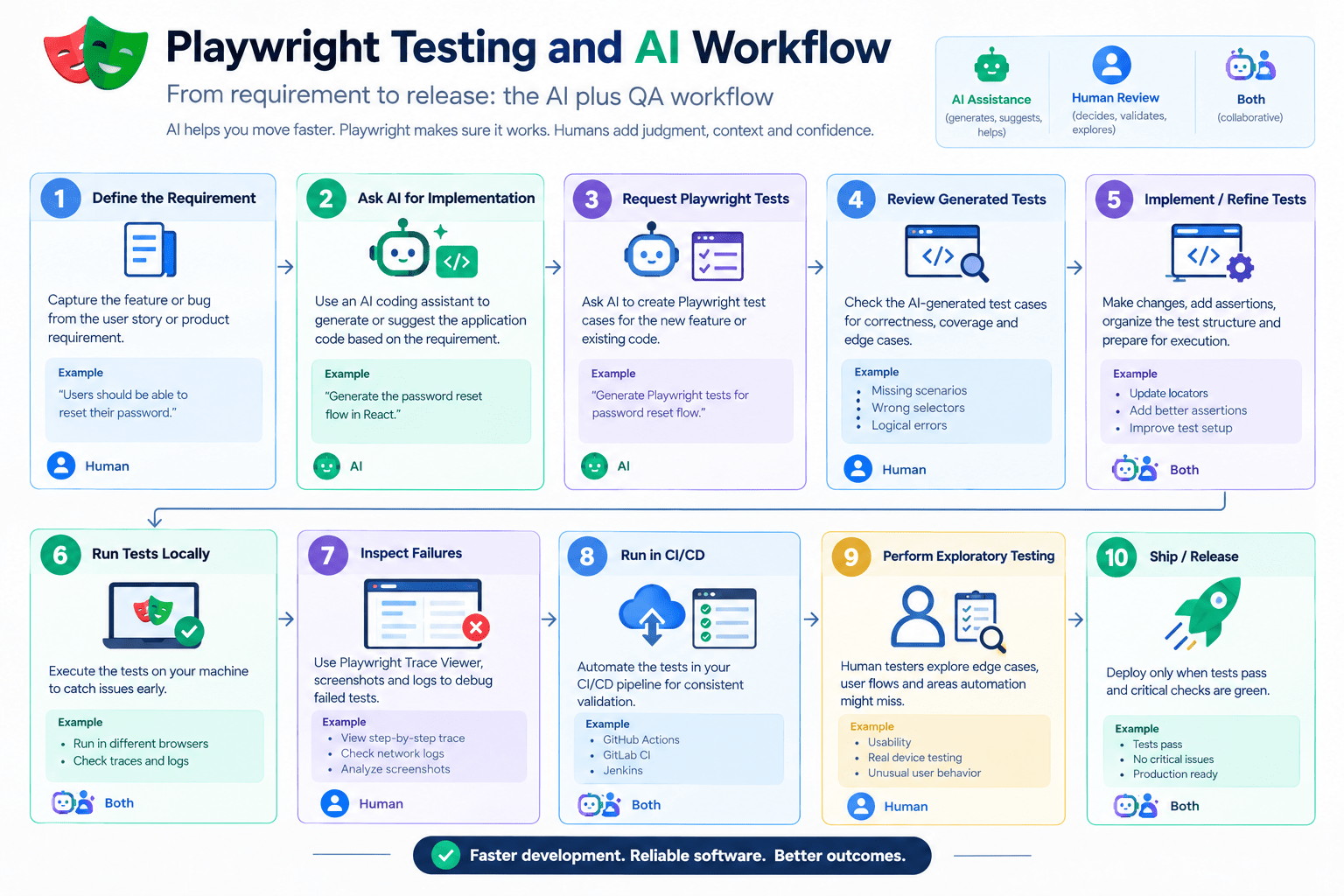
- Define the requirement in plain language.
- Ask an AI assistant to help implement the feature.
- Ask the AI assistant to propose Playwright test scenarios for it.
- Review the proposed scenarios and cut anything irrelevant or redundant.
- Write or refine the actual Playwright tests based on that review.
- Run the tests locally and check the Trace Viewer for any failures.
- Run the full suite in CI/CD on every pull request.
- Perform human exploratory testing on anything automation doesn’t cover well, like visual polish or ambiguous edge cases.
- Ship only after both the automated suite and the exploratory pass are done.
Steps 2, 3, and 6 can genuinely be sped up by AI. Steps 4, 8, and the final judgment call in step 9 need a human who understands the product.
[IMAGE 4 — see Image SEO table]
Real-World Scenario: Playwright Testing an AI-Generated Checkout Flow
Say a developer uses an AI assistant to add a new checkout step to an e-commerce site. The generated code looks correct and the page renders fine. But AI-generated code can quietly introduce problems that aren’t obvious from a glance: a submit button that doesn’t disable during processing, form validation that accepts an empty coupon field, a redirect that points to the wrong confirmation page, cart contents that don’t persist after a page refresh, or a layout that breaks on a mobile viewport.
A Playwright testing suite covering the core checkout journey (add to cart, apply a coupon, submit payment details, land on the confirmation page) will catch most of these automatically, on both desktop and mobile viewports, every time the code changes. It won’t catch everything. It won’t tell you the checkout flow feels confusing, or that the coupon field’s placeholder text is misleading. That’s still a job for a person actually using the product.
Playwright Testing vs Manual Testing: Where Each One Wins
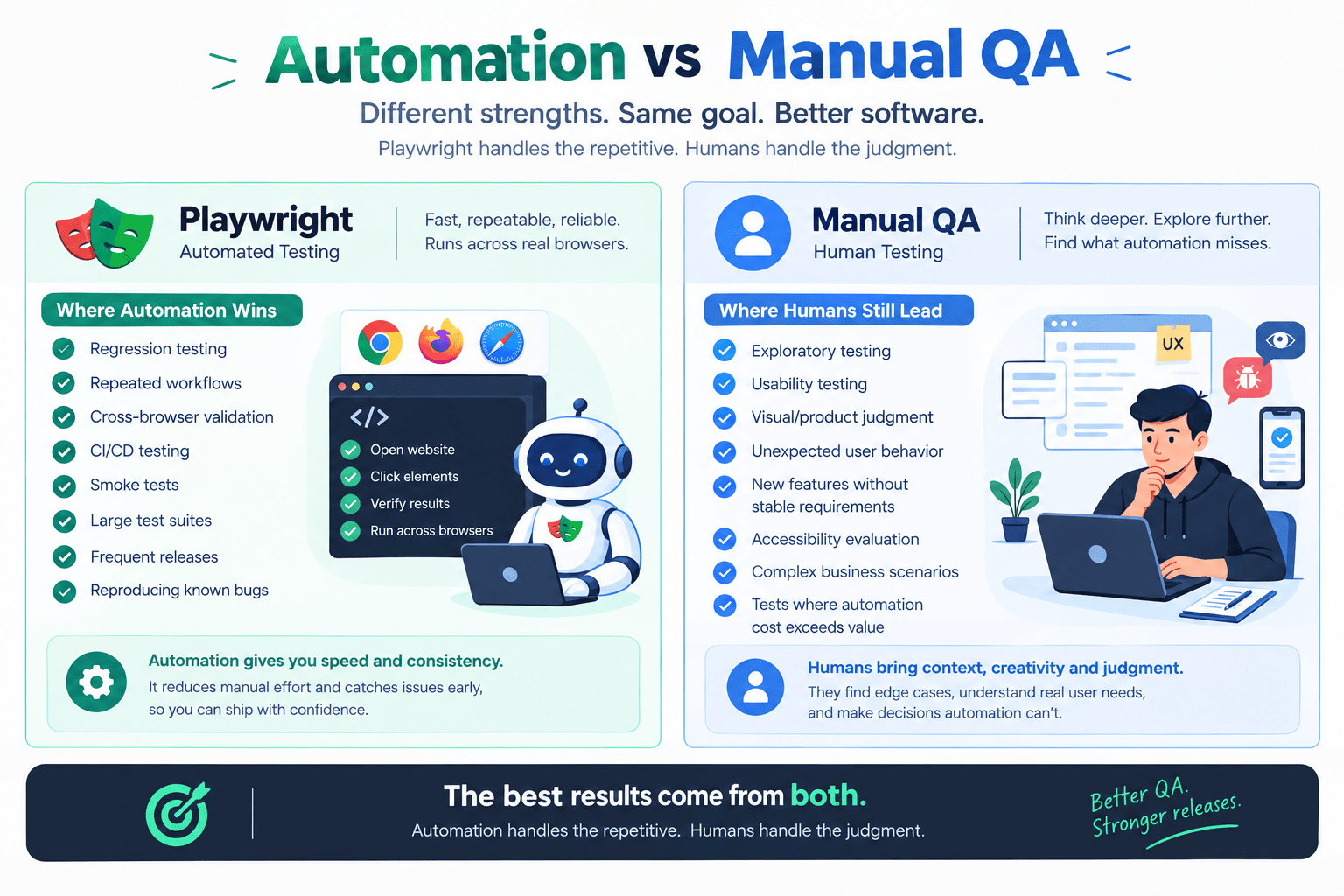
Playwright testing does not eliminate manual testing. It changes what manual testing is for.
Where Playwright automation is the better choice:
- Regression testing across releases
- Repeated workflows like login, checkout, or search
- Cross-browser validation
- CI/CD gatekeeping before a merge
- Smoke tests after every deploy
- Reproducing a previously reported bug to confirm a fix
Where manual testing is still the better choice:
- Exploratory testing on a brand-new feature with no fixed requirements yet
- Usability and visual judgment calls
- Unexpected or unscripted user behavior
- Accessibility evaluation that needs human judgment, not just automated checks
- Complex business scenarios where the “correct” outcome depends on context
- One-off checks where writing and maintaining an automated test costs more than it saves
Manual testing is not disappearing. Its role is shifting away from repetitive regression checks and toward the judgment-heavy work automation genuinely can’t do.
[IMAGE 5 — see Image SEO table]
Pros and Limitations of Playwright Testing
Pros:
- Genuine cross-browser automation in one API
- Modern, accessibility-friendly locator model (
getByRole,getByLabel, and similar) - Built-in auto-waiting that cuts down on flaky tests
- Parallel test execution by default
- Trace Viewer and VS Code extension for real debugging, not guesswork
- Multiple language bindings, so teams aren’t locked into one stack
- Strong support for modern, JavaScript-heavy web apps
Limitations:
- Still has a learning curve, especially around fixtures and configuration
- Tests still need ongoing maintenance as the app’s UI changes
- Automation doesn’t replace exploratory or usability testing
- Flaky tests can still happen with poorly written locators or genuine app-side race conditions
- Browser automation tests the browser experience, not your entire application (API, database, and infrastructure layers still need their own tests)
How to Start Learning Playwright Testing
If you’re moving from manual QA into automation, or you’re a developer picking this up for the first time, a realistic learning sequence looks like this:
- Basic JavaScript or TypeScript
- Core web concepts: HTML, CSS, and how the DOM works
- Locators and selectors (
getByRole,getByText,getByLabel) - Writing assertions with
expect - Organizing tests into files and test suites
- Fixtures for shared setup and teardown
- Debugging with the Playwright Inspector
- Reading failures in the Trace Viewer
- Configuring parallel execution
- Wiring tests into a CI/CD pipeline
- Using AI assistance for test generation, and reviewing its output critically
Expect this to take a few weeks of steady practice, not an afternoon. Playwright’s basics are approachable, but writing a test suite that stays reliable as an app grows is a skill you build over time.
Conclusion
Playwright testing isn’t a replacement for QA engineers, and it isn’t an AI tool in itself. It’s a browser automation framework that has become a practical answer to a real problem: AI-assisted development is producing code faster than manual testing alone can verify it. Automation handles the repeatable checks, AI helps you get there faster, and people still make the judgment calls that keep a product actually usable. Start with one small, repeated user flow, write a Playwright test for it, and grow the suite from there.
9. FAQ
Is Playwright testing better than Selenium? “Better” depends on your situation. Playwright testing generally offers a more modern developer experience, built-in auto-waiting, and easier cross-browser setup. Selenium still has the widest official browser and driver support and a longer track record in large legacy test suites. Neither has fully replaced the other.
Is Playwright testing useful for manual testers moving into automation? Yes. Its locator model and codegen tool (which records your clicks and generates starter test code) make Playwright testing one of the more approachable ways for someone to move from manual testing into a developer-adjacent role.
Can AI write Playwright testing scripts for me? AI assistants can generate a solid first draft of a Playwright test from a requirement or existing page. Every AI-generated Playwright testing script still needs a human review before it’s trusted in a CI pipeline.
Does Playwright testing replace manual testing? No. Playwright testing automates repeatable checks like regression and cross-browser validation. Exploratory testing, usability judgment, and edge cases without a fixed requirement still need a human.
Is Playwright testing hard to learn? The basics are approachable within a few days if you already know JavaScript or Python. Building and maintaining a full Playwright testing suite reliably is a longer-term skill, closer to weeks than hours.
Is Playwright testing good for CI/CD pipelines? Yes. It can generate a working GitHub Actions workflow during setup and integrates with Jenkins, CircleCI, GitLab, and Azure Pipelines.
Should QA engineers learn Playwright testing in 2026? If your team tests web applications and wants one framework that covers multiple browsers and multiple language stacks, Playwright testing is a reasonable and currently in-demand skill to invest in. It’s not the only valid choice, and the right pick still depends on your team’s existing stack.



