

Playwright E2E testing has become the standard way to prove that a full-stack Next.js application actually works not just in isolation, but from the browser all the way down to the database. Unit and integration tests verify that individual functions, hooks, and components behave correctly on their own. End-to-end (E2E) testing goes further: it checks that the whole system holds together when a real user clicks through it.
Historically, Selenium and Cypress dominated the E2E space. But modern stacks built with Next.js, React, and TypeScript need something faster and more reliable across browsers. Playwright, built by Microsoft, has quickly become the industry standard for full-stack web automation. Its native multi-browser support, web-first auto-waiting assertions, isolated browser contexts, and built-in trace debugging make it a natural fit for teams shipping production Next.js apps.
This guide walks through setting up Playwright E2E testing in a full-stack JavaScript project, structuring maintainable tests with the Page Object Model (POM) pattern, mocking network requests, running visual regression tests, and wiring it all into a CI/CD pipeline.
Also Read: Microservices & Real-Time Architecture with NestJS, Redis Pub/Sub & WebSockets
1. Why Playwright Over Legacy E2E Frameworks?
Playwright’s architecture solves several pain points that made Selenium and Cypress harder to scale.
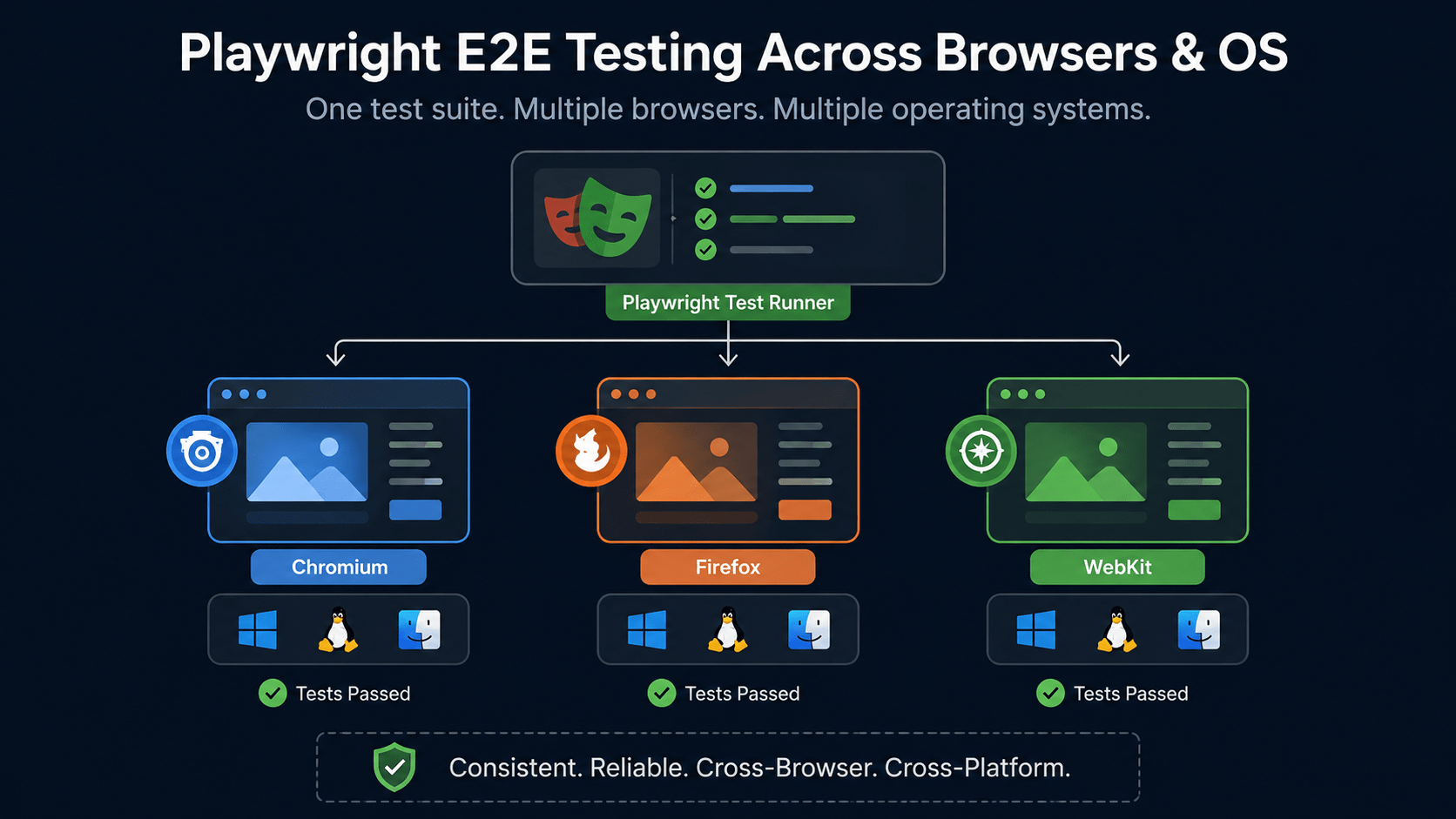
True multi-browser, multi-OS engine. Playwright runs Chromium, Firefox, and WebKit (Safari) natively across Linux, macOS, and Windows through one unified API no separate driver setup per browser.
Auto-waiting mechanics. Playwright automatically waits for elements to become actionable visible, enabled, and stable in the DOM before it interacts with them. That kills the flaky sleep() calls and arbitrary delays that made older E2E suites unreliable.
Isolated browser contexts. Instead of spinning up a full, heavy browser instance per test, Playwright creates lightweight isolated contexts in milliseconds, giving each test complete state isolation even when tests run in parallel.
Network and API interception. Playwright can route, mock, or modify HTTP requests at the browser layer, so you can test edge cases without standing up backend stubs.
Deep tooling. The Trace Viewer, UI Mode, Codegen test generator, and native visual snapshots give you a debugging experience most legacy frameworks never built.
2. Setting Up Playwright E2E Testing in a Full-Stack Project
Install Playwright into your repository:
npm init playwright@latest
The installer creates a playwright.config.ts file, an e2e test directory, and downloads the required browser binaries.
Configuring playwright.config.ts for Playwright E2E Testing
typescript
// playwright.config.ts
import { defineConfig, devices } from '@playwright/test';

export default defineConfig({
  testDir: './e2e',
  timeout: 30 * 1000,
  expect: {
    timeout: 5000,
  },
  fullyParallel: true,
  forbidOnly: !!process.env.CI,
  retries: process.env.CI ? 2 : 0,
  workers: process.env.CI ? 1 : undefined,
  reporter: [['html', { open: 'never' }], ['list']],

  use: {
    baseURL: process.env.BASE_URL || 'http://localhost:3000',
    trace: 'on-first-retry',
    screenshot: 'only-on-failure',
    video: 'retain-on-failure',
  },

  projects: [
    {
      name: 'chromium',
      use: { ...devices['Desktop Chrome'] },
    },
    {
      name: 'firefox',
      use: { ...devices['Desktop Firefox'] },
    },
    {
      name: 'webkit',
      use: { ...devices['Desktop Safari'] },
    },
    {
      name: 'Mobile Chrome',
      use: { ...devices['Pixel 5'] },
    },
  ],

  // Automatically spins up your local dev server during local E2E runs
  webServer: {
    command: 'npm run dev',
    url: 'http://localhost:3000',
    reuseExistingServer: !process.env.CI,
  },
});
This config is close to what you’d want for a real Next.js project: parallel execution locally, single-worker retries in CI, and traces captured automatically on the first retry so a flaky failure doesn’t cost you a re-run to diagnose.
3. Web-First Locators & Auto-Waiting Assertions
A big part of what makes Playwright E2E testing reliable is its locator strategy. Playwright pushes you toward user-centric locators that mirror accessibility guidelines, similar in spirit to React Testing Library.
| Locator | Primary Use Case |
|---|---|
page.getByRole() |
Finding buttons, headings, textboxes by ARIA role and accessible name |
page.getByLabel() |
Finding form inputs associated with <label> tags |
page.getByPlaceholder() |
Locating input fields using placeholder text |
page.getByText() |
Locating non-interactive text nodes |
page.getByTestId() |
Fallback query using explicit
data-testid attributes
|
Here’s what a web-first assertion looks like in practice:
typescript
// e2e/auth.spec.ts
import { test, expect } from '@playwright/test';

test.describe('Authentication Flow', () => {
  test('allows a user to log in and redirects to dashboard', async ({ page }) => {
    await page.goto('/login');

    // Fill out the login form
    await page.getByLabel(/email address/i).fill('developer@example.com');
    await page.getByLabel(/password/i).fill('SecurePass123!');

    // Trigger submit
    await page.getByRole('button', { name: /sign in/i }).click();

    // Auto-waiting assertion verifies URL navigation and DOM presence
    await expect(page).toHaveURL('/dashboard');
    await expect(page.getByRole('heading', { name: /welcome back/i })).toBeVisible();
  });
});
Notice there’s no manual wait anywhere in that test. Playwright’s assertions retry themselves until the condition is true or the timeout is hit, which is the core reason Playwright E2E testing tends to produce far fewer flaky failures than Selenium-based suites.
4. The Page Object Model (POM) Design Pattern
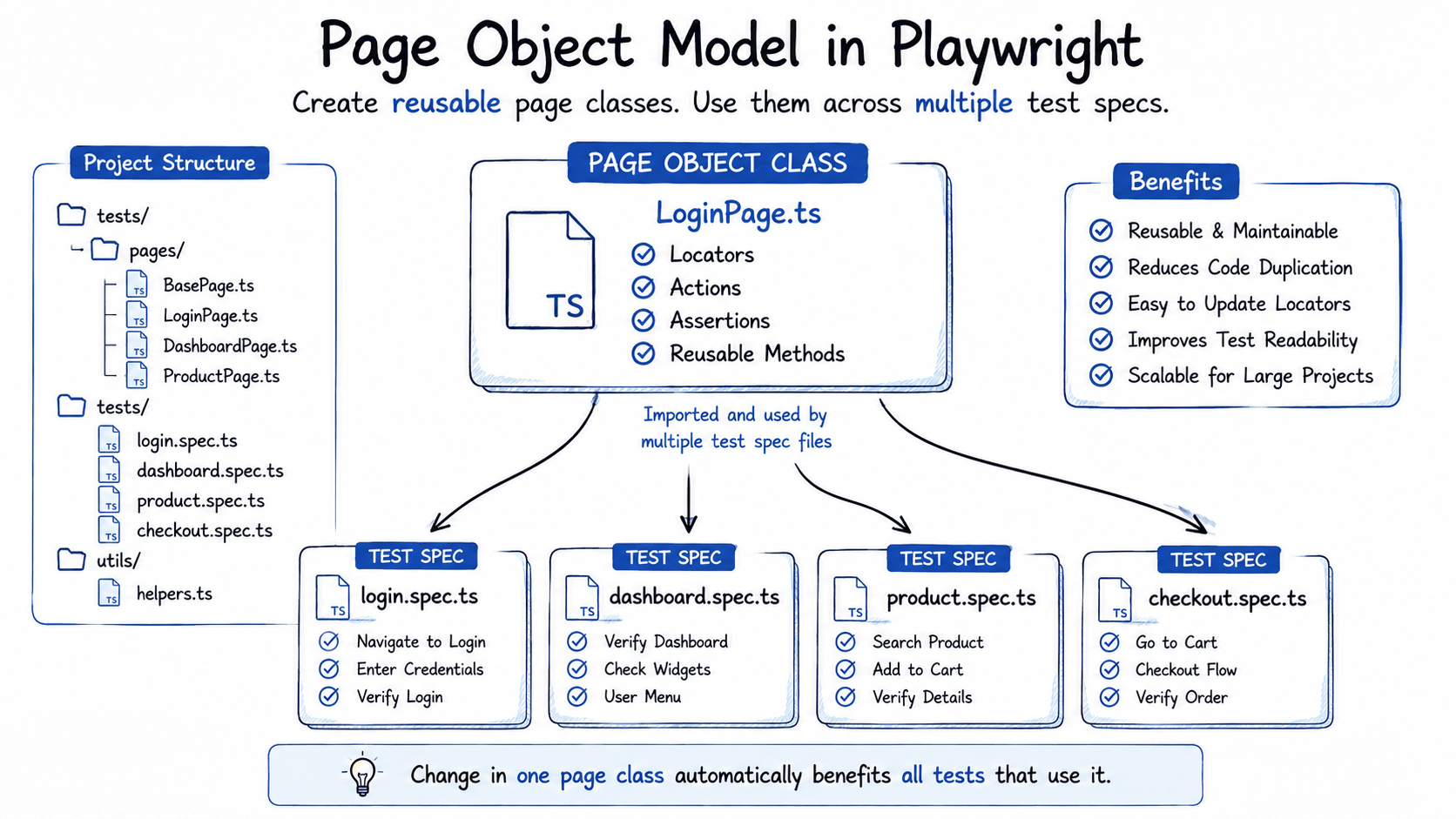
As an app grows, inline selector queries scattered across dozens of spec files become a maintenance headache. The Page Object Model (POM) pattern encapsulates UI selectors and user interactions inside reusable classes, so a single markup change only requires one file to be updated.
Creating a page object: e2e/pages/LoginPage.ts
typescript
// e2e/pages/LoginPage.ts
import { Page, Locator, expect } from '@playwright/test';

export class LoginPage {
  readonly page: Page;
  readonly emailInput: Locator;
  readonly passwordInput: Locator;
  readonly submitButton: Locator;
  readonly errorMessage: Locator;

  constructor(page: Page) {
    this.page = page;
    this.emailInput = page.getByLabel(/email address/i);
    this.passwordInput = page.getByLabel(/password/i);
    this.submitButton = page.getByRole('button', { name: /sign in/i });
    this.errorMessage = page.getByRole('alert');
  }

  async goto() {
    await this.page.goto('/login');
  }

  async login(email: string, pass: string) {
    await this.emailInput.fill(email);
    await this.passwordInput.fill(pass);
    await this.submitButton.click();
  }

  async expectErrorMessage(message: string) {
    await expect(this.errorMessage).toBeVisible();
    await expect(this.errorMessage).toHaveText(message);
  }
}
Clean spec file using POM: e2e/login.spec.ts
typescript
// e2e/login.spec.ts
import { test, expect } from '@playwright/test';
import { LoginPage } from './pages/LoginPage';

test.describe('Login Functionality with POM', () => {
  let loginPage: LoginPage;

  test.beforeEach(async ({ page }) => {
    loginPage = new LoginPage(page);
    await loginPage.goto();
  });

  test('displays validation error for invalid credentials', async () => {
    await loginPage.login('invalid@example.com', 'wrongpassword');
    await loginPage.expectErrorMessage('Invalid credentials provided');
  });

  test('navigates successfully on correct submission', async ({ page }) => {
    await loginPage.login('user@example.com', 'correctpassword');
    await expect(page).toHaveURL('/dashboard');
  });
});
Once your login flow lives in LoginPage, every other spec file that needs to authenticate just imports the class instead of re-declaring selectors this is the pattern most real-world Playwright E2E testing suites converge on once they pass a handful of spec files.
5. Network Interception & API Mocking
Network mocking is where Playwright E2E testing really separates itself from browser-only tools. Playwright lets you intercept and mock backend routes directly from the test suite. That makes it fast to test edge cases 500 errors, high latency, offline states without touching a real database.
typescript
// e2e/dashboard.spec.ts
import { test, expect } from '@playwright/test';

test.describe('Dashboard Async Data Interception', () => {
  test('renders user analytics correctly from mocked API response', async ({ page }) => {
    // Intercept backend REST request and return mock JSON payload
    await page.route('**/api/v1/analytics', async (route) => {
      const mockAnalytics = {
        totalUsers: 1420,
        activeSessions: 89,
        monthlyRevenue: '$42,500',
      };
      await route.fulfill({
        status: 200,
        contentType: 'application/json',
        body: JSON.stringify(mockAnalytics),
      });
    });

    await page.goto('/dashboard');

    // Assert UI elements rendered from mocked network data
    await expect(page.getByTestId('metric-total-users')).toHaveText('1,420');
    await expect(page.getByTestId('metric-revenue')).toHaveText('$42,500');
  });

  test('handles 500 server error gracefully', async ({ page }) => {
    // Force backend endpoint failure
    await page.route('**/api/v1/analytics', (route) =>
      route.fulfill({ status: 500, body: 'Internal Error' })
    );

    await page.goto('/dashboard');

    // Verify error state banner appears
    await expect(page.getByRole('alert')).toHaveText(/failed to load analytics data/i);
  });
});
6. Visual Regression Testing
Visual regression is an underused piece of most Playwright E2E testing setups. Playwright can catch unexpected layout regressions by comparing screenshots pixel-by-pixel against a stored baseline.
typescript
// e2e/visual.spec.ts
import { test, expect } from '@playwright/test';

test.describe('Visual Snapshot Regression', () => {
  test('landing page matches snapshot baseline', async ({ page }) => {
    await page.goto('/');

    // Wait for critical hero image or animation to stabilize
    await page.waitForLoadState('networkidle');

    // Compares pixel snapshot against stored baseline
    await expect(page).toHaveScreenshot('landing-page-baseline.png', {
      maxDiffPixelRatio: 0.02, // Allow max 2% sub-pixel difference
    });
  });
});
Keep the diff ratio tight 2% is usually enough tolerance for font-rendering noise without letting a real regression slip through.
7. CI/CD Automation with GitHub Actions
yaml
# .github/workflows/playwright.yml
name: Playwright Tests
on:
  push:
    branches: [ main, master ]
  pull_request:
    branches: [ main, master ]

jobs:
  test:
    timeout-minutes: 60
    runs-on: ubuntu-latest
    steps:
    - uses: actions/checkout@v4

    - uses: actions/setup-node@v4
      with:
        node-version: 20
        cache: 'npm'

    - name: Install dependencies
      run: npm ci

    - name: Install Playwright Browsers
      run: npx playwright install --with-deps

    - name: Run Playwright tests
      run: npx playwright test
      env:
        BASE_URL: http://localhost:3000

    - uses: actions/upload-artifact@v4
      if: always()
      with:
        name: playwright-report
        path: playwright-report/
        retention-days: 30
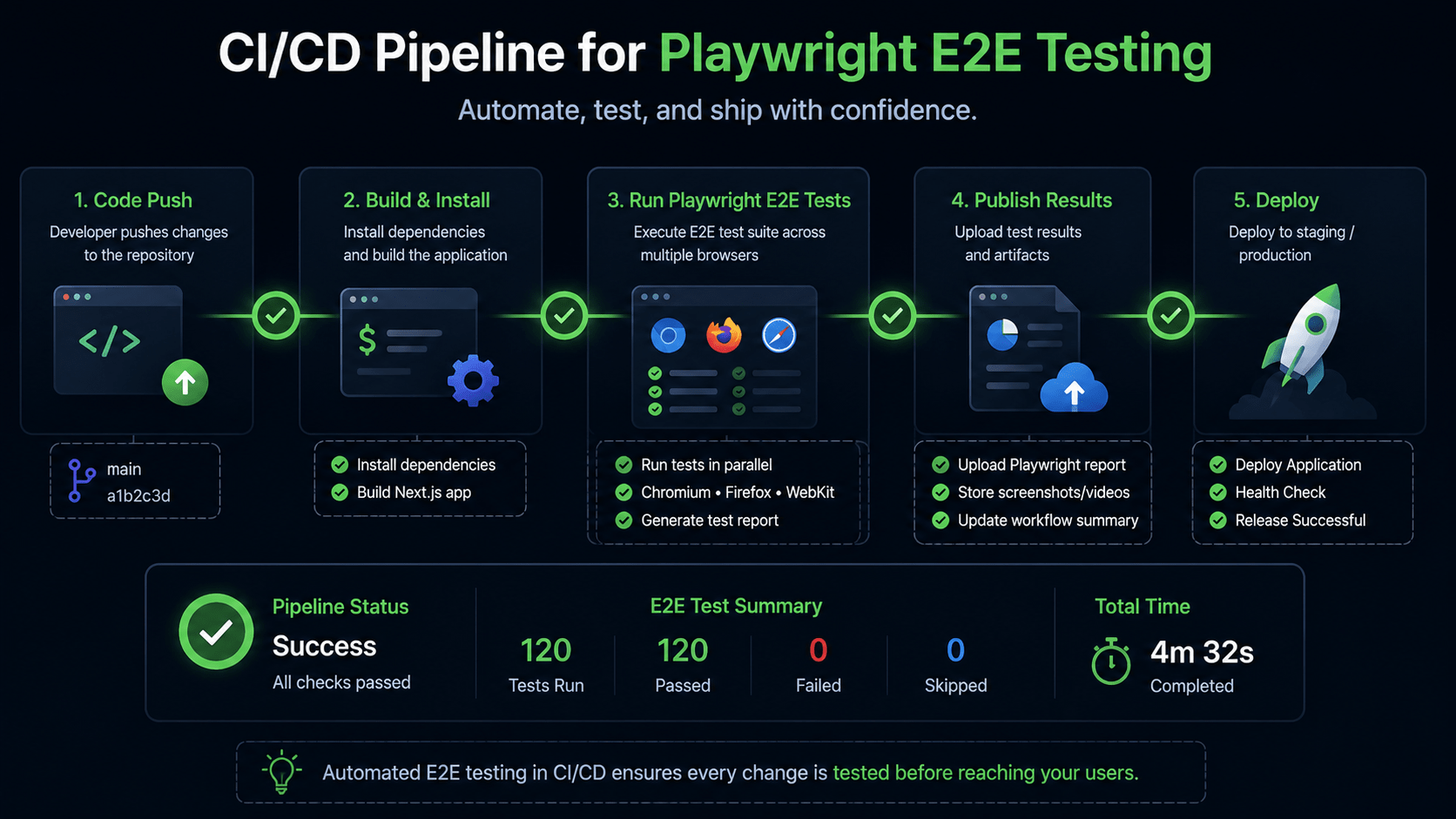
The uploaded HTML report is worth keeping even on green runs when a test does start flaking weeks later, you’ll want a trail of traces to compare against.
8. Key Takeaways
- Full-stack coverage. Playwright E2E testing exercises your entire integrated stack frontend, routing, API, and database from the client browser’s point of view.
- Page Object Model. Modularizing locators and actions into reusable classes keeps large test suites clean, readable, and scalable.
- Network interception. Mocking HTTP routes with
page.route()gives you full control over async data states and failure scenarios. - Resilient assertions. Web-first assertions wait automatically for DOM stability, which is what eliminates the fragile timer delays that plagued older frameworks.
What’s next: we’ll complete Phase 9 by configuring application monitoring, log aggregation, and error tracking with Sentry and OpenTelemetry.



