


Every kilobyte of JavaScript you ship has to be downloaded, parsed, compiled, and executed before a user can interact with your page, which is exactly why Next.js bundle size is the number one lever for fixing a bad Interaction to Next Paint (INP) score. Cut your bundle size and INP almost always improves with it.
We already covered how Server Components fix Largest Contentful Paint (LCP) and how pre-allocating space fixes Cumulative Layout Shift (CLS) in Post 47. This time, the villain is different: Massive JavaScript Bundles sitting on your main thread.
If you ship a 2MB JavaScript bundle on initial load, the browser’s main thread locks up while it parses that code, and your INP score pays for it. In this post, we will cure that “bundle phobia” by learning how to analyze your payload, cut dead code, and defer heavy components with code splitting, in five concrete steps you can use to shrink bundle size on a real Next.js app this week.
Also Read: Core Web Vitals in React: A Practical Guide to LCP, CLS, and INP
When you run next build (or Webpack/Turbopack directly), the bundler starts at your entry point and walks every import statement in your app. It gathers those files, along with every third-party npm package they depend on, and squashes them into one or more minified .js files called chunks.
Out of the box, Next.js already does route-level code splitting. A user who visits /login only downloads the JavaScript for the login page, not for /admin-dashboard. That is a real improvement over a traditional Create React App single-page app, which downloads the entire app upfront.
But route-level splitting alone is not enough to fix bundle size on a heavy route. If your /admin-dashboard page ships a charting library, a rich-text editor, and a date picker, that one route’s bundle size can still balloon into a huge initial payload. That is where the five techniques below come in.
1. Analyze Your Bundle Before You Touch Anything
You cannot optimize what you cannot see, so the first step in any bundle size cleanup is measurement, not guessing. A bundle size number you have not measured is just a guess.
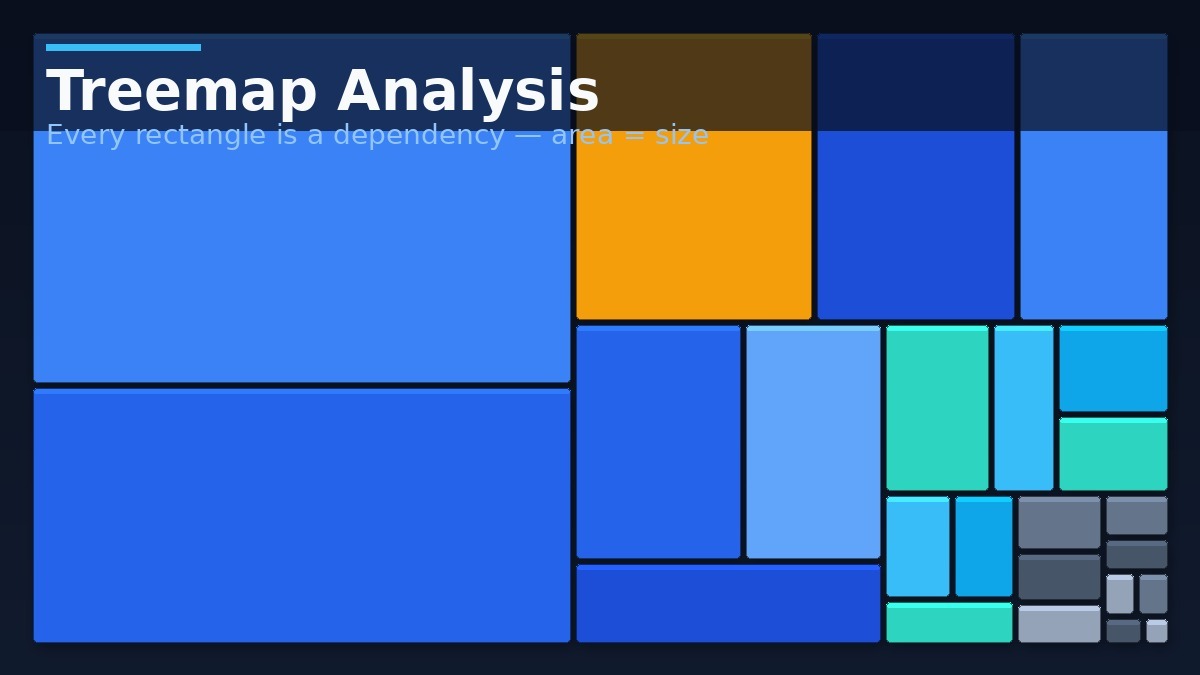
For Next.js, the standard bundle size analysis tool is @next/bundle-analyzer.
Step 1: Install it
bash
npm install @next/bundle-analyzer
Step 2: Configure next.config.js
js
const withBundleAnalyzer = require('@next/bundle-analyzer')({
  enabled: process.env.ANALYZE === 'true',
})

module.exports = withBundleAnalyzer({
  // Your normal Next.js config
})
Step 3: Run the build with the flag
bash
ANALYZE=true npm run build
This opens an interactive treemap in your browser that maps your entire bundle size, dependency by dependency. Large boxes mean heavy dependencies. Three offenders show up in most React and Next.js codebases:
- moment.js — notoriously heavy and does not support tree shaking at all.
- lodash — often imported in full just to use one function like
debounceorcloneDeep. - Icon libraries — pulling in an entire icon set to use three icons.
The table below shows what swapping these out actually saves, based on published package sizes rather than a guess:
Heavy Dependencies & Their Lighter Swaps
Swap these common packages and reclaim kilobytes before your users ever notice the difference.
| Heavy Dependency | Typical Gzipped Size | Lighter Swap | Approx. Reduction |
|---|---|---|---|
| moment.js | ~72KB | date-fns or dayjs | 90%+ |
| lodash (full import) | ~24KB gzipped | lodash-es or per-function imports | 80–95% |
| axios | ~13KB | native fetch or ky | Up to 100% |
| Full icon library import | Varies, often 30KB+ | Per-icon imports (e.g. lucide-react/icon) | 70%+ |
-
Heavymoment.jsSize~72KB gzippedSwapdate-fns or dayjs
-
Heavylodash (full import)Size~24KB gzippedSwaplodash-es or per-function imports
-
HeavyaxiosSize~13KB gzippedSwapnative fetch or ky
-
HeavyFull icon library importSizeVaries, often 30KB+SwapPer-icon imports (lucide-react, etc.)
2. Split Heavy Components with Dynamic Imports
Once you know what is heavy, component-level code splitting (dynamic imports) is how you stop shipping it on every page load and keep your bundle size under control.
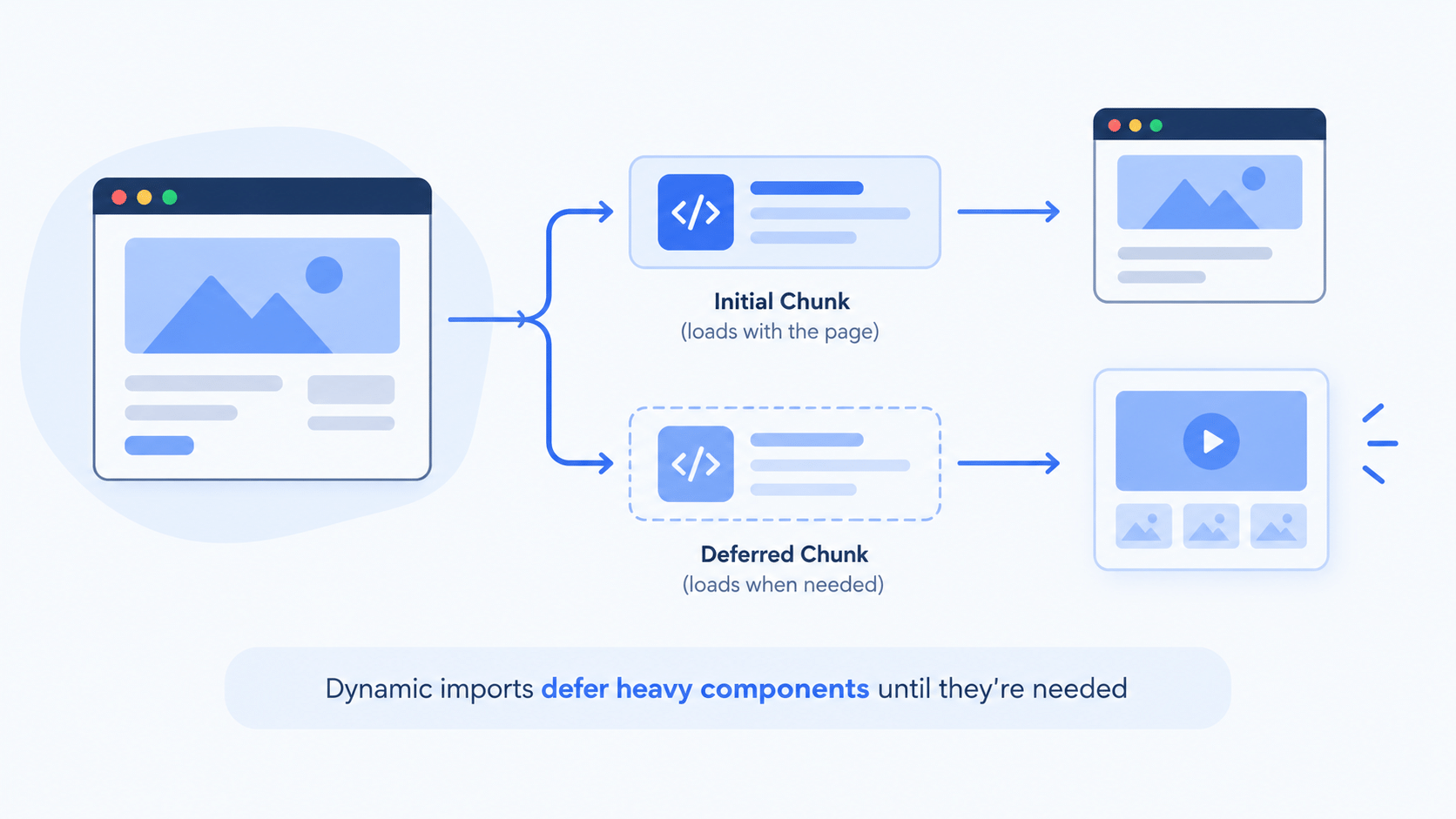
Instead of importing a heavy component statically at the top of the file, tell Next.js to pull it into its own chunk and load it only when needed.
jsx
//  Static import: the charting library ships in the initial page bundle
import DataChart from '@/components/DataChart';
import { useState } from 'react';

export default function Dashboard() {
  const [showChart, setShowChart] = useState(false);

  return (
    <div>
      <h1>User Dashboard</h1>
      <button onClick={() => setShowChart(true)}>View Analytics</button>
      {/* The JS for DataChart already downloaded, even though it's hidden */}
      {showChart && <DataChart data={userData} />}
    </div>
  );
}
Fix it with next/dynamic, which wraps React.lazy and Suspense under the hood:
jsx
//  Dynamic import: the charting library is deferred
import dynamic from 'next/dynamic';
import { useState } from 'react';

const DynamicDataChart = dynamic(() => import('@/components/DataChart'), {
  // Loading fallback prevents CLS while the chunk downloads
  loading: () => <div className="h-64 w-full bg-slate-200 animate-pulse rounded-lg" />
});

export default function Dashboard() {
  const [showChart, setShowChart] = useState(false);

  return (
    <div>
      <h1>User Dashboard</h1>
      <button onClick={() => setShowChart(true)}>View Analytics</button>
      {/* This chunk is only requested over the network once showChart is true */}
      {showChart && <DynamicDataChart data={userData} />}
    </div>
  );
}
With this change, /dashboard‘s bundle size on first render shrinks dramatically and the route loads fast. When the user clicks the button, the browser fetches the chart’s chunk, shows the skeleton for a split second, then renders.
Reach for dynamic imports on:
- Modals, complex dropdowns, rich-text editors, and 3D canvases (Three.js)
- Below-the-fold content that does not need its JavaScript immediately (pair with an Intersection Observer for scroll-triggered loading)
3. Eliminate Dead Code with Real Tree Shaking
Tree shaking removes unused code from your final bundle. Think of your dependency graph as a tree: tree shaking “shakes” it to see which branches (unused functions) fall off.
Modern bundlers do this automatically for ES Modules (import/export), which is why writing imports the right way matters as much for bundle size as the library you pick; they cannot do it for older CommonJS modules (require). This is the single biggest reason two developers importing the “same” library end up with wildly different bundle size numbers on the same page.
js
//  BAD: imports the entire Lodash library
import _ from 'lodash';
const arr = _.chunk(['a', 'b', 'c', 'd'], 2);

// ALSO BAD (sometimes): depending on bundler config, this can still pull in everything
import { chunk } from 'lodash';

// GOOD: direct import, guarantees only the chunk function ships
import chunk from 'lodash/chunk';
Modern Next.js has a built-in compiler optimization that automatically rewrites the “also bad” example into the “good” one for specific libraries, including lodash and several popular UI kits. That is a safety net, not a reason to stop writing direct imports yourself, since not every package you add will be on that internal list.
4. Swap Out the Worst Offenders Before You Write a Line of New Code
Sometimes the fastest bundle size win is not a code change at all, it is a dependency change. The table in Step 1 already names the usual suspects, and the fix is almost always a find-and-replace, not a rewrite:
- Replace
momentwithdate-fns(import only the functions you use) ordayjs. - Replace a full
lodashimport withlodash-esor direct per-function imports. - Replace
axioswith nativefetchfor simple requests. - Audit any icon package import and switch to per-icon imports.
This step gets skipped constantly because swapping a dependency feels less “technical” than code splitting, even though it often has a bigger effect on bundle size. In practice, it is often the highest-leverage 30 minutes you can spend on a slow route.
Also Read: Framer Motion and Modern CSS Animations in React: Closing Out Phase 6
If you followed our Phase 6 animation post and added Framer Motion to a page, run the bundle analyzer on that route specifically. Animation libraries are a common hidden contributor to bundle size that this step’s dependency audit should also catch.
5. Move Heavy Logic to Server Components
The biggest structural fix for bundle size is React Server Components (RSCs), because their dependencies are never sent to the client at all.
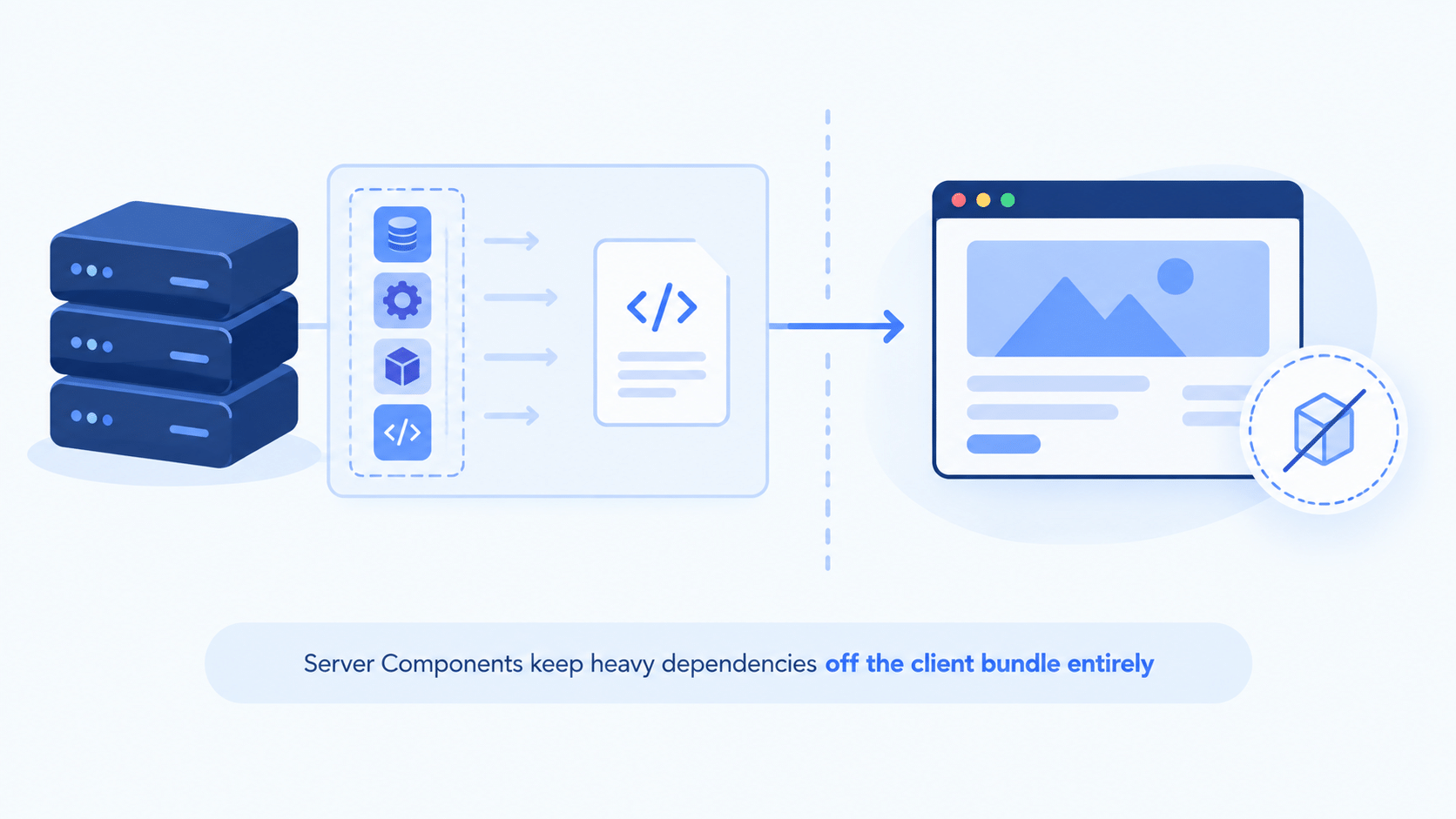
Say you have a component that parses a Markdown string using a 50KB library like marked or remark. Traditionally, that 50KB shipped to the browser. As a Server Component:
- The Markdown parsing happens entirely on the server.
- The server outputs plain HTML (
<h1>,<p>, and so on). - The browser receives only that HTML. The client-side JavaScript weight added by
markedis 0 bytes.
Why This Matters More If Your Traffic Skews Indian
A smaller bundle size is not just a Lighthouse vanity metric. On a flagship phone over fast Wi-Fi, a bloated bundle is annoying. On a mid-range Android device over 4G in a Tier 2 or Tier 3 Indian city, the same 2MB bundle is the difference between a page that feels usable and one that visibly stalls while the JavaScript parses.
If a meaningful share of your traffic comes from India, treat bundle size work as a direct fix for your actual bounce rate, not just a scorecard number.
Next.js Bundle Size FAQ
Does reducing bundle size actually improve INP, or just Lighthouse scores?
Both. INP measures real interaction latency, and a smaller, split bundle means less JavaScript blocking the main thread when a user taps or clicks, which is exactly what INP penalizes.
Do I need @next/bundle-analyzer, or can I just guess which packages are heavy?
Guessing is unreliable. Packages that look small in node_modules can pull in large transitive dependencies. Run the analyzer before making changes, and again after, to confirm the fix worked.
Will next/dynamic hurt my SEO if I use it on important content?
Not if you use it correctly. Dynamic imports are for interactive, client-heavy pieces like charts and editors, not for your primary content. Core content should stay server-rendered or in a Server Component so crawlers and Core Web Vitals both see it immediately.
Is tree shaking automatic, or do I have to do anything?
Modern bundlers tree-shake ES Module code automatically, but only if your imports are written in a tree-shakeable way and the package itself ships ES Modules. CommonJS packages and full-library imports defeat it.
How much of my bundle size problem is really just old dependencies?
Often most of it. Moment.js, full lodash imports, and full icon-library imports are still common in older codebases, and each one has a lighter, drop-in replacement, as shown in the table above.
Conclusion
Fixing your Next.js bundle size comes down to five habits: measure first with a real bundle analyzer, defer heavy components with dynamic imports, write tree-shakeable imports, swap out the worst offending dependencies, and push whatever logic you can onto Server Components. Do all five and your bundle size drops fast. Start with the analyzer, since you cannot fix what you have not measured, and go from there.
Code is not the only thing eating your page weight. In Post 49, we close out Phase 7 by tackling image and font optimization, including the Next.js <Image> component, WebP and AVIF formats, and killing the layout shifts caused by custom typography.



