
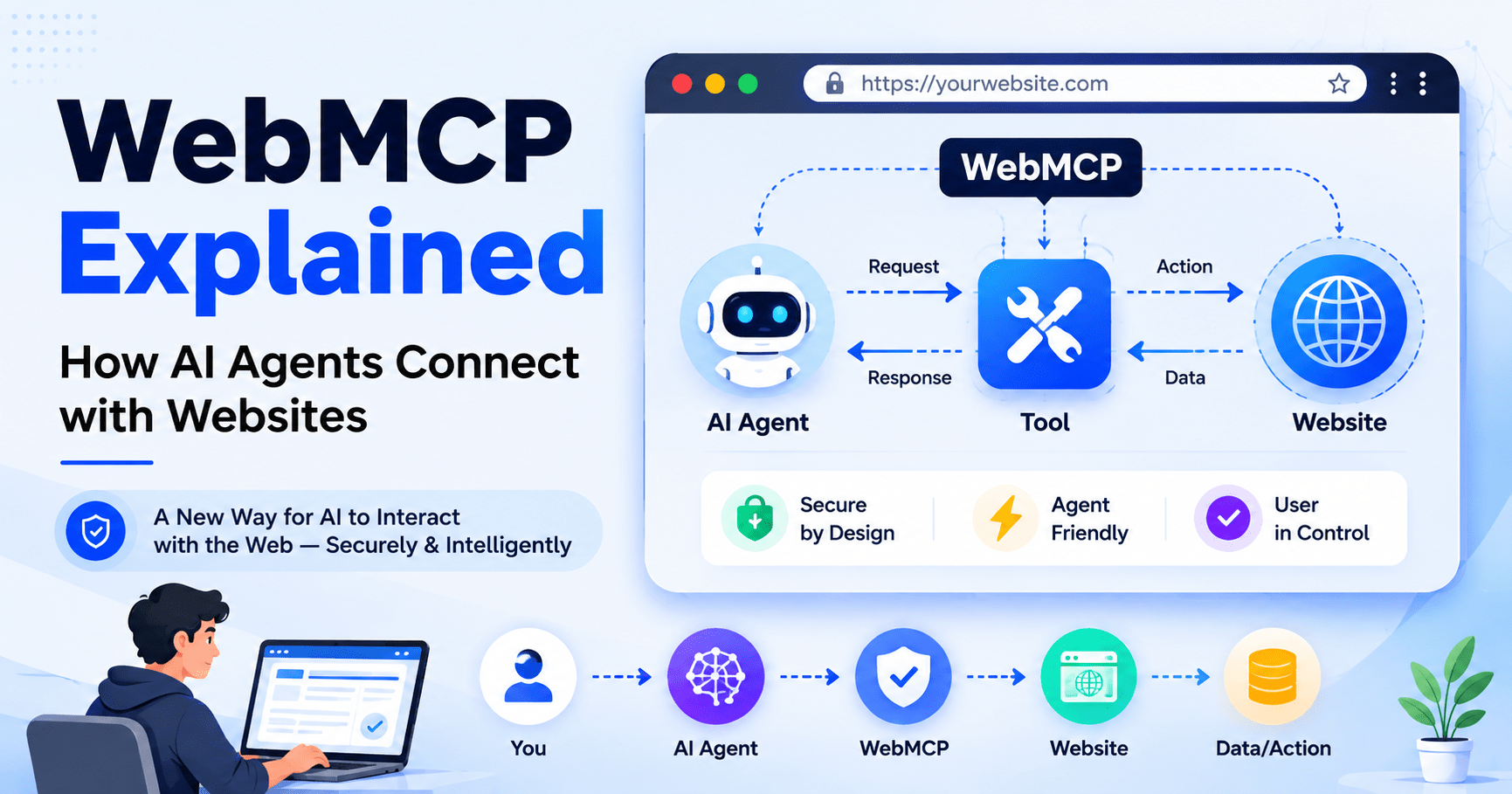

WebMCP is the new browser standard behind a very specific promise: instead of an AI agent clicking through six screens to reorder your usual food delivery, it calls one structured action and gets it done. That is also exactly where things can go wrong if a website hands out the wrong kind of access. WebMCP lets a website tell an AI agent, in plain structured terms, what actions it is allowed to take, instead of forcing the agent to guess by reading buttons and forms.
This guide explains what WebMCP actually is, how it works under the hood, what Chrome and Cloudflare have really shipped so far, and why the security side of this deserves more attention than the hype around it. We will separate what is confirmed today from what is still a future possibility, because a lot of what circulates online about WebMCP blurs that line.
What Is WebMCP, Actually?
WebMCP (short for Web Model Context Protocol) is a proposed web standard being developed inside the W3C Web Machine Learning Community Group, with engineers from Google and Microsoft as the main authors. It adds a browser API, navigator.modelContext, that lets a web page register “tools” small, named functions with a plain-language description and a JSON Schema for their inputs that an AI agent running in the browser can discover and call directly.
The name invites confusion, so it is worth being precise: WebMCP is not an implementation of Anthropic’s Model Context Protocol (MCP). It borrows MCP’s idea of describing a “tool” with a name, a description, and a schema, but it does not use MCP’s JSON-RPC wire protocol, and it does not require a backend server. A traditional MCP server runs on infrastructure you host and talk to over a network connection. WebMCP tools run entirely inside the browser tab, in the page’s own JavaScript, and they share whatever session the visitor already has open.
As of mid-2026, WebMCP is a Draft Community Group Report, not an official W3C standard. Chrome is the reference implementation and has moved from a Canary-only flag into a public origin trial, meaning real sites can test it on live traffic without every visitor needing to flip a browser flag. Microsoft Edge has experimental support behind a flag because Microsoft co-authored the spec. Mozilla and Apple are participating in the working group discussions but have not committed to shipping it in Firefox or Safari. No mainstream consumer AI agent calls WebMCP tools in production yet Google has said its own Gemini-in-Chrome assistant is the intended first adopter.
Also Read: Developer Snacks: 7 Easy Ways to Beat Coding Fatigue
How WebMCP Works, Step by Step
It helps to think of WebMCP as four layers stacked on top of each other, each with a different job:
User → AI agent → Browser → WebMCP-enabled website
- The user starts the interaction, either by giving an agent a goal directly or by browsing normally with an agent assisting in the background.
- The AI agent is the language model plus whatever orchestration logic sits around it inside Chrome itself, inside a browser extension, or inside a separate assistant that controls the browser.
- The browser is the referee. It loads the page, mediates every tool call, and decides what the agent is and is not allowed to touch. This is the part that did not exist before WebMCP previously, an agent had no standardized channel into a page beyond reading the DOM or taking screenshots.
- The website registers its tools using
navigator.modelContext, either declaratively through HTML form annotations or imperatively through JavaScript. Each tool has a name, a natural-language description the model reads to decide when to use it, a JSON Schema for its parameters, and a handler function that runs the page’s own existing code.
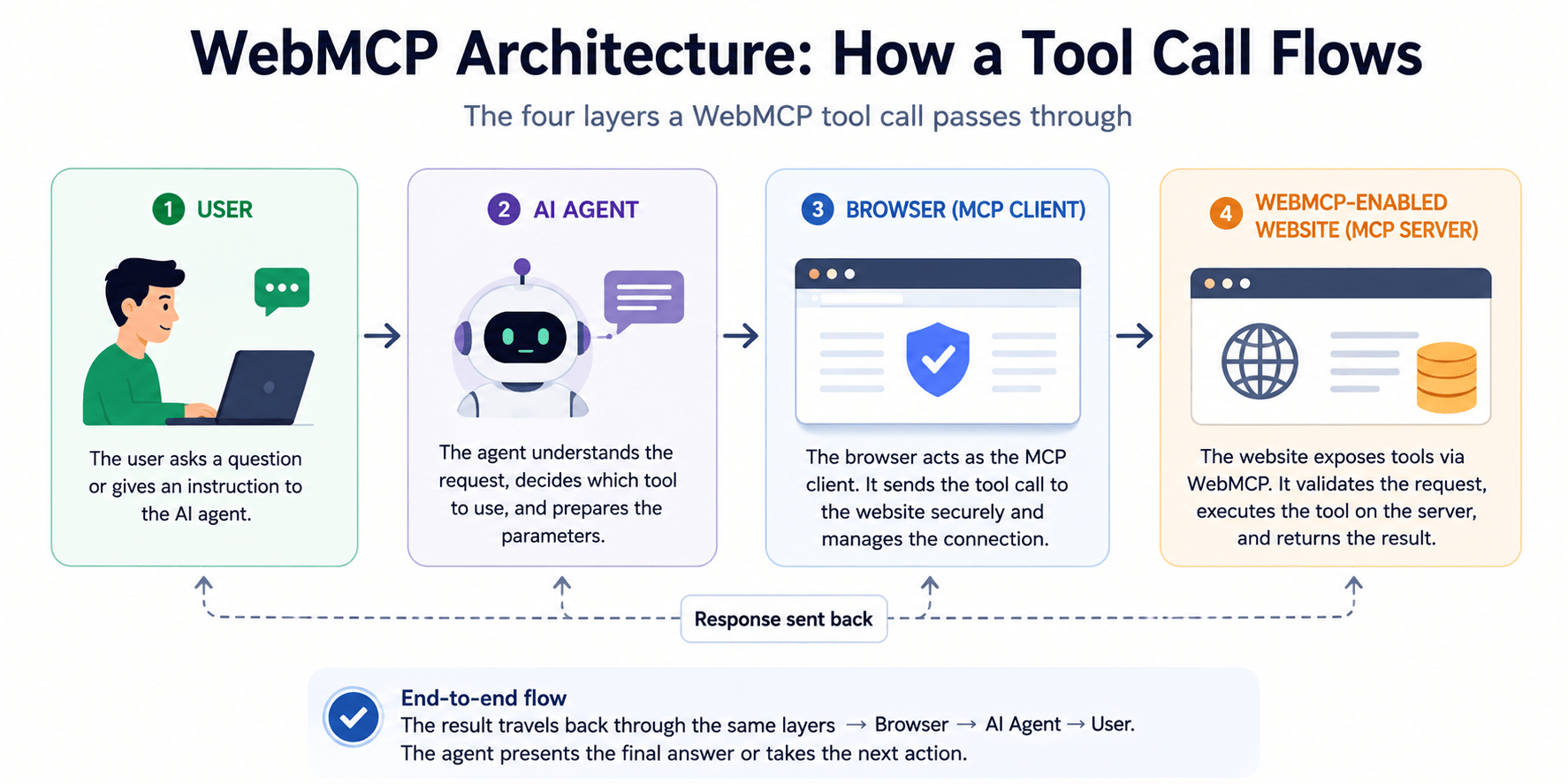
When an agent decides to use a tool, it sends parameters that match the schema. The page’s JavaScript executes exactly as it would if a human had clicked the equivalent button, and it returns structured data instead of a wall of HTML. Nothing routes through a separate backend unless the page’s own code already talks to one. The website’s server never sees “an AI agent called this,” it just sees the same API request or form submission it would normally get.
This is a meaningfully different architecture from a standard MCP deployment, where a company stands up a dedicated server that speaks JSON-RPC to remote clients. WebMCP skips that infrastructure entirely, at the cost of only working while the relevant tab is open.
WebMCP vs. Everything That Came Before It
A reasonable question: if agents can already use websites by reading the DOM or looking at screenshots, why do we need another standard? Here is how WebMCP compares to the existing approaches.
| Approach | How the agent understands the site | Reliability | Requires site changes? |
|---|---|---|---|
| DOM scraping / computer-use agents | Reads raw HTML or takes screenshots and guesses what elements do | Fragile — breaks when a layout changes | No |
| Traditional API integration | Developer hand-builds a custom integration per agent/platform | Reliable, but one-off and not reusable | Yes, per integration |
| Traditional MCP server | Separate backend server exposes tools over JSON-RPC | Reliable, but needs hosting, auth, and maintenance | Yes, new infrastructure |
| Structured data / schema.org markup | Reads metadata describing content, not actions | Good for describing content, not for performing actions | Yes, markup only |
| WebMCP | Page registers explicit tools with schemas the agent calls directly | Reliable for the actions a site chooses to expose | Yes, but no new backend needed |
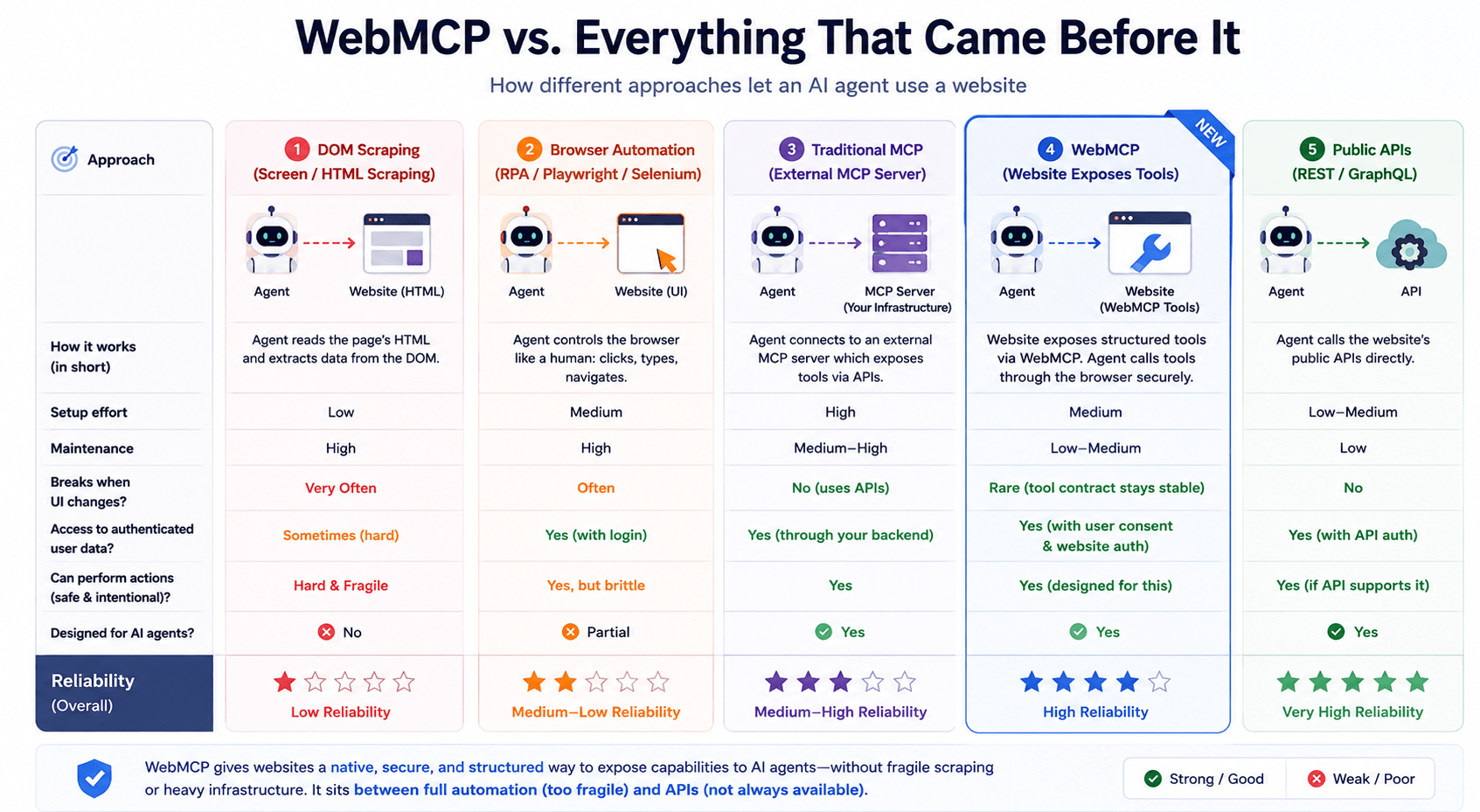
The honest way to frame this: DOM scraping and computer-use agents let an AI act on a website that was never designed for it, which is powerful but brittle. WebMCP does not replace APIs or traditional MCP servers it gives front-end teams a lighter-weight way to expose the actions a site already supports, using code that already runs in the browser.
The Real Benefits and Who They’re For
Every claimed benefit below is labeled by how solid the evidence is: demonstrated (shown working today), reasonable technical advantage (follows logically from the architecture), or future possibility (plausible, not yet proven at scale).
For users
- Fewer repetitive clicks when an agent completes a multi-step task through a defined tool instead of simulating each click reasonable technical advantage.
- More reliable outcomes than screenshot-based agents, since a structured tool call either succeeds or returns a clear error, instead of an agent misreading a button demonstrated in early implementations like clothing-store product filtering demos.
- Agents can surface features a person might not have noticed on their own, such as a hidden print-ordering option in a design tool demonstrated in the W3C’s own example scenarios, though only as illustrative demos, not large-scale production use.
For website owners
- Less dependence on fragile scraping, since a defined tool interface is more predictable than an agent guessing at page structure reasonable technical advantage.
- Control over exactly which actions are exposed to agents, rather than implicit access to everything a human could click demonstrated; this permissioning is core to the API’s design.
- Whether this translates into more traffic, conversions, or AI-search visibility is unproven future possibility, not demonstrated.
For developers
- A standardized way to expose actions instead of building a bespoke integration per AI platform reasonable technical advantage.
- Reuse of application logic that already exists in the front end, since a tool handler is often just a wrapper around a function the site already has demonstrated in current implementations.
- Less reliance on DOM-level browser automation for legitimate integrations reasonable technical advantage.
Is WebMCP Safe? Understanding the Security Risks
This is the section that gets skipped in most WebMCP explainers, and it should not be. Exposing structured tools to an autonomous agent is a genuine new attack surface, not just a convenience feature, and Chrome’s own security documentation says so directly.
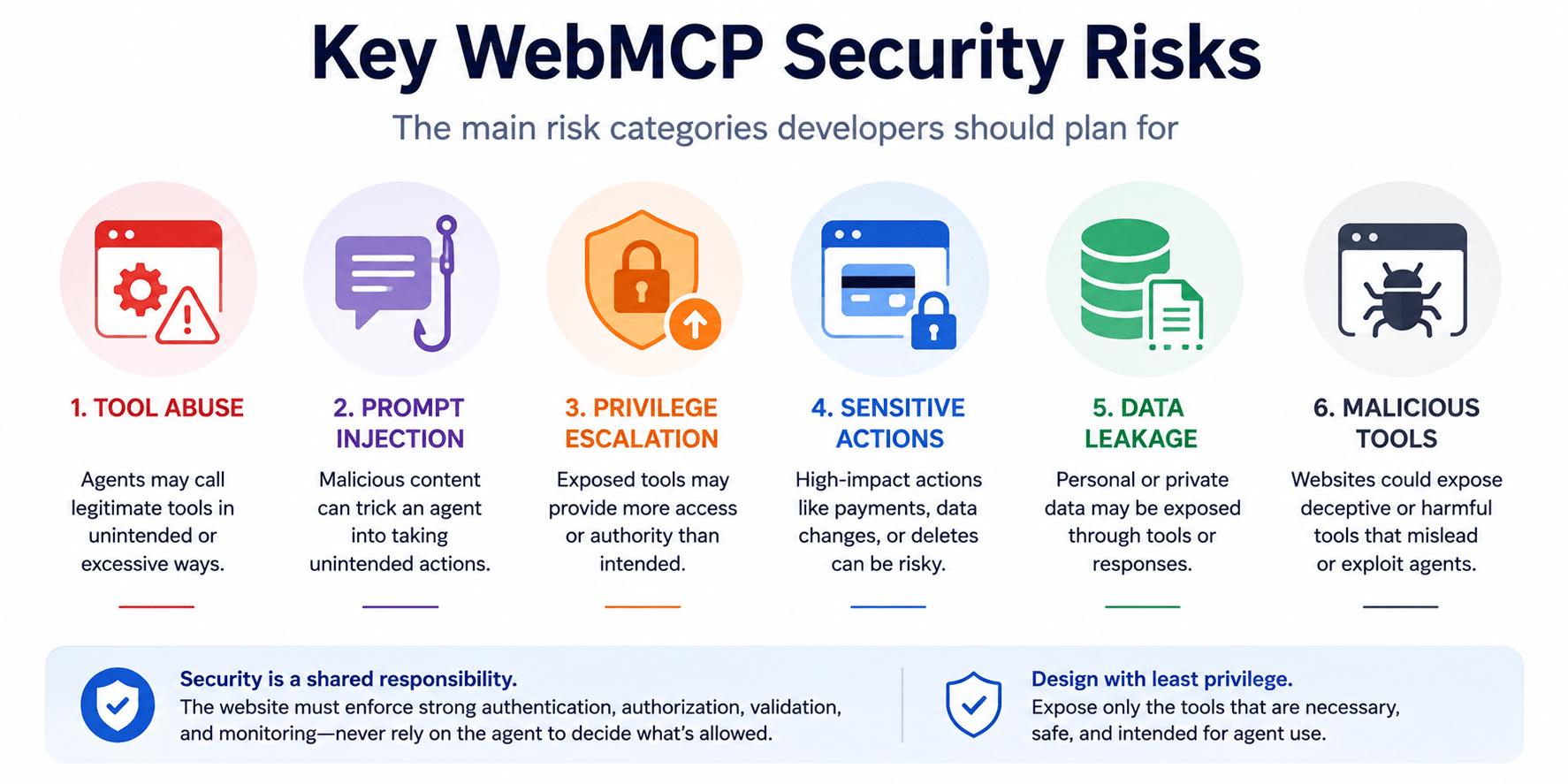
Tool abuse
A tool that is technically callable is not automatically safe to call. An agent malicious, compromised, or simply confused can invoke a legitimate tool in unintended ways: calling it far more often than a human would, chaining it into a destructive sequence, or triggering a financial or account-changing action the user never asked for. Chrome’s guidance recommends marking read-only tools with a readOnlyHint, so both the agent and anyone reviewing its behavior can tell which tools are safe to call freely.
Prompt injection through WebMCP tools
This is the single biggest documented risk. Because a language model processes instructions and data as one continuous stream of text, it cannot always tell the difference between “the user’s actual goal” and “text on a webpage pretending to be an instruction.” Chrome’s own agent security documentation treats all WebMCP tool output as untrusted by default, and recommends base64-encoding it specifically so an agent’s underlying model doesn’t accidentally execute instructions hidden inside it.
Also Read: Rogue AI Agents: The Hidden Risks of Autonomous AI
There are two distinct attack paths here, and they are worth separating clearly:
- Malicious manifests – a website writes a tool’s name, description, or parameters to contain hidden instructions aimed at the agent itself, not the user.
- Contaminated outputs a legitimate, trustworthy site returns a tool result that includes attacker-controlled content, such as a user comment or review, which itself contains an injected instruction.
It is important to be precise about blame here: prompt injection is not a flaw WebMCP invented. It is a known, unsolved weakness of how language models process text, and it exists for any agent reading any web content, WebMCP or not. What WebMCP changes is that it gives that existing weakness a clean, structured delivery channel, since a tool description or tool response is exactly the kind of text a model is primed to trust.
Privilege escalation
A tool being technically available to call does not mean it should be available to an autonomous agent by default. If a page exposes a tool that inherits the user’s full session say, changing account settings or issuing a refund an agent that misunderstands a request, or that is manipulated by injected instructions, could perform that action with the same authority a logged-in human has. The fix is not something WebMCP grants automatically: authentication, authorization, and permission scoping still have to be designed deliberately, tool by tool.
Sensitive actions
Payments, password changes, deletions, message sending, and administrative actions all deserve a higher bar than a simple tool call. Chrome’s guidance and general agent-security practice both point toward the same mitigations: explicit user confirmation before the action executes, stronger authorization checks, rate limits, and audit logging. None of these protections are automatic just because a tool exists a developer has to build them in, the same way they would for any sensitive server-side action.
Also Read: OpenAI Dots Explained: How They Work + 5 Best Uses
Data leakage
Tool descriptions and schemas can unintentionally reveal a site’s internal architecture or business logic simply by describing what a tool does. Separately, if an agent has multiple tabs open, a poorly scoped tool could carry authenticated data across origins in ways the site never anticipated a risk the spec admits is not yet fully defined. Some of this is inherent to any browser-agent setup; the schema-description leakage specifically is new to WebMCP.
Malicious websites and malicious tools
Nothing stops a bad-faith website from publishing a tool with a deceptive name designed to trick an agent, and by extension the user, into an unwanted action a “checkAvailability” tool that quietly also submits an order, for example. Chrome’s guidance is explicit that agents should only trust tools from origins they have reason to trust, not treat every WebMCP-enabled site as equally safe.
Server-side security still applies
WebMCP does not replace conventional web application security, and no part of the specification claims to. Authentication, authorization, CSRF protection, XSS prevention, input validation, and rate limiting all still have to be implemented correctly on the server. A tool call is, underneath, still an HTTP request or a JavaScript function call every normal way that request can be abused still applies.
The WebMCP Security Model in Simple Terms
The clearest way to think about trust in a WebMCP interaction:
- The user is who the whole system is supposed to serve, and is the only party who should approve genuinely sensitive actions.
- The browser mediates every tool call and enforces which origins can talk to which tools, but it does not judge whether an action is a good idea.
- The AI agent decides which tool to call and with what parameters, but it should never be the sole authority deciding whether an action is permitted its judgment can be manipulated by injected instructions.
- The website and its backend are responsible for enforcing authorization on every single tool call, exactly as they would for a normal logged-in request.
The core principle, consistent with standard application-security guidance and not something unique to WebMCP’s specification: never let the AI model be the thing that decides whether an action is allowed. Authorization has to be enforced server-side, the same way it always has been. WebMCP changes how a request arrives; it does not change who is responsible for deciding if that request should succeed.
Real-World Use Cases (Hypothetical Unless Noted)
These scenarios are illustrative examples of what WebMCP-style tool exposure could look like, based on the kinds of demos published by the W3C group and early implementers not confirmed production deployments unless stated otherwise.
| Scenario | Traditional workflow | WebMCP-style workflow | Benefit | Security concern |
|---|---|---|---|---|
| E-commerce product search | User manually filters and scrolls a catalog | Agent calls a getProducts(filters) tool and receives structured results |
Faster, less scrolling | Tool could leak inventory/pricing logic through its schema |
| Food ordering | User taps through menu screens to reorder | Agent calls a reorderLast() tool |
One-step repeat orders | Needs confirmation before payment fires |
| Customer support | User searches a help center manually | Agent calls a searchTickets(query) tool tied to the user’s account |
Faster resolution | Must not expose other users’ ticket data |
| Developer code review platforms | Reviewer manually reads test failure logs | Agent calls a tool to fetch failing tests and propose a fix | Faster review cycles | Fix-application tools need human approval, not silent commits |
What WebMCP Does Not Do
It is worth being blunt about the limits, because a lot of hype online overstates them:
- WebMCP does not make a website rank higher in Google Search.
- It does not guarantee inclusion in AI-generated answers or visibility to AI search crawlers that is a separate discovery problem WebMCP does not solve.
- It does not make a website secure on its own; it adds a new interface that still needs the same server-side protections every website already needs.
- It does not make an AI agent trustworthy the agent’s behavior depends on its own model and guardrails, not on WebMCP.
- It does not eliminate the need for APIs, authentication, or, realistically, web scraping plenty of agents will keep reading pages the old way for years, especially outside Chrome.
- It does not give AI agents unrestricted access to a website; it only exposes exactly the tools a developer chooses to register.
- Turning it on does not automatically make “every page” on a site AI-ready tools have to be built deliberately, page by page.
The Cloudflare Connection, Explained Accurately
Cloudflare launched a developer preview that lets any site on its network turn WebMCP on from the dashboard, without writing code or changing anything at the origin server. In practice, Cloudflare injects a small bridge script into the site’s HTML at the edge, and that script exposes “tool packs” the initial preview ships two packs, including a basic site-search style tool that a visiting agent can discover and call. Site owners can point Cloudflare’s own remote-browser product at their URL to confirm the tools are live and being called correctly.
It is worth being precise about what this does and does not mean. It gives a site a working WebMCP bridge without custom development, which is genuinely useful for smaller teams that don’t want to hand-build the JavaScript. It does not mean the site is guaranteed better visibility in AI search results, and it does not replace the need to think through which actions are safe to expose the developer preview ships with a limited, curated set of tool packs precisely because arbitrary, unreviewed tool exposure is a security decision, not a one-click convenience.
Also Read:How to Buy Your First Crypto Coin – Step-by-Step Guide for Absolute Beginners in 2026
Where the “Bots Passed Humans” Statistic Actually Comes From
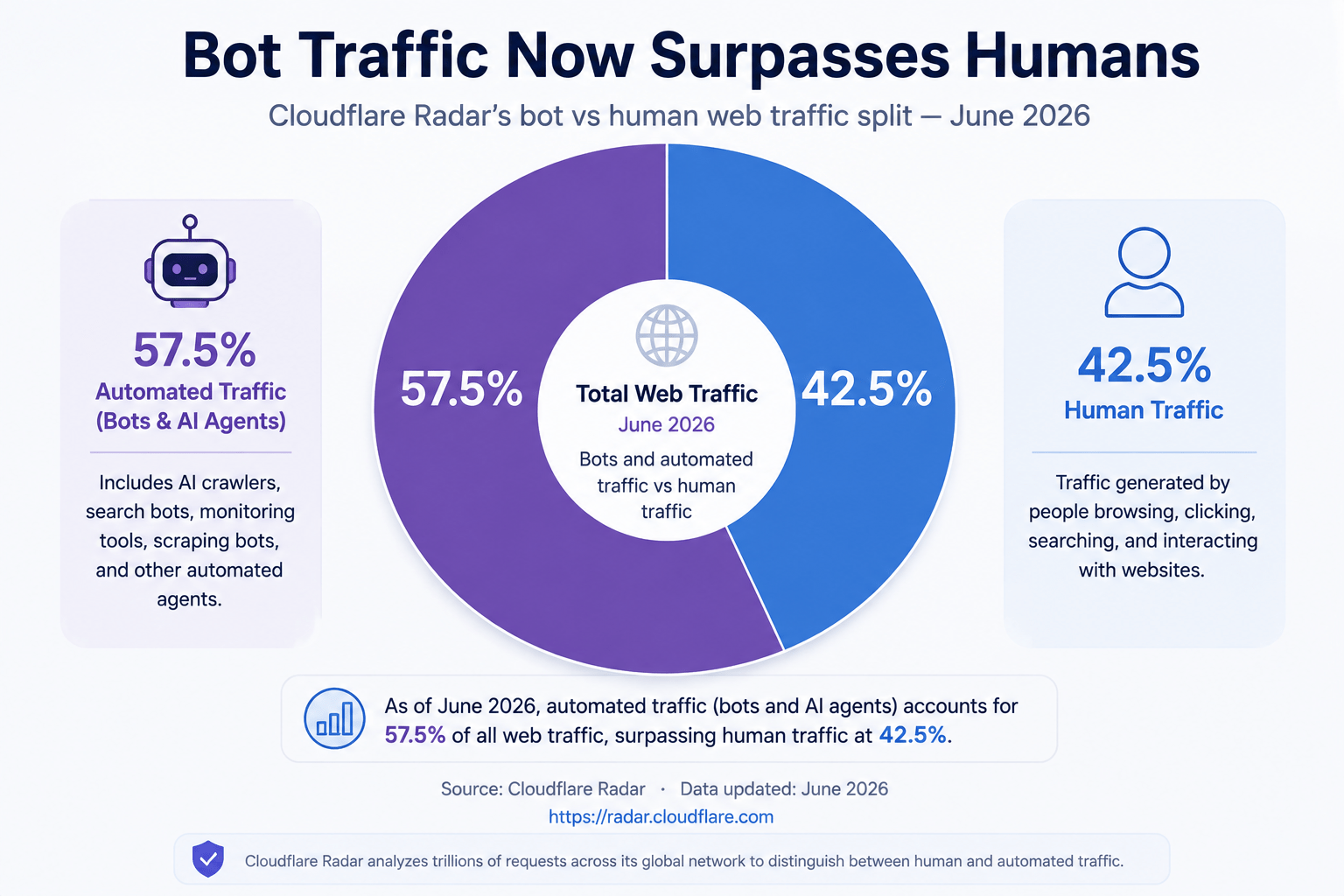
You may have seen the claim that AI agents now generate more web traffic than humans do. The real number, reported from Cloudflare Radar in June 2026, is that automated requests reached roughly 57.5% of HTTP requests to HTML content across sites on Cloudflare’s network, versus about 42.5% from humans.
A few important corrections to how this stat usually gets repeated:
- It measures all bot traffic, not just AI agents specifically. It includes traditional crawlers, scrapers, and indexers alongside the newer category of AI agents browsing on a person’s behalf.
- It only covers traffic Cloudflare’s network can see and classify by Cloudflare’s own account, roughly a fifth of websites not the entire internet, and it excludes video streaming, email, and gaming traffic.
- Cloudflare’s CEO announced the figure on social media as a milestone the company had predicted would arrive by late 2027; it arrived roughly 18 months earlier than expected, which is itself worth noting as a trend even if the exact percentage shifts month to month.
- Some analysts have pointed out that Cloudflare’s own visibility is limited, meaning the real proportion of automated traffic across the wider web could be different in either direction from what one company’s network shows.
None of this means the underlying trend is fake automated and agentic traffic is genuinely growing fast. It means the specific 57/43 number should be cited as “bot vs. human requests on Cloudflare’s network, per Cloudflare Radar,” not as “57% of the internet is now AI agents,” which overstates what was actually measured.
Should You Adopt WebMCP in 2026?
Consider adopting early if:
- Your site already has clear, well-defined user workflows that make sense as agent-callable actions (search, filter, reorder).
- Your team can experiment on a staging environment or origin trial without exposing production data.
- The actions you’d expose can be cleanly permissioned and are safe if called far more often than a human would call them.
- You have an actual agent use case in mind, not just a general sense that “AI-ready” sounds good.
Consider waiting if:
- Your site handles highly sensitive operations banking, health data, account recovery where the cost of a mistake is high and the security guidance is still evolving.
- Your team does not yet have a plan for server-side authorization on every tool call.
- Your primary audience isn’t on Chrome, since browser support outside Chrome is still experimental or nonexistent.
- You would be implementing it purely because it’s trending, without a concrete workflow it improves.
Practical Developer Checklist
Before exposing any WebMCP tool, work through this list:
| Question | Why it matters |
|---|---|
| What exact action does this tool perform? | Vague tools are harder to reason about and easier to misuse |
| Does it mutate data? | Mutating tools need stricter controls than read-only ones |
| Does it require authentication? | Unauthenticated tools should never touch account-specific data |
| What permissions does it inherit? | A tool should never have more authority than the workflow needs |
| Could an agent abuse it by calling it repeatedly? | Set rate limits for anything that isn’t purely read-only |
| Does it expose sensitive information in its schema or output? | Descriptions can leak business logic even without a data breach |
| Does it need explicit user confirmation before it runs? | Payments, deletions, and messages generally should |
| Is input validated server-side? | Client-side trust is not real trust |
| Are calls logged for auditing? | You need a record if something goes wrong |
| Can the action be reversed? | Irreversible actions need the highest bar for confirmation |
Frequently Asked Questions
Is WebMCP the same as Anthropic’s Model Context Protocol? No. WebMCP borrows the idea of describing tools with a name, description, and schema, but it runs entirely in the browser and does not use MCP’s JSON-RPC wire protocol or require a separate server.
Which browsers support WebMCP right now? Chrome is the only browser with a working implementation, currently in a public origin trial. Edge has experimental support behind a flag. Firefox and Safari are participating in spec discussions but have not committed to shipping it.
Does turning on WebMCP make my site more secure? No it adds a new interface for agents, but every normal web security practice (authentication, input validation, rate limiting) still has to be implemented separately.
Will WebMCP help my site rank better in AI search results? There’s no confirmed connection between exposing WebMCP tools and better visibility in AI-generated search answers. Those are separate systems solving separate problems.
Is Cloudflare’s WebMCP feature the same as implementing WebMCP myself? It achieves a similar outcome a site becomes callable by agents but Cloudflare’s preview injects a bridge script at the edge with a curated set of tool packs, rather than you writing custom navigator.modelContext code yourself.
Conclusion
WebMCP is a real, actively developed browser standard, not vaporware, but it is also not yet a finished, secure, or widely supported one. The technical idea is sound: giving agents structured tools to call is more reliable than making them guess at a page’s layout. The part that deserves equal attention is that every tool a site exposes is also a new boundary someone has to defend, and right now that responsibility sits squarely with the developer, not with the browser or the model. If you’re experimenting with WebMCP this year, treat it the way you would any new API surface touching real user data permission it deliberately, log it, and confirm anything sensitive before it fires.



