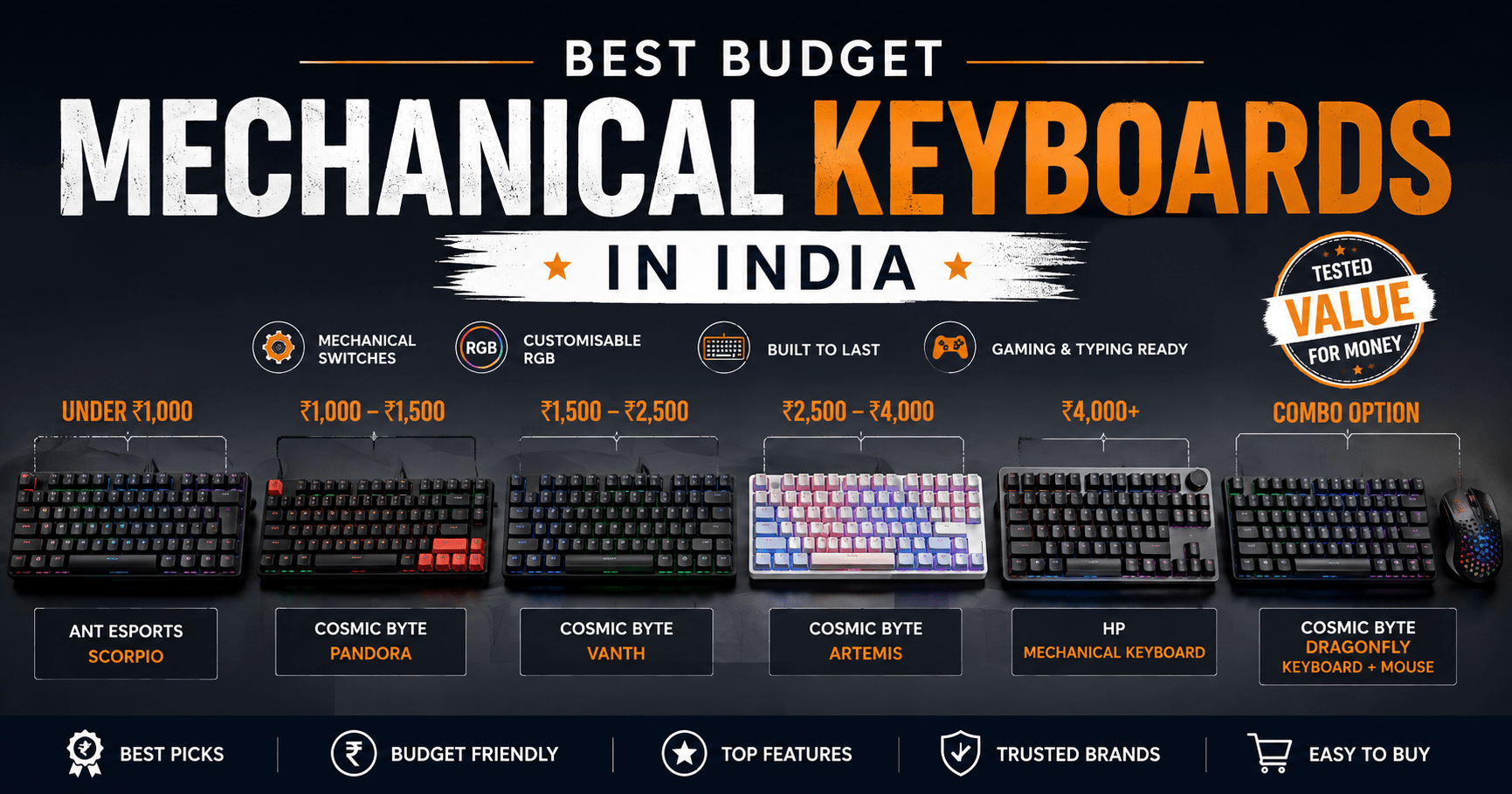

Best budget mechanical keyboards in India span a much wider range than most roundups admit from sub-₹1,000 gaming boards to ₹2,600 tri-mode wireless options, and picking wrong usually means one of two regrets. Either you paid extra for RGB modes you’ll turn off in a week, or you saved ₹300 and ended up with mushy switches that make typing feel worse than your old membrane board.
That gap between marketing copy and real typing feel is exactly where this guide tries to be useful. We looked at what’s actually available right now on Amazon India, Flipkart, and direct brand stores, cross-checked specs against manufacturer pages, and left out anything we couldn’t confirm. No filler picks, no keyboards chosen just because they showed up in someone else’s list.
Also Read: Best WFH Tools That Make Working From Home More Productive (India 2026 Guide)
What to Check Before You Buy a Mechanical Keyboard
A few features decide whether a keyboard feels good in your hands, and most budget listings bury them under vague marketing lines. Here’s what actually matters.
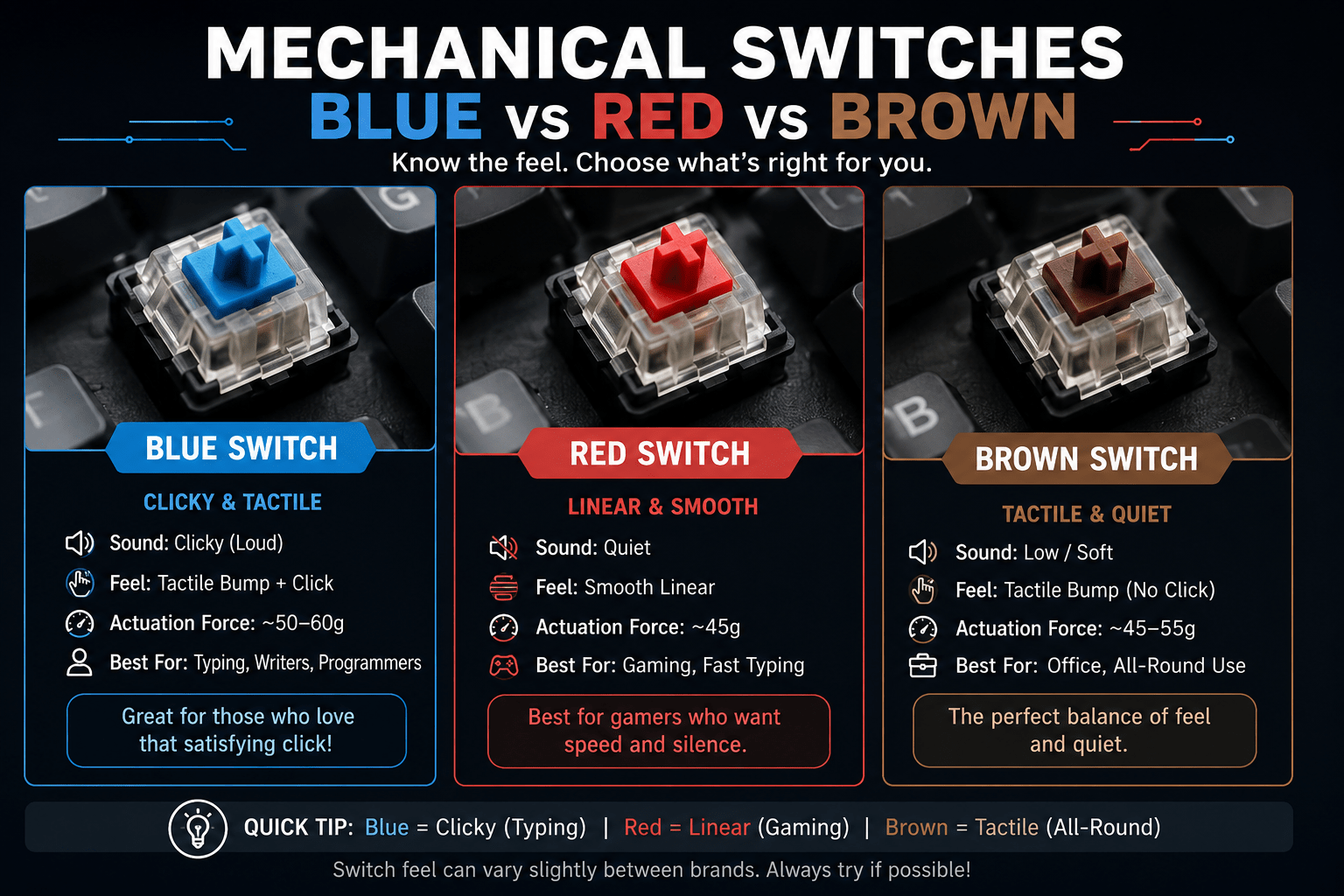
Mechanical vs membrane. Mechanical keyboards use individual physical switches under each key, so every keystroke feels the same whether you’re a light or heavy typist. Membrane keyboards use a rubber dome sheet, which feels mushier and wears unevenly over time. If a listing doesn’t name a switch type (Blue, Red, Brown, or similar), it’s probably membrane dressed up as “gaming.”
Switch type. Blue switches click and feel tactile satisfying to type on, loud enough to annoy anyone sitting near you. Red switches are linear and quiet, which most gamers and fast typists prefer. Brown sits in between: a soft tactile bump without the click. At this price range in India, Outemu is the switch brand you’ll see most often, and it’s a reasonable, well-tested choice.
Layout: 60%, 65%, 75%, TKL, full-size. Full-size keyboards (104 keys) keep the number pad; TKL (87 keys) drops it for more desk space; 75% (also around 87 keys but tighter) keeps function keys in a compact footprint; 60% (61 keys) strips almost everything except letters and modifiers. If you do spreadsheet work or accounting, skip 60%. If you’re gaming and want more mouse room, a compact layout is worth the trade-off.
| Layout | Keys | Recommended Models | Ideal For | Avoid If |
|---|---|---|---|---|
| 60% | 61 | Ant Esports MK1200 Mini | Ultra-compact desks, travel, pure gaming | You need number pad or frequent function keys |
| 65% / 75% | 68–87 | Artemis (65%), Scorpion MK20 (75%) | Balanced desk space + most keys retained | Heavy number-entry work |
| TKL | 87 | Cosmic Byte Pandora | Programmers & gamers who want more mouse room | You use the numpad daily |
| Full-size | 104 | HP GK320, Cosmic Byte Vanth | Office work, accounting, spreadsheets | Very limited desk space |
Hot-swappable switches. This lets you physically pull out and replace switches without soldering useful if you want to try a different feel later, or if one switch fails. Most keyboards under ₹1,800 in India still don’t offer this; it starts becoming common closer to ₹2,000+.
Anti-ghosting and N-key rollover. Anti-ghosting means the keyboard registers multiple simultaneous key presses correctly instead of dropping some. Full N-key rollover (NKRO) is the strongest version of this and matters mainly for competitive gaming for typing and general work, basic anti-ghosting on the WASD/arrow cluster is enough.
Wired vs wireless. Wired keyboards are cheaper, have zero input lag, and never run out of battery. Wireless (2.4GHz or Bluetooth) adds convenience but costs more and needs occasional charging. In this price bracket, wired is still the more reliable default.
RGB. It looks good on camera and does nothing for typing performance. Don’t let RGB alone justify a price jump check the switches and build quality first.
Best Budget Mechanical Keyboards in India by Price
| Price Bracket | Recommended Model | Why It Wins | Main Trade-off |
|---|---|---|---|
| Under ₹1,200 | ANT Esports Scorpion MK20 | Real linear Red switches + 75% layout at the lowest price | ABS keycaps, no hot-swap |
| ₹1,200 – ₹1,600 | HP GK320 or Ant Esports MK1200 Mini | HP offers 3-year warranty; Mini offers true 60% portability | HP is clicky only; Mini lacks number row |
| ₹1,600 – ₹2,000 | Cosmic Byte Pandora / Vanth | Genuine Outemu switches + solid build for the money | Still no hot-swap |
| ₹2,000 – ₹2,600 | Cosmic Byte Artemis (CB-GK-40) | Only hot-swappable + tri-mode wireless option in this list | Higher price, smaller 65% layout |
Under ₹1,200
ANT Esports Scorpion MK20 a 75% layout with 87 keys and linear Outemu-style Red switches, priced typically around ₹900–₹1,200 depending on ongoing sales (its listed MRP is much higher, so ignore that number and check the actual sale price). It has a detachable USB cable, full anti-ghosting, and 19 backlight modes. The trade-off: no hot-swap support, and the keycaps are standard ABS plastic, which will get shiny with heavy use over a year or two.
Best For: Budget gamers and students who want their first real mechanical keyboard without spending much.
₹1,200–₹1,600
Ant Esports MK1200 Mini a 60% board (61 keys) with linear Red switches, typically around ₹1,200–₹1,800. It’s genuinely compact, has a detachable Type-C cable, and 14 LED modes. If you don’t need a number pad or arrow-key cluster and want the smallest possible footprint, this is the one to check first. Skip it if you do spreadsheet-heavy work the missing number row means reaching for symbols through a function layer.
HP GK320 a full-size (104-key) board with clicky Blue switches, typically around ₹1,300–₹1,600. The standout here isn’t the switches, it’s the 3-year warranty from an established brand, which matters if you’ve had bad luck with smaller peripheral brands’ after-sales support. Several buyers specifically call out that HP honored replacement claims without hassle.
Best For: MK1200 Mini compact desks and light travel. HP GK320 buyers who value brand-backed warranty over features.
₹1,600–₹2,000
Cosmic Byte Pandora (CB-GK-25 Blue / CB-GK-26 Red) a TKL board (87 keys) with genuine Outemu Blue or Red switches, typically ₹1,400–₹1,900. It’s rated for 50 million keystrokes per switch, has RGB with 20 lighting effects, and a splash-resistant design. No hot-swap here either, but the price-to-feel ratio is one of the better ones we found in this range.
Cosmic Byte Vanth (CB-GK-27 Blue / CB-GK-28 Red) full-size (104 keys), same switch options, typically ₹1,500–₹1,900. Buyer reviews consistently mention it as good value for the switch quality you get, though a few note occasional key rattle on certain units worth a quick tactile check if you’re buying in person.
Best For: Pandora programmers who want desk space back without losing keys. Vanth office and typing-heavy work where you still want the number pad.
₹2,000–₹2,600
Cosmic Byte Artemis (CB-GK-40) this is the one genuinely different option in the list. It’s a 65%-style 68-key board with hot-swappable 3-pin Outemu Blue switches, per-key RGB, a 3,000mAh battery, and tri-mode connectivity: wired, 2.4GHz wireless, and Bluetooth. Typically ₹2,000–₹2,600. Software support lets you remap keys and save lighting profiles. If you want to eventually try different switches without buying a new board, this is the only keyboard here that lets you.
Best For: Buyers who want one keyboard to last through a switch upgrade later, or who need wireless flexibility between a laptop and desktop.
₹3,000+ (Premium / Hot-Swap Picks Kreo)
If ₹2,600 isn’t a hard ceiling, Kreo’s Hive and Swarm lines are worth the jump this is where hot-swap stops being a rare feature and becomes standard, and where you start getting genuinely better keycaps and sound-dampening foam instead of just more RGB modes.
Kreo Hive75 V2 a 75% layout with a 5-pin and 3-pin hot-swap PCB, KTT Red (linear) or Brown (tactile) switches, per-key RGB with 16 effects, and a CNC-machined metal volume knob, typically around ₹3,150. Double-shot ABS keycaps hold up better than the single-shot caps common on sub-₹2,000 boards. This is the clearest step up from the Cosmic Byte Artemis if you specifically want to experiment with different switches later.
Kreo Hive98 V2 -Kreo’s own “96%” framing: a full 98-key layout (numpad included) compressed into a footprint closer to a TKL board, typically ₹3,400–3,500. Same hot-swap PCB and per-key RGB as the Hive75 V2, just with the numpad kept. Buyer reviews are genuinely positive on typing feel and build for the price, with the main recurring complaint being keycap legends that blur slightly under RGB.
Kreo Swarm – the wireless option, with Bluetooth (up to 3 paired devices), 2.4GHz, and USB-C wired modes, a 5-pin hot-swap PCB, and 5 layers of internal sound-dampening, typically ₹4,300–₹5,500 depending on the switch and colorway. If you split time between a laptop and a desktop, or just want zero cables on your desk, this is the one to check.
Worth knowing before you buy: Kreo’s earliest Hive keyboards had scattered reports of switches failing during hot-swapping. The V2 boards and Swarm line appear to have addressed this recent reviews are largely positive but if hot-swapping matters to you, handle the switches gently on first swap regardless of brand.
Best For: Hive75 V2 buyers who want to try different switches without a full teardown. Hive98 V2 full-size typists who still want hot-swap. Swarm anyone who wants one keyboard across a laptop and desktop.
Comparison Table
Best Mechanical Keyboards Under ₹5,500 in India
Compare switches, layouts, connectivity and prices across the top budget mechanical keyboards for gaming, typing and travel.
| Keyboard | Approx. Price | Switch / Type | Layout | Connectivity | Key Feature | Best For |
|---|---|---|---|---|---|---|
| ANT Esports Scorpion MK20 | ₹900 – ₹1,200 | Outemu Red (linear) | 75% (87 keys) | Wired, detachable | Full anti-ghosting | Budget gaming |
| Ant Esports MK1200 Mini | ₹1,200 – ₹1,800 | Outemu Red (linear) | 60% (61 keys) | Wired, detachable Type-C | Ultra-compact | Small desks, travel |
| HP GK320 | ₹1,300 – ₹1,600 | Blue (clicky) | Full-size (104 keys) | Wired | 3-year warranty | Warranty-conscious buyers |
| Cosmic Byte Pandora | ₹1,400 – ₹1,900 | Outemu Blue / Red | TKL (87 keys) | Wired | Splash-resistant | Programmers |
| Cosmic Byte Vanth | ₹1,500 – ₹1,900 | Outemu Blue / Red | Full-size (104 keys) | Wired | Metal top plate | Office / typing |
| Cosmic Byte Artemis (CB-GK-40) | ₹2,000 – ₹2,600 | Outemu Blue, hot-swap | 65% (68 keys) | Wired / 2.4GHz / Bluetooth | Tri-mode, software | Flexibility + longevity |
| Kreo Hive75 V2 | ₹3,100 – ₹3,200 | KTT Red / Brown, hot-swap | 75% (87 keys) | Wired, USB-C | Metal volume knob, sound foam | Switch tinkerers |
| Kreo Hive98 V2 | ₹3,400 – ₹3,500 | Red / Brown, hot-swap | 96% full-size (98 keys) | Wired, USB-C | Numpad kept, compact footprint | Full-size typists |
| Kreo Swarm | ₹4,300 – ₹5,500 | Pre-lubed, hot-swap | 75% (87 keys) | Bluetooth / 2.4GHz / Wired | 5-layer sound dampening, multi-device | Laptop + desktop users |
Also Read: GitHub Copilot vs Cursor vs Codeium: Which AI Coding Assistant Is Worth It
Which Keyboard Should You Buy?
- Best under ₹1,200: ANT Esports Scorpion MK20
- Best under ₹1,600: HP GK320 (if warranty matters more than features) or Ant Esports MK1200 Mini (if desk space matters more)
- Best under ₹2,000: Cosmic Byte Vanth for full-size typing, Cosmic Byte Pandora if you want the number pad gone
- Best for gaming: ANT Esports Scorpion MK20 or MK1200 Mini both use linear Red switches
- Best for programming/typing: Cosmic Byte Vanth or HP GK320 full-size layouts, no missing keys
- Best premium/most future-proof: Cosmic Byte Artemis (CB-GK-40) the only hot-swap, wireless-capable option here
Why spend ₹2,000+ instead of ₹1,200? Mainly for hot-swap support and wireless flexibility the actual typing feel difference between a ₹1,200 and ₹2,000 Outemu-switch board is smaller than the price gap suggests. Spend more only if you specifically want those two features.
Price Disclaimer: Mechanical keyboard prices in India shift often with seller stock and platform sales. Every price above is a typical range observed across Amazon India, Flipkart, and brand stores at the time of writing confirm the current price before buying, since a listed MRP is rarely what you’ll actually pay.
FAQ
Are budget mechanical keyboards in India actually mechanical, or just marketed that way?
Not always. Several “gaming keyboard” combo listings under ₹1,500 use membrane switches despite the branding always check that the listing names an actual switch type (Blue, Red, Brown) before buying.
Do I need hot-swappable switches for a first mechanical keyboard?
No. Hot-swap is a nice-to-have if you think you’ll want to experiment with switch feel later. For a first mechanical keyboard, focus on layout and switch type first.
Is Outemu a good switch brand, or should I hold out for Cherry MX?
Outemu is a reasonable, widely-used switch brand at this price point and performs close enough to Cherry MX for most people. Cherry MX keyboards in India usually start well above ₹3,000, so Outemu is the practical choice in the budget segment.
Wired or wireless for a budget mechanical keyboard?
Wired, unless you specifically need to switch between devices. Wireless mechanical keyboards under ₹2,600 in India are rare the Cosmic Byte Artemis here is one of the few genuine options and wired removes any input-lag or battery concerns entirely.
Will a 60% or 75% keyboard slow me down if I’m used to a full-size layout?
There’s a short adjustment period, usually a few days, mainly around reaching function-layer symbols. If your work involves heavy number entry, stick with a full-size or TKL layout instead.
Is it worth spending over ₹3,000 on a mechanical keyboard in India, or does it stop mattering after ₹2,000?
It still matters, mainly in switch feel and keycap durability rather than any single headline feature. Kreo’s ₹3,000+ boards use better pre-lubed or KTT switches and double-shot keycaps that resist shine longer than the Outemu switches common at ₹1,500–2,000. If you type or game for hours daily, that difference compounds; if it’s occasional use, the ₹1,500–2,000 tier is still a reasonable stopping point.