
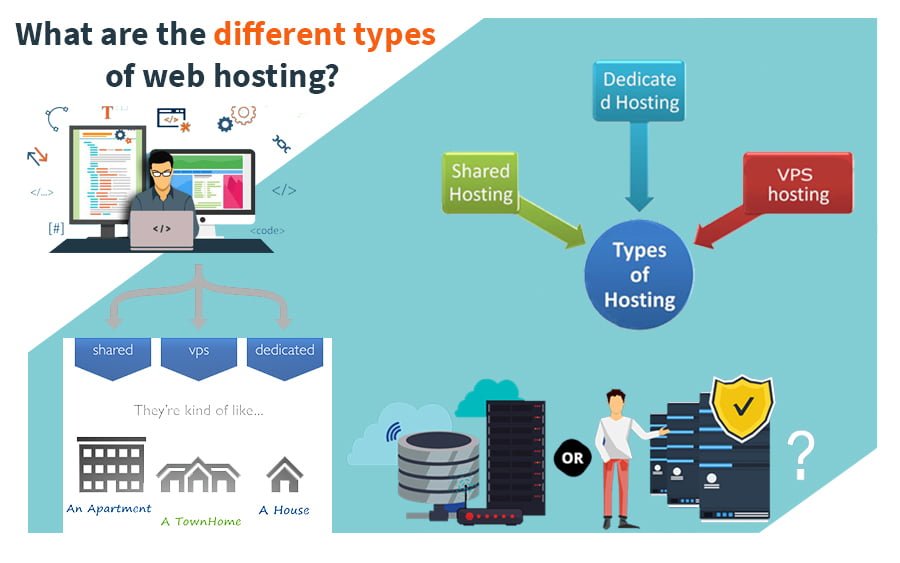

Hi everyone, if you looking to create a new website or just a blog. You might be looking for Web hosting and getting confused about which Web Hosting to go with. Read this article more to know about types of Web Hosting, probably for your next site. I will be sharing this in the series, so it is the first one you gonna read.
Before starting let us discuss what is Web Hosting and why we need the same.
What is a Hosting or Web Hosting
So simply saying Hosting or Web hosting or say a web hosting server, all refer to the same thing as hosting.
So, Hosting is like a personal computer but someone else’s. Let’s take an example, we have a personal home computer or office computer where we install some apps like MS Office or a game, which we can use locally, but no one from far away can use. In so same way hosting is a service where someone provides his computer and connected resources for our use from far away, by the connected network.
So collecting all this together, Hosting is a computer with resources like OS, a hard drive connected over a network, available for use by someone over the internet.
We require hosting to install our web app and make it available to people all around the world for use. So now moving to types of Hosting.
Types of Web Hosting Services
We have two types of Web Hosting.
1. Shared Web Hosting
2. Dedicated Web Hosting
Shared Web Hosting
It is a big hosting where some resources are common and available for use by multiple users. Let’s say we have a machine with 100 CPUs, 10 TB hard disk, and 1024 GB RAM. So In this case there can be more than 100 users using this system, without interacting with any other user. As the resources are shared anyone can use the same resource as and when required.
The benefit of this is if one user has some free resources and another needs to do something he will use the resource as another person does not use it. After his use, the resources may be free again and can be used by another user on. This way the hardware cost is reduced, as the resources are not dedicated to anyone and can be shared when there is a requirement.
Most of the hosting companies provide this hosting as the cheaper plans for small websites like GoDaddy, hostinger, etc. This one is best for small sites with less traffic and less load.
Dedicated Web Hosting
This type of hosting as by name shows has the same resources as the shared one, but they are dedicated to a specific user and not shared. So let’s say a user wants a system of 2 CPUs, and 8 GB ram. He will be provided with the same hosting and only he will use it, no one else. This one is costlier than shared hosting, as resources are dedicated and will not be shared, even if they stay free anytime.
Hosting like VPS hosting, and cloud hosting are some examples provided by companies like GoDaddy and Digital Ocean. These hostings are best if you want more heavy sites with large traffic. Another reason is to get full control over your hosting, whatever specific you may want.
Difference between Both Web Hostings
| Shared Hosting | Dedicated Hosting |
| 1. Shared Resources | 1. Dedicated Resources |
| 2. Cheap than Dedicated | 2. Costlier than Dedicated |
| 3. Mostly no root access | 3. Root access available |
| 4. Less control over resources and software | 4. More control over resources and software |
| 5. No custom software as they are shared by everyone | 5. We can have custom software as there is no sharing |
| 6. Good for small projects/testing sites and web apps | 6. Good for large-scale and enterprise web apps and sites |
| 7. Most storage is Hard Disk Drives | 7. Storage is mostly SSD |
| 8. No Customizable environment | 8. Customizable environment |
| 9. Mostly hosts only PHP applications | 9. Can host PHP along with other applications |
| 10. Apache Server and MySql DB | 10. Choice of server like Nginx and DB PostgreSQL |
| 11. Cpanel Managed by Hosting | 11. Cpanel is not available by default, but can be installed |
[su_note note_color=”#f5f5d4″ radius=”6″]| Also Read | IP Address Says About You [/su_note]
Other Types of Hosting Classification
Based on OS
- Linux Based – like CentOs, Ubuntu
2. Windows Based – Windows 10, Windows Server
1. Linux Based
- Secure Os
- Efficient workload
- Support most of the deployments
- Cheaper than Windows Hosting
- Open Source software available
2. Windows Based
- Less Secure than Linux
- For Applications that require Windows only like ASP.net applications
- Less efficient than Linux
- Costlier than Linux Hosting
- Freemium and premium software
Based on Service Type and Usage

1. Shared Hosting
This is the most affordable option, where your website is hosted on the same server as many other websites. This means you’ll have limited resources available to you, but it’s a good option for small or personal websites.
2. VPS (Virtual Private Server) hosting
This is a step up from shared hosting, where you have your own virtual server with dedicated resources. This is a good option for websites that receive a lot of traffic and need more resources than a shared hosting plan can provide.
3. Dedicated hosting
This is the most expensive option, where you have your own physical server and are responsible for maintaining it. This is a good option for very large websites that receive a lot of traffic and need the resources of an entire server to themselves.
4. Cloud hosting
This type of hosting uses a network of servers to host websites, allowing for more flexibility and scalability. It’s a good option for websites that experience sudden spikes in traffic.
5. Managed hosting
This is a type of hosting where the hosting company handles the maintenance and management of the server for you. It’s a good option for those who don’t want to deal with the technical aspects of server management.
Web Hosting Service based on Software support or different factor

There are a few other types of web hosting services that you may come across:
Colocation hosting
This is where you provide your own server hardware, but the hosting company provides the infrastructure (such as the data centre, power, and cooling systems) to house it.
WordPress hosting
This is a type of hosting that is optimized for WordPress, a popular content management system (CMS).
E-commerce hosting
This is a type of hosting that is specifically designed for online stores and includes features such as secure checkout and payment processing.
Green hosting
This is a type of hosting that is environmentally friendly, using renewable energy sources to power the servers.
Free hosting
Some hosting companies offer free hosting, usually with the caveat that they will display advertisements on your website. This is generally not recommended, as the advertisements can be intrusive and the hosting is usually very basic.
Real-World Use Cases: Which Hosting Type Is Right for You?
Understanding the types of hosting is one thing — knowing which one fits your actual situation is another. Here’s a quick reference showing who typically uses each type and why, based on real-world patterns.
| Hosting Type | Best For | Typical User | Why It Fits |
|---|---|---|---|
| Shared Hosting | Small sites, first websites | Bloggers, students, hobby projects | Low cost, no technical knowledge needed, enough for under 10k monthly visitors |
| VPS Hosting | Growing sites needing more control | Developers, SaaS startups, agencies | Dedicated resources, root access, scalable without full server cost |
| Dedicated Hosting | High-traffic or compliance-heavy sites | E-commerce platforms, fintech, gaming servers | Full server resources, maximum security, no resource competition |
| Cloud Hosting | Sites with unpredictable traffic | Online stores, news sites, product launches | Auto-scales on demand — you only pay for what you use |
| Managed Hosting | Non-technical site owners | Small business owners, bloggers on WordPress | Provider handles updates, security, and backups — you focus on content |
| WordPress Hosting | WordPress-specific sites | Content creators, magazine-style blogs | Optimised server stack, one-click installs, WP-specific caching |
| E-commerce Hosting | Online stores | Retail businesses, Shopify/WooCommerce users | Built-in SSL, payment gateway support, performance tuned for product pages |
| Colocation Hosting | Companies with own hardware | Mid-size companies, enterprises | Use your own servers in a professional data centre — best of both worlds |
| Green Hosting | Eco-conscious site owners | NGOs, sustainable brands | Powered by renewable energy — growing importance for brand reputation |
| Free Hosting | Experimenting or learning | Students, developers testing ideas | Zero cost, but expect ads, limited bandwidth, and no custom domain |
Keep in mind that your needs will evolve. Most sites start on shared hosting and move to VPS or cloud as traffic grows. The section below covers those decision points in detail.
How Much Does Web Hosting Cost? A Realistic Pricing Guide
Pricing is one of the most confusing parts of choosing a host — mostly because providers advertise introductory rates that jump significantly at renewal. Here’s an honest breakdown of what each hosting type actually costs, so you can budget properly from the start.
Hosting Cost by Type
The table below shows realistic price ranges across hosting types. Note that the lower end usually reflects introductory or promotional rates on long-term plans, while the upper end reflects renewal pricing or higher-tier plans.
| Hosting Type | Entry Price ($/mo) | Typical Range ($/mo) | INR Equivalent (approx.) | Best Budget Entry Point |
|---|---|---|---|---|
| Shared Hosting | $2–3 | $3–10 | ₹170–₹850 | Hostinger, Namecheap |
| WordPress Hosting | $3–4 | $4–25 | ₹340–₹2,100 | Bluehost, SiteGround |
| VPS Hosting | $4–10 | $10–100 | ₹850–₹8,400 | DigitalOcean, InterServer |
| Cloud Hosting | $8–10 | $10–200 | ₹850–₹16,800 | Cloudways, Hostinger Cloud |
| Managed Hosting | $30–35 | $35–300 | ₹2,900–₹25,000 | Cloudways, Kinsta |
| Dedicated Hosting | $80–100 | $100–500 | ₹8,400–₹42,000 | InMotion, Liquid Web |
| Free Hosting | $0 | $0 | ₹0 | InfinityFree, 000webhost |
What the Price Actually Includes
The monthly fee is rarely the whole picture. Most hosting plans advertise a base price that doesn’t include everything you’ll actually need. Here’s what to check before committing to any plan:
Domain name — Often free for the first year, then ₹800–₹1,500/year on renewal. Some hosts charge from the start.
SSL certificate — Free with most reputable hosts via Let’s Encrypt, but verify before signing up. A paid SSL can cost $50–200/year.
Email hosting — Not always included. Dedicated email (like Google Workspace) costs around $6–$8/user/month separately.
Backups — Daily automated backups are included with some providers, chargeable extras with others. Worth checking.
Renewal pricing — Most website hosting providers increase prices after the initial term. A plan advertised at $2.99/month may renew at $8–12/month. Always calculate the total cost over 2–3 years before choosing.
Managed vs Unmanaged: The Hidden Cost of Time
One distinction that doesn’t always show up in pricing comparisons is managed vs unmanaged hosting. Managed hosting typically costs 2–3x more than unmanaged — but it includes server management, automatic updates, security monitoring, and technical support. If you’re not technical, the time saved managing a server yourself often makes managed hosting the better value, even at higher price points. A developer comfortable on the command line might prefer a $6/month DigitalOcean Droplet. A business owner who just needs their site to work without thinking about it is better served by a managed option at $30–40/month.
When to Upgrade Your Plan
Starting cheap and upgrading later is a perfectly valid strategy — most hosts make it easy to move up without downtime. Here are the signs it’s time to move to the next tier:
- Your site regularly hits memory or CPU limits and pages slow down under load
- You’re getting more than 20,000–30,000 monthly visitors on a shared plan
- You need to install custom software or run background processes — shared hosting won’t allow this Your site handles payments, user data, or sensitive information — VPS or dedicated gives you better security control
- You’ve expanded content and features significantly, or your eCommerce store is scaling with more transactions and inventory
There’s no single “right” budget for hosting. A personal blog can run perfectly well on a $3/month shared plan. A fast-growing e-commerce store might need $50–100/month on managed cloud hosting. The key is matching the plan to where your site is now — with room to grow without paying for resources you don’t yet need.
What types of web hosting to choose or recommend
The type of web hosting that is best for you will depend on your specific needs. Here are a few things to consider when choosing a web hosting service:
The size and complexity of your website
If you have a small, static website, you may be able to get by with shared hosting. If you have a larger, more complex website, you may need a more powerful option like VPS or dedicated hosting.
The amount of traffic your website receives
If you expect a lot of traffic to your website, you’ll need a hosting plan with more resources to handle the increased load.
Your budget
Web hosting can range in price from a few dollars per month to hundreds of dollars per month, depending on the type of hosting and the resources you need.
The level of control you need
If you have the technical skills and want more control over your server, a VPS or dedicated hosting plan may be the way to go. If you want someone else to handle the technical details, a managed hosting plan might be a better fit.
Your website’s specific requirements
If you have a WordPress website, you may want to look for a hosting plan that is specifically optimized for WordPress. Similarly, if you are running an online store, you may want to look for an e-commerce hosting plan.
Overall, it’s a good idea to start with a shared hosting plan and then upgrade to a more powerful option as your website grows and your needs change.
Safety Concerns while Choosing a Web Hosting

When choosing a web hosting provider, it’s important to consider the security of your website and the sensitive information that it may handle. Here are a few safety concerns to keep in mind:
1. Data breaches
Data breaches can occur when hackers gain unauthorized access to a server and steal sensitive information, such as passwords and credit card numbers. Choose a hosting provider that has strong security measures in place, such as firewalls and frequent security updates.
2. DDoS attacks

DDoS (Distributed Denial of Service) attacks are a type of cyber attack in which a website is flooded with traffic from multiple sources, causing it to go offline. Choose a hosting provider that has DDoS protection to prevent your website from being taken down by these types of attacks.
3. Malware
Malware is malicious software that can harm your website or steal sensitive information. Choose a hosting provider that offers malware protection and scans for viruses and other types of malware.
4. SSL certificates
SSL (Secure Sockets Layer) certificates encrypt data transmitted between a website and a user’s browser, protecting sensitive information such as passwords and credit card numbers. Choose a hosting provider that offers SSL certificates to ensure that your website is secure.
5. Backups
It’s important to have regular backups of your website in case something goes wrong. Choose a hosting provider that offers regular backups to ensure that your website can be easily restored if something goes wrong.
6. Secure Cloud Hosting
As with modern platforms and apps, we sometimes require cloud storage over old storage types available to have more performance. So a platform that provides multiple Cloud Hosting options with Storage is recommended.
Some popular Web Hosting platforms
There are dozens of hosting companies out there, but a handful consistently stand out for reliability, performance, and value. Here are six providers worth knowing — each suited to a different type of user. For a deeper comparison of additional providers, see our full hosting provider comparison guide (Will update)1. Bluehost One of the most beginner-friendly hosts available and the officially recommended provider on WordPress.org. Plans include a free domain for the first year, one-click WordPress installation, and 24/7 support. Renewal rates can climb, so pay attention to the initial vs. renewal pricing. Best for: bloggers and small business owners starting their first WordPress site.
2. SiteGround Known for consistently strong performance and customer support that actually delivers. Higher-tier plans run on Google Cloud infrastructure, which translates to better speed and reliability. Slightly pricier than budget alternatives but the quality justifies it. Best for: WordPress site owners who prioritise uptime and responsive support over getting the cheapest deal.
3. Hostinger The strongest option if budget is your main constraint. Hostinger offers genuinely low pricing — often under ₹100–150/month on promotional plans — without sacrificing speed or usability. Their hPanel is clean and beginner-friendly. Best for: first-time website owners, students, and anyone running a lightweight site on a tight budget.
4. GoDaddy The world’s largest domain registrar that also offers hosting, making it convenient if you want domain, hosting, and email under one roof. Performance is decent at mid-tier plans, though their upselling during checkout can be aggressive. Best for: users who want a single provider for domain registration and basic hosting without switching between accounts.
5. DigitalOcean A developer-first cloud platform where you spin up virtual machines (called “Droplets”) starting at around $4/month. There’s no cPanel — you manage your own server via command line — but the flexibility and value are hard to beat for technical users. Best for: developers building apps, APIs, or side projects who need full root access and cloud infrastructure at low cost.
6. Cloudways A managed cloud hosting platform that sits between DIY cloud and traditional shared hosting. You pick your underlying cloud provider (AWS, Google Cloud, DigitalOcean, Vultr, or Linode) and Cloudways handles the server management layer — updates, security, caching, and backups. Best for: agencies, freelancers, and growing WooCommerce or Magento stores that want cloud-level performance without hiring a sysadmin.
7. HostGator A long-established name in shared and VPS hosting with very competitive introductory pricing. Performance is reliable for small to medium sites, and their support is available around the clock. Like Bluehost, watch for renewal price increases. Best for: small to mid-sized sites that need straightforward shared or VPS hosting at a reasonable price.
8. InMotion Hosting Known for reliable services and excellent customer support, with SSD storage, advanced caching, and free site migrations across plans. US-based support via chat, phone, and email is a genuine standout. Pricing is slightly higher than budget hosts but the quality of service compensates. Best for: small businesses that need reliable hosting with strong support and don’t want to manage technical details themselves. Web Hosting Cat
9. A2 Hosting Speed is A2 Hosting’s biggest selling point — their Turbo plans claim up to 20x faster load times than standard shared hosting. They also offer developer-friendly features like SSH access, support for multiple PHP versions, and a staging environment. A2 Hosting provides a money-back guarantee, offering flexibility for those uncertain about committing. Best for: developers and performance-conscious site owners who want shared hosting without sacrificing speed. HostAdvice
10. GreenGeeks GreenGeeks offsets its carbon footprint by 300%, making it one of the most environmentally responsible hosting providers available. Beyond the eco credentials, it delivers solid performance with SSD storage, built-in CDN, and free daily backups. It may not match A2 Hosting’s Turbo plans for high-traffic periods, but for most sites it’s more than capable. Best for: eco-conscious individuals, NGOs, and sustainable brands that want reliable hosting with a genuine green commitment. Web Hosting CatHostAdvice
11. Liquid Web A premium managed hosting provider aimed at businesses with serious performance needs. Liquid Web provides fully managed VPS, dedicated, and cloud hosting services, handling all technical aspects — so your team focuses on the business, not the server. The cost reflects the quality: this isn’t a budget option. Best for: high-traffic e-commerce stores, SaaS companies, and enterprises that need fully managed infrastructure with expert support. Web Hosting Cat
12. FastComet
FastComet stands out with lower renewal rates, complimentary daily backups, and global data centre locations for improved site speed across regions. Customer support is frequently praised for being responsive and knowledgeable. Best for: users who’ve been burned by steep renewal price hikes elsewhere and want a more transparent pricing structure with solid support. HostAdvice
13. InterServer
InterServer offers a price-lock guarantee — your hosting cost will not increase at renewal — along with unlimited storage and bandwidth on shared plans. That price-lock alone makes it worth serious consideration for long-term hosting. Best for: budget-conscious site owners who want predictable costs and aren’t interested in chasing introductory deals that expire. Web Hosting Cat
14. Namecheap
Best known as a domain registrar offering some of the cheapest domain prices around, but their hosting is genuinely solid too. Namecheap is popular for its competitive pricing and user-friendly interface, with reliable performance and uptime. Support and advanced features are more limited compared to dedicated hosting-first providers. Best for: users who primarily want affordable domain registration and want simple, no-fuss hosting bundled with it.
15. DreamHost
One of the oldest independent hosting companies still operating, and the only other provider officially recommended by WordPress.org alongside Bluehost. They’re strong advocates for privacy and open-source software. DreamHost offers a generous 97-day money-back guarantee — the longest in the industry. Best for: bloggers, developers, and privacy-conscious users who want a reliable, independently owned host with a long track record.
16. Kinsta
A premium managed WordPress hosting provider built entirely on Google Cloud infrastructure. Kinsta is fast, secure, and offers an intuitive dashboard with staging environments, automatic backups, and global CDN. The price point is high — plans start around $35/month — but the performance is in a different league from standard shared hosting. Best for: established WordPress sites, agencies, and businesses where performance and reliability are non-negotiable and budget is not the primary constraint.
17. Eldernode
With Eldernode you can buy a Japan VPS (Tokyo) Server with Bitcoin that provides Instant Setup. The best-performance VPS Server in the Asia region is Japan. (Tokyo). Japan virtual servers are offered at low prices, SSD Storage and high uptime.
Each of these providers has its own strengths depending on your site type, traffic level, and technical comfort. For a side-by-side comparison with current pricing and uptime data, visit our full provider comparison guide. [link placeholder]



Pingback: Top 10 Cheap Unlimited and Best Web Hosting Providers