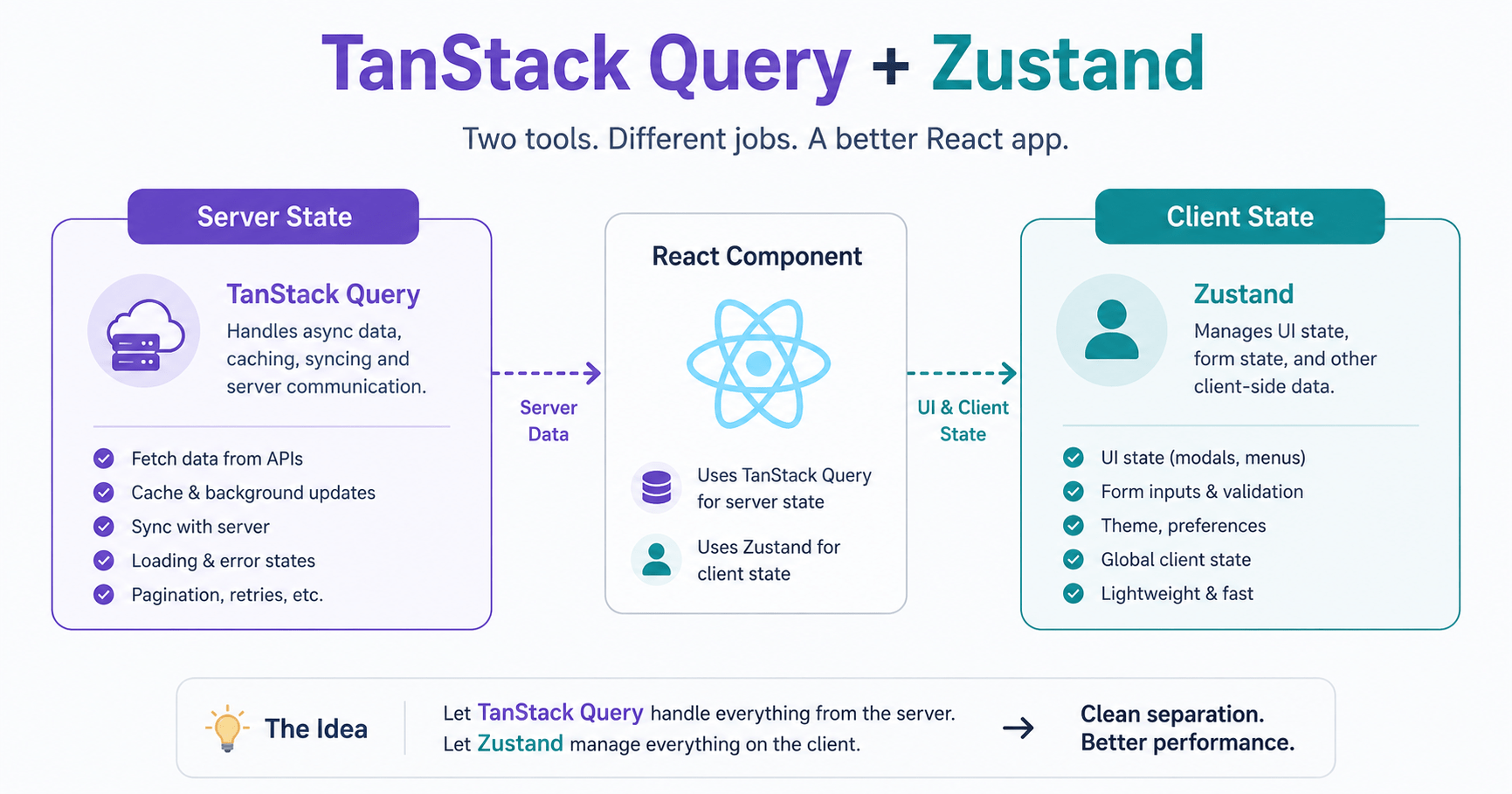

TanStack Query and Zustand solve two completely different problems, and mixing them up is the fastest way to end up with a bloated, hard-to-debug React store. As React applications scale, state management often turns messy. A common anti-pattern in large codebases is dumping everything into a single global store Redux, or a massive Zustand slice including API response payloads, loading flags, error strings, selected UI tabs, and sidebar toggle booleans.
That approach creates real friction:
- Stale server cache – manually managing network responses inside a global store forces you to reimplement caching, invalidation, retries, and deduplication by hand
- Store bloat – store files balloon into thousands of lines of reducer and action logic just to set
isLoading: trueordata: response.json - Re-render cascades – unrelated global store updates trigger re-renders in components that don’t even touch the mutated data
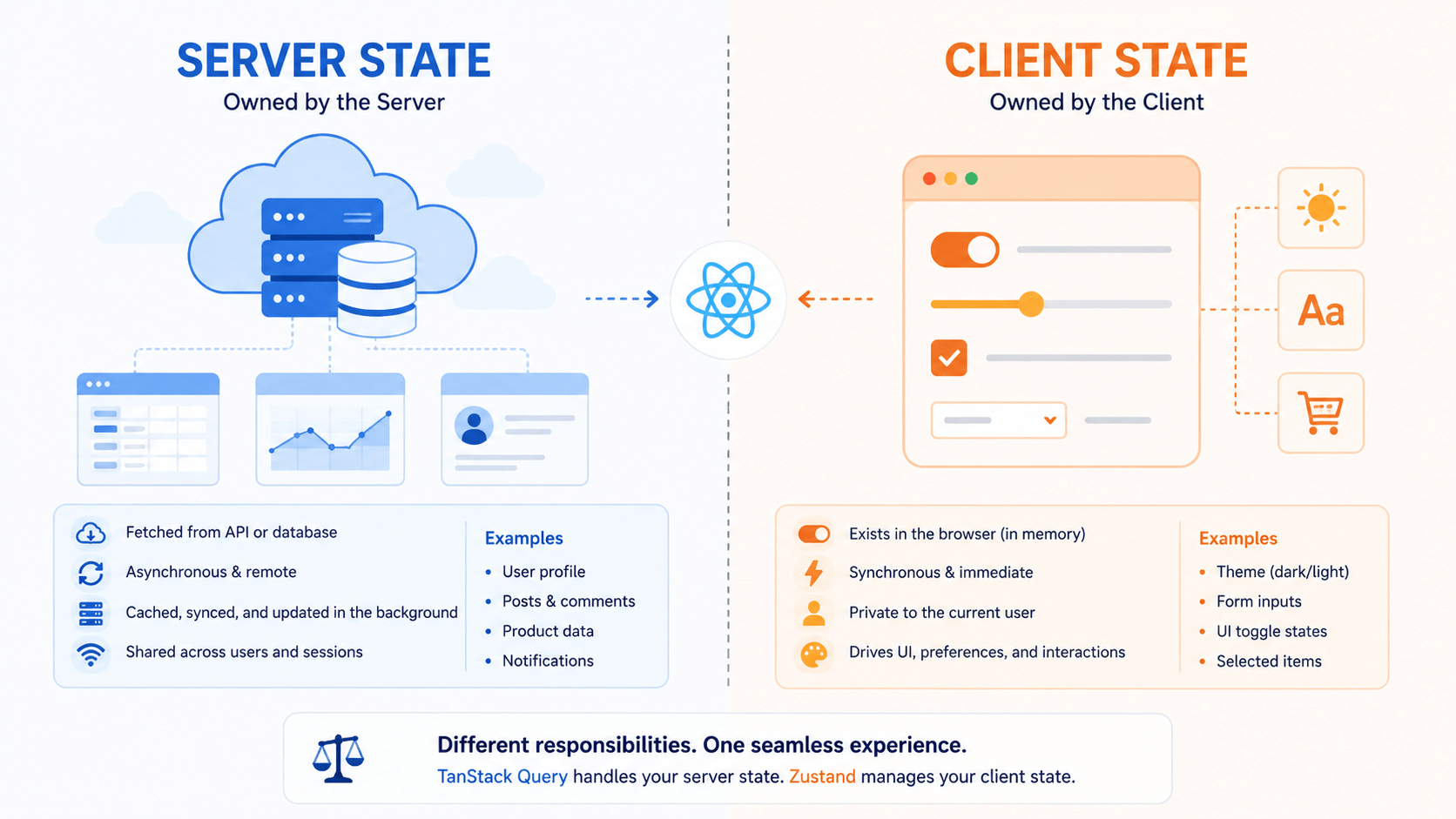
The fix is a clean separation of concerns: use TanStack Query exclusively for server state (async, remote, cached data) and Zustand exclusively for client state (synchronous, ephemeral, local UI state). This guide walks through exactly how to pair TanStack Query and Zustand cleanly, with working code, so you can build faster and more maintainable React apps. Once you’ve set up TanStack Query and Zustand this way, most of the boilerplate that used to live in a single bloated store simply disappears.
How TanStack Query and Zustand Divide Responsibilities
The TanStack Query and Zustand Boundary at a Glance
Before writing any code, it helps to see the boundary laid out side by side.
TanStack Query vs Zustand
Side-by-side comparison of server state vs client state management in React. Know when to reach for TanStack Query and when Zustand is the better fit.
| Responsibility | TanStack Query (Server State) | Zustand (Client State) |
|---|---|---|
| Data origin | Remote API / database | Local browser memory |
| Examples | User feeds, product lists, profiles | Sidebar toggle, active tab, dark mode, draft inputs |
| Async handling | Native promises, loading, retries | Not meant for network calls |
| Cache lifetime | Governed by staleTime and gcTime |
Persists until reload (or manual persist) |
| Primary identifier | queryKey array |
A named store hook (useStore) |
Once you enforce this boundary, Zustand stores stay thin and fast synchronous values and actions only while TanStack Query owns the entire cache lifecycle: freshness, deduplication, and garbage collection. This is the boundary that makes TanStack Query and Zustand worth adopting together instead of reaching for a single do-everything store.
Step 1: Define the Zustand Client Store
Start with a clean Zustand store that manages UI search filters and display settings for an e-commerce dashboard. Notice it contains zero network-fetching code and zero API response fields that’s the whole point of keeping TanStack Query and Zustand separate. Any time you’re tempted to add a fetch call inside a Zustand store, that’s the signal you’ve blurred the TanStack Query and Zustand boundary you’re trying to build.
javascript
// src/stores/useFilterStore.js
import { create } from 'zustand';

export const useFilterStore = create((set) => ({
  // Local UI State
  searchQuery: '',
  category: 'all',
  sortBy: 'price-asc',
  viewMode: 'grid', // 'grid' | 'list'

  // Actions
  setSearchQuery: (query) => set({ searchQuery: query }),
  setCategory: (category) => set({ category }),
  setSortBy: (sortBy) => set({ sortBy }),
  toggleViewMode: () =>
    set((state) => ({ viewMode: state.viewMode === 'grid' ? 'list' : 'grid' })),
  resetFilters: () => set({ searchQuery: '', category: 'all', sortBy: 'price-asc' }),
}));
Every field here is something the user changed with a click or a keystroke. Nothing here came from a server response that distinction is the entire reason TanStack Query and Zustand work well together instead of fighting each other.
Step 2: Connect Zustand State to TanStack Query
The trick isn’t copying Zustand state into TanStack Query or vice versa. Instead, read the Zustand state inside your custom query hook and pass those values straight into the queryKey.
Because TanStack Query automatically refetches whenever anything in the queryKey array changes, updating a Zustand filter triggers a fresh API call automatically no manual useEffect wiring required.
javascript
// src/hooks/useProducts.js
import { useQuery } from '@tanstack/react-query';
import { useFilterStore } from '../stores/useFilterStore';

async function fetchProducts({ searchQuery, category, sortBy }) {
  const params = new URLSearchParams({
    q: searchQuery,
    category,
    sort: sortBy,
  });

  const res = await fetch(`/api/products?${params.toString()}`);
  if (!res.ok) throw new Error('Failed to fetch products');
  return res.json();
}

export function useProducts() {
  // 1. Read atomic values from the Zustand client store
  const searchQuery = useFilterStore((state) => state.searchQuery);
  const category = useFilterStore((state) => state.category);
  const sortBy = useFilterStore((state) => state.sortBy);

  // 2. Pass Zustand values directly into the queryKey array
  return useQuery({
    queryKey: ['products', { searchQuery, category, sortBy }],
    queryFn: () => fetchProducts({ searchQuery, category, sortBy }),
    staleTime: 1000 * 60 * 2, // Data stays fresh for 2 minutes
  });
}
This is the actual bridge between TanStack Query and Zustand: Zustand owns the filter values, TanStack Query owns the fetch that reacts to them. Nowhere in this hook do you manually sync the two the queryKey array does that work for you.
Step 3: Build the UI Component
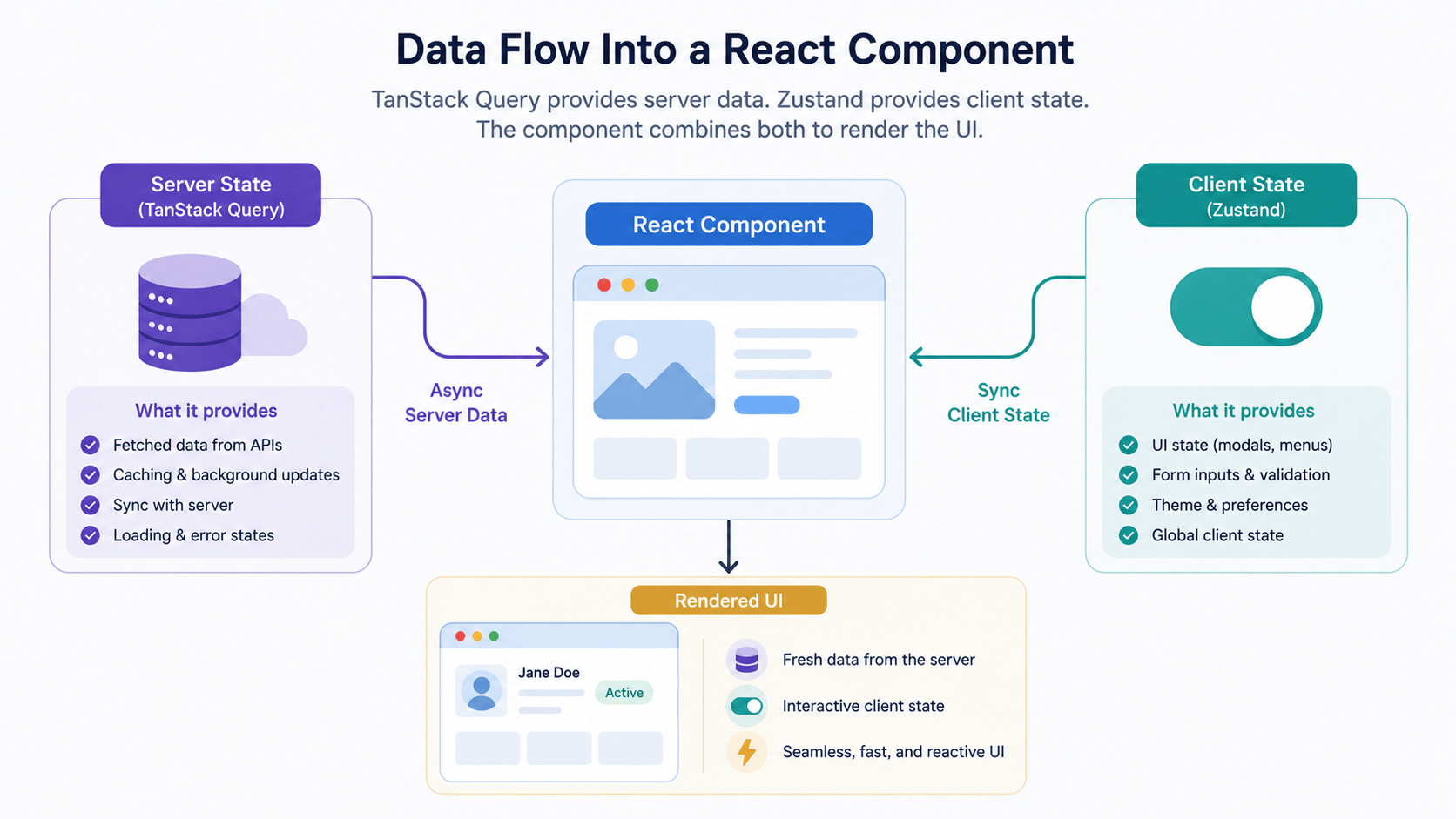
With the store and the query hook in place, the component itself stays remarkably clean. It consumes Zustand for UI interactions and TanStack Query for data display and never has to reconcile the two manually. This is what a proper TanStack Query and Zustand split looks like once it reaches the component layer: two clearly separated data sources, zero manual glue code.
jsx
// src/components/ProductCatalog.jsx
import React from 'react';
import { useFilterStore } from '../stores/useFilterStore';
import { useProducts } from '../hooks/useProducts';

export function ProductCatalog() {
  // Zustand state & actions (client UI)
  const { searchQuery, category, viewMode, setSearchQuery, setCategory, toggleViewMode } =
    useFilterStore();

  // TanStack Query hook (server data)
  const { data: products, isLoading, isError, error } = useProducts();

  return (
    <div className="p-6">
      {/* Search & filter controls, driven by Zustand */}
      <div className="flex gap-4 mb-6">
        <input
          type="text"
          value={searchQuery}
          onChange={(e) => setSearchQuery(e.target.value)}
          placeholder="Search products..."
          className="border p-2 rounded"
        />

        <select value={category} onChange={(e) => setCategory(e.target.value)}>
          <option value="all">All Categories</option>
          <option value="electronics">Electronics</option>
          <option value="clothing">Clothing</option>
        </select>

        <button onClick={toggleViewMode} className="bg-gray-200 px-4 py-2 rounded">
          View: {viewMode.toUpperCase()}
        </button>
      </div>

      {/* Server data display, driven by TanStack Query */}
      {isLoading && <div>Loading products...</div>}
      {isError && <div className="text-red-500">Error: {error.message}</div>}

      {products && (
        <div className={viewMode === 'grid' ? 'grid grid-cols-3 gap-4' : 'flex flex-col gap-2'}>
          {products.map((product) => (
            <div key={product.id} className="border p-4 rounded shadow">
              <h3 className="font-bold">{product.name}</h3>
              <p>${product.price}</p>
            </div>
          ))}
        </div>
      )}
    </div>
  );
}
Notice what’s absent: no useEffect syncing server data into Zustand, no manual loading/error state tracking, no risk of the two stores drifting out of sync.
Why Splitting TanStack Query and Zustand Works So Well
- Zero data-synchronization bugs. You never copy server response fields into Zustand, so there’s nothing to keep manually in sync when a mutation happens.
- Fine-grained re-renders. Zustand selectors mean components re-render only when their specific picked slice changes. TanStack Query re-renders components only when the cache actually updates.
- Decoupled testing. You can test filter logic in isolation with simple Zustand state assertions, and test API integration separately using TanStack Query’s testing utilities.
Keeping TanStack Query and Zustand in their own lanes also makes onboarding easier a new developer opening the codebase immediately knows where to look: Zustand for anything the user clicked, TanStack Query for anything that came from the network. Teams that skip this and let TanStack Query and Zustand responsibilities blur together are usually the ones rewriting their state layer a year later.
Common Mistakes When Mixing TanStack Query and Zustand
Most TanStack Query and Zustand problems trace back to one of three habits carried over from single-store thinking.
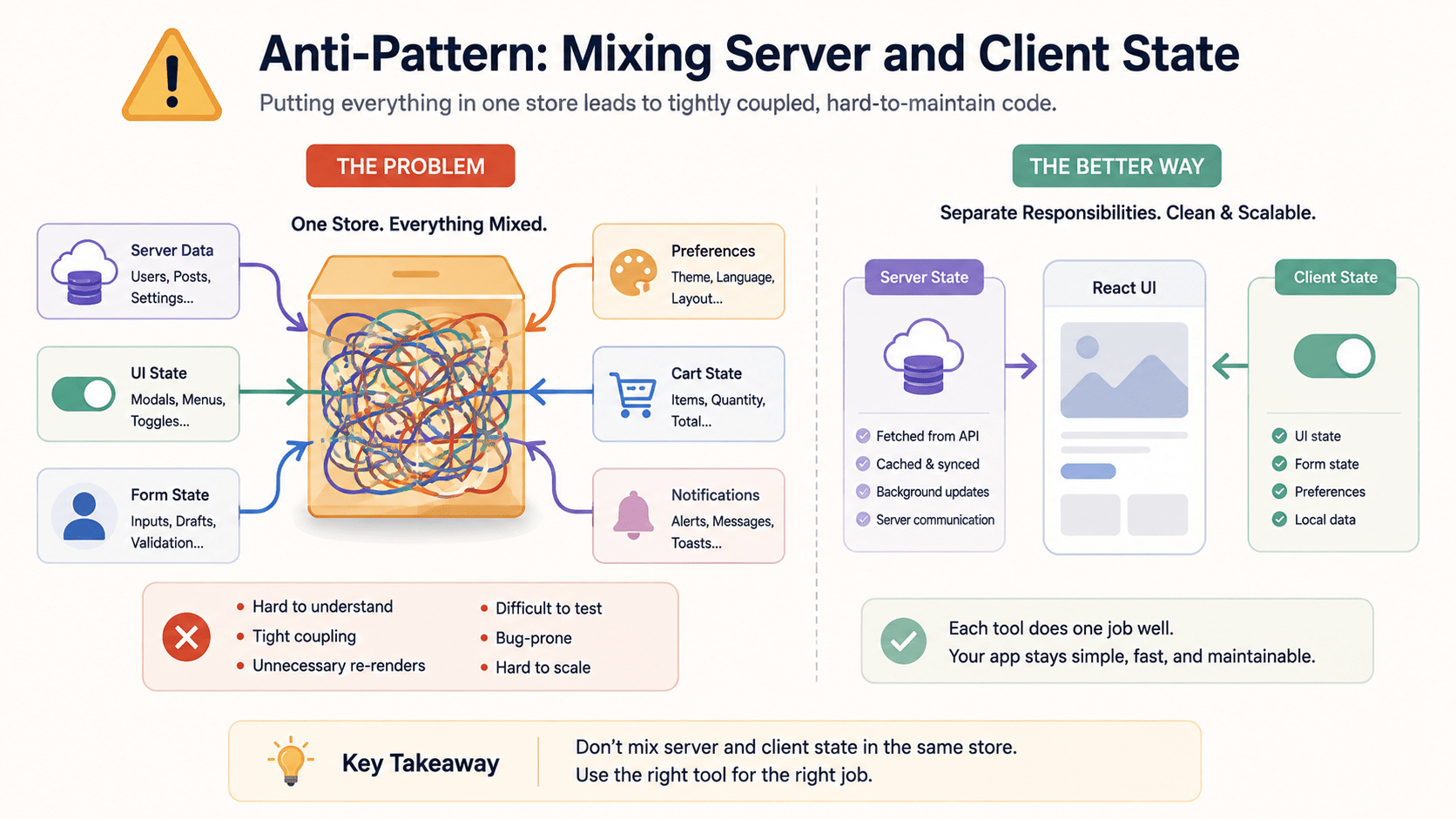
- Storing fetched data in Zustand “just to be safe.” This reintroduces the exact staleness problem TanStack Query exists to solve. A TanStack Query and Zustand setup only works if fetched data stays out of the store entirely.
- Putting
isLoadingflags in Zustand manually. TanStack Query already tracks loading and error state per query a hand-rolledisLoadingboolean in Zustand is redundant and will eventually drift out of sync with the real request state. - Using Zustand’s
persistmiddleware for server data. Persisting API responses tolocalStoragedefeats TanStack Query’s cache invalidation entirely. Reservepersistfor genuine user preferences like theme or layout. Each of these mistakes has the same root cause: not committing fully to the TanStack Query and Zustand boundary once it’s set up.
Frequently Asked Questions
Can I use Redux instead of Zustand with TanStack Query?
Yes the same separation-of-concerns principle applies whether you pair TanStack Query with Redux, Jotai, or Zustand. TanStack Query still owns server state; the client-state library owns the rest. TanStack Query and Zustand is simply the lighter-weight combination and requires far less boilerplate.
Does Zustand need middleware to work well with TanStack Query?
No middleware is required for the core TanStack Query and Zustand pattern shown here. Zustand’s persist middleware is optional and should be reserved for genuine client preferences, not server data.
What happens if I put server data in a Zustand store anyway?
You lose TanStack Query’s automatic cache invalidation, deduplication, and background refetching for that data, and you take on the job of manually keeping it in sync the exact problem a proper TanStack Query and Zustand split is designed to avoid.
Do I need to rewrite my entire store to adopt this pattern?
No. TanStack Query and Zustand can be introduced incrementally migrate one data-fetching hook at a time out of your existing global store rather than rewriting everything at once.
Conclusion
Pairing TanStack Query and Zustand for React state management gives you a clean, well-understood boundary: TanStack Query owns anything that comes from a server, Zustand owns anything that lives only in the browser. Keeping that boundary strict eliminates hundreds of lines of boilerplate, prevents rendering bottlenecks, and makes the codebase easier for anyone else to pick up. Once you’ve made the switch, it’s hard to go back to a codebase that doesn’t split TanStack Query and Zustand this cleanly.
If your app currently stores API data in Zustand or Redux, start by migrating your highest-traffic data fetch to a TanStack Query hook first that single change usually removes the most boilerplate for the least risk.