
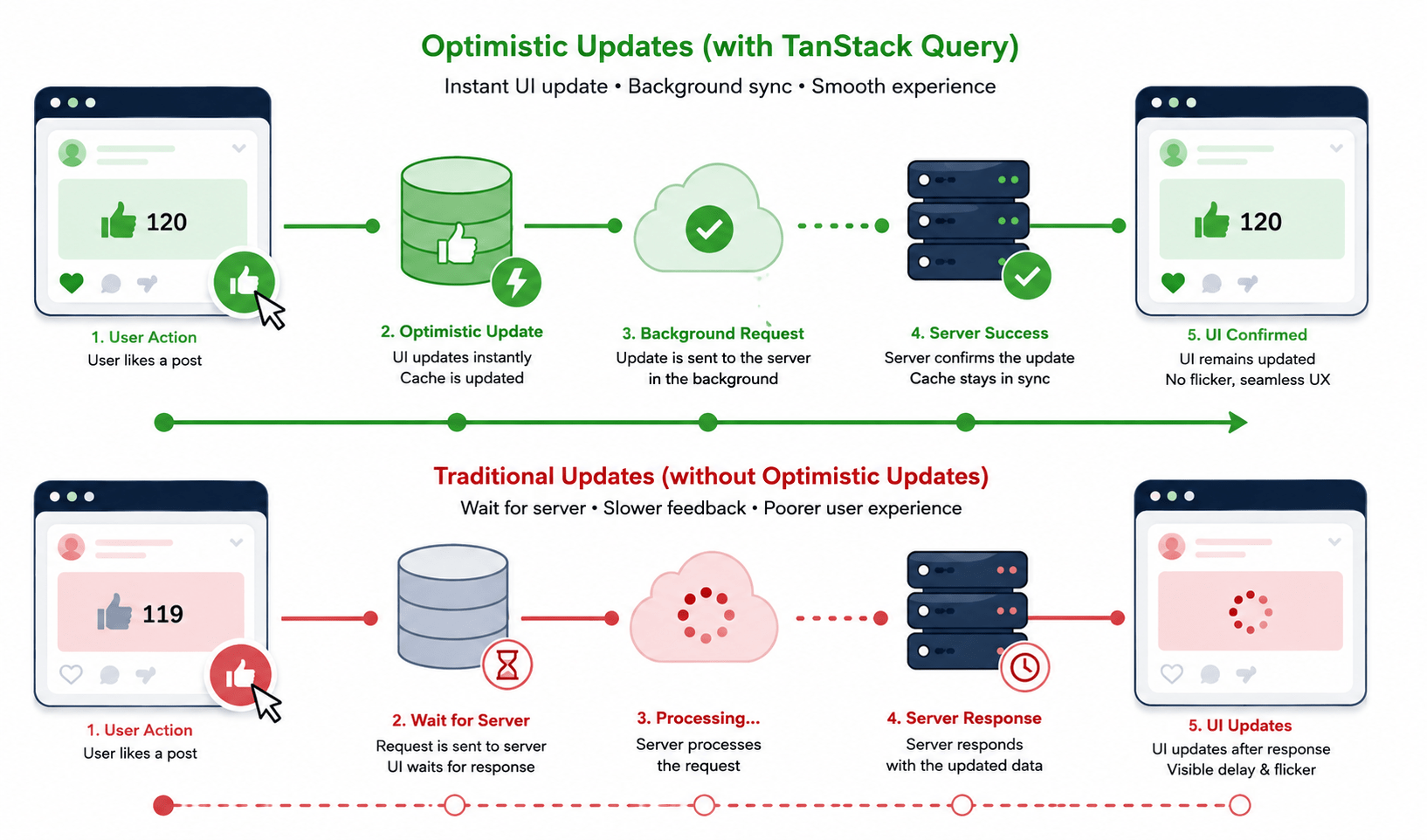

In modern web apps, user experience is measured in milliseconds. When someone clicks “Like,” posts a comment, or archives an item, waiting 500ms for a round-trip server response before the screen updates feels sluggish and unnatural and that’s exactly the gap TanStack Query optimistic updates are built to close.
The fix is to update the client instantly, assuming the request will succeed, then gracefully roll back if it doesn’t. That’s the whole idea behind optimistic UI, and it’s what turns a React app from “web page” into “desktop-class app” in the user’s hands.
There’s a second, related problem: as data sets grow, fetching thousands of records at once stops being an option. Instead of page-number buttons, modern feeds like X or LinkedIn lean on infinite scroll pagination loading the next chunk only when the user actually scrolls to it.
In this post, we’ll walk through both: mutating data safely with useMutation, layering TanStack Query optimistic updates on top with onMutate/onError/onSettled, and building an infinite-loading feed with useInfiniteQuery.
Also Read: New to TanStack Query itself? Start with our TanStack Query Tutorial: 4 Easy Steps To Fetch Data before diving into mutations below.
What Are TanStack Query Optimistic Updates?
At a basic level, this pattern means writing the expected result straight into the query cache before the network request even resolves. If the server agrees, nothing else has to happen the UI was already right. If the server rejects the change, the cache gets rolled back to its exact previous snapshot, so the user never sees a permanently wrong state.
This only works well for predictable actions likes, toggles, comment counts, archiving where the local guess almost always matches the real outcome. It’s a poor fit for anything high-stakes, like a payment amount, where showing a number that might be wrong for even a second causes more harm than a short loading spinner would.
Part 1: Mutating Server Data with useMutation
While useQuery is for read-only data, useMutation is the hook for creating, updating, or deleting data on the server your POST, PUT, PATCH, and DELETE calls.
The Basic useMutation Pattern
js
import { useMutation, useQueryClient } from '@tanstack/react-query';

async function addCommentApi(newComment) {
  const res = await fetch('/api/comments', {
    method: 'POST',
    headers: { 'Content-Type': 'application/json' },
    body: JSON.stringify(newComment),
  });
  if (!res.ok) throw new Error('Failed to post comment');
  return res.json();
}

function AddCommentForm() {
  const queryClient = useQueryClient();

  const mutation = useMutation({
    mutationFn: addCommentApi,
    onSuccess: () => {
      queryClient.invalidateQueries({ queryKey: ['comments'] });
    },
    onError: (error) => {
      alert(`Error posting comment: ${error.message}`);
    },
  });

  const handleSubmit = (e) => {
    e.preventDefault();
    mutation.mutate({ text: 'Awesome post!' });
  };

  return (
    <button onClick={handleSubmit} disabled={mutation.isPending}>
      {mutation.isPending ? 'Posting...' : 'Post Comment'}
    </button>
  );
}
This pattern alone already beats manual fetch + useState juggling you get isPending, error handling, and cache invalidation for free. But it still waits for the round trip before anything visible changes. That’s where the next section comes in. (See TanStack Query’s official mutations guide for the full API. For handling many mutation buttons in a large list efficiently, see advanced hook optimization with useMemo and useCallback.)
Part 2: Implementing TanStack Query Optimistic Updates
TanStack Query optimistic updates update the cache before the request is even sent. If it succeeds, the cache is finalized as-is. If it fails, the cache reverts to its exact prior state no flicker, no stale lie left on screen.
The Optimistic Lifecycle: onMutate, onError, onSettled
Three lifecycle callbacks inside useMutation handle this safely:
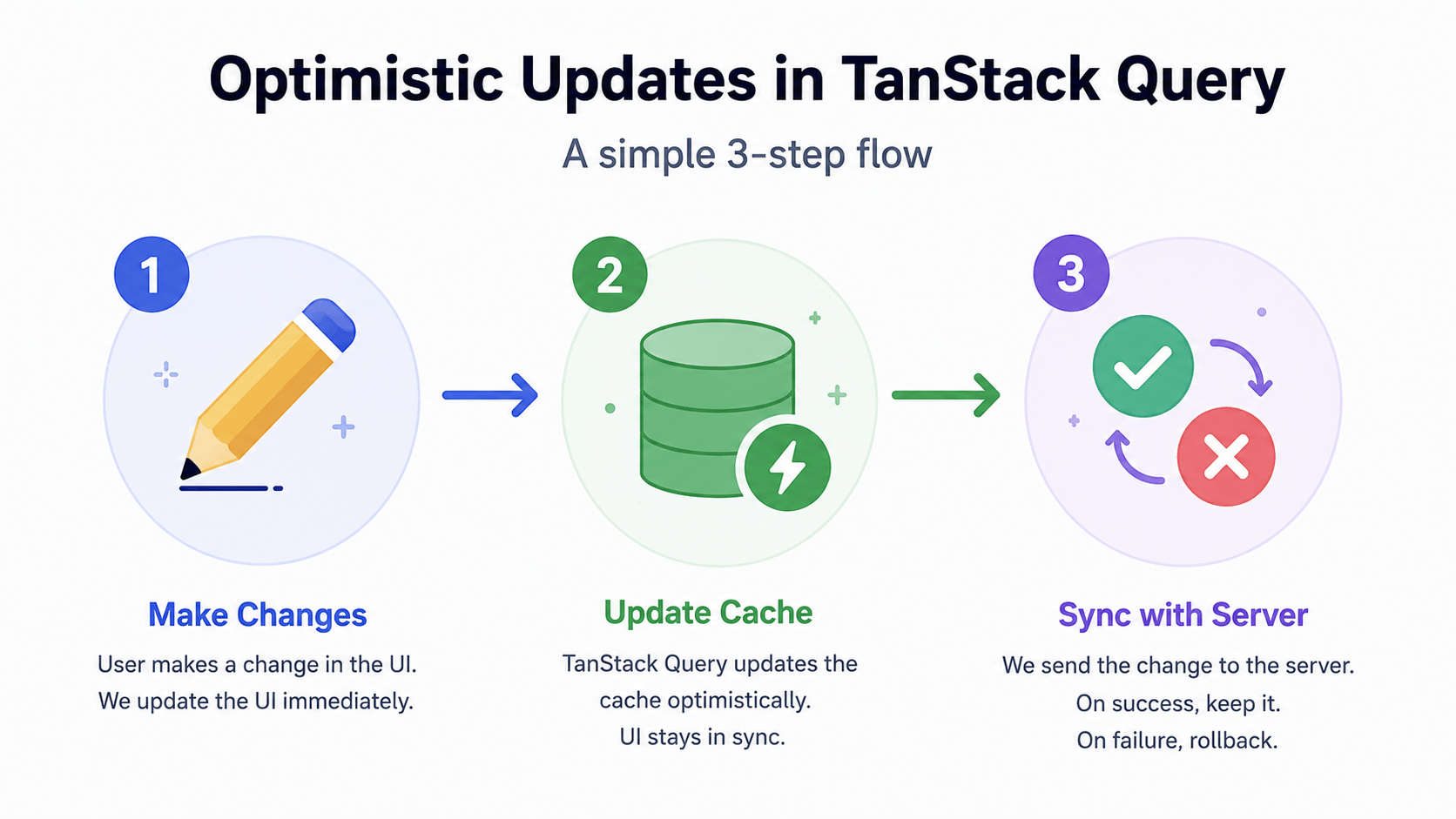
onMutate– runs before the mutation function fires. It should cancel any outgoing refetches (so they can’t overwrite your optimistic write), snapshot the current cache value for rollback, write the expected data into the cache, and return that snapshot as context.onError– runs if the mutation fails. Use the context saved inonMutateto roll the cache back to its last known-good state.onSettled– runs after the mutation finishes, success or failure. Invalidate the relevant queries here so the local cache is fully back in sync with the real server state.
(Full details in TanStack’s optimistic updates documentation.)
Complete Example: Optimistic “Like” Toggle
js
import { useMutation, useQueryClient } from '@tanstack/react-query';

async function toggleLikeApi({ postId, isLiked }) {
  const res = await fetch(`/api/posts/${postId}/like`, {
    method: 'POST',
    headers: { 'Content-Type': 'application/json' },
    body: JSON.stringify({ isLiked }),
  });
  if (!res.ok) throw new Error('Failed to update like status');
  return res.json();
}

export function LikeButton({ postId, currentLikes, isLiked }) {
  const queryClient = useQueryClient();

  const { mutate } = useMutation({
    mutationFn: toggleLikeApi,

    onMutate: async (newVariables) => {
      await queryClient.cancelQueries({ queryKey: ['post', postId] });
      const previousPost = queryClient.getQueryData(['post', postId]);

      queryClient.setQueryData(['post', postId], (old) => {
        if (!old) return old;
        return {
          ...old,
          isLiked: newVariables.isLiked,
          likesCount: newVariables.isLiked ? old.likesCount + 1 : old.likesCount - 1,
        };
      });

      return { previousPost };
    },

    onError: (err, newVariables, context) => {
      if (context?.previousPost) {
        queryClient.setQueryData(['post', postId], context.previousPost);
      }
    },

    onSettled: () => {
      queryClient.invalidateQueries({ queryKey: ['post', postId] });
    },
  });

  return (
    <button onClick={() => mutate({ postId, isLiked: !isLiked })}>
      {isLiked ? ' Liked' : ' Like'} ({currentLikes})
    </button>
  );
}
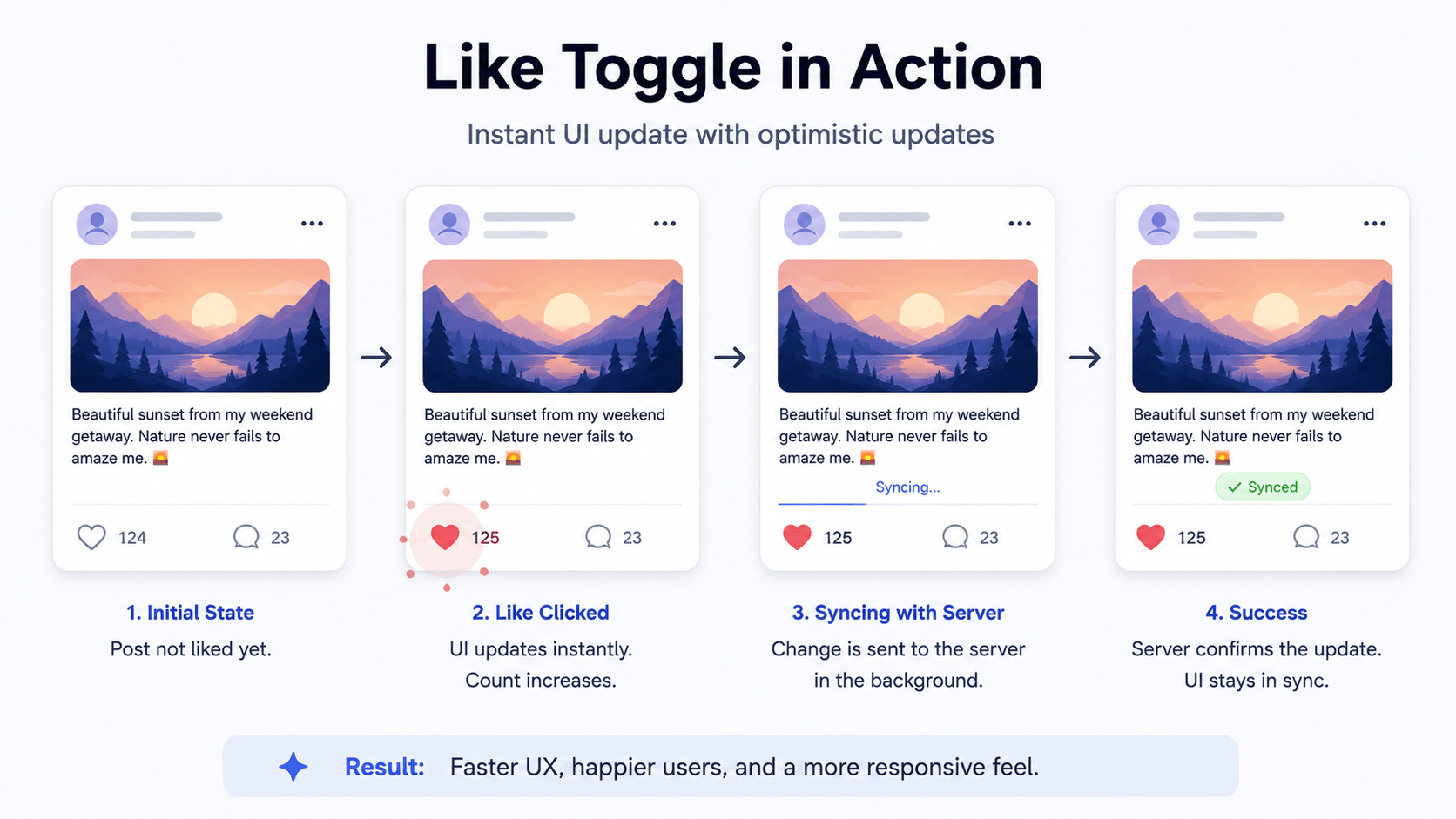
Notice the button never shows a loading state the like count changes the instant it’s clicked. That’s the entire point of the extra onMutate/onError work: perceived speed comes from the cache write, not from a faster server.
Part 3: Infinite Scroll Pagination with useInfiniteQuery
Newsfeeds, social timelines, and product catalogs all share the same problem: you can’t load everything at once. useInfiniteQuery is TanStack Query’s purpose-built answer for paginated, continuously-loading feeds. (See the infinite queries guide for edge cases like bidirectional pagination. If you’re rendering the feed inside a Next.js server-rendered route, our Next.js Server Components guide covers how client-only hooks like this one fit into that model.)
Key Options and Return Values
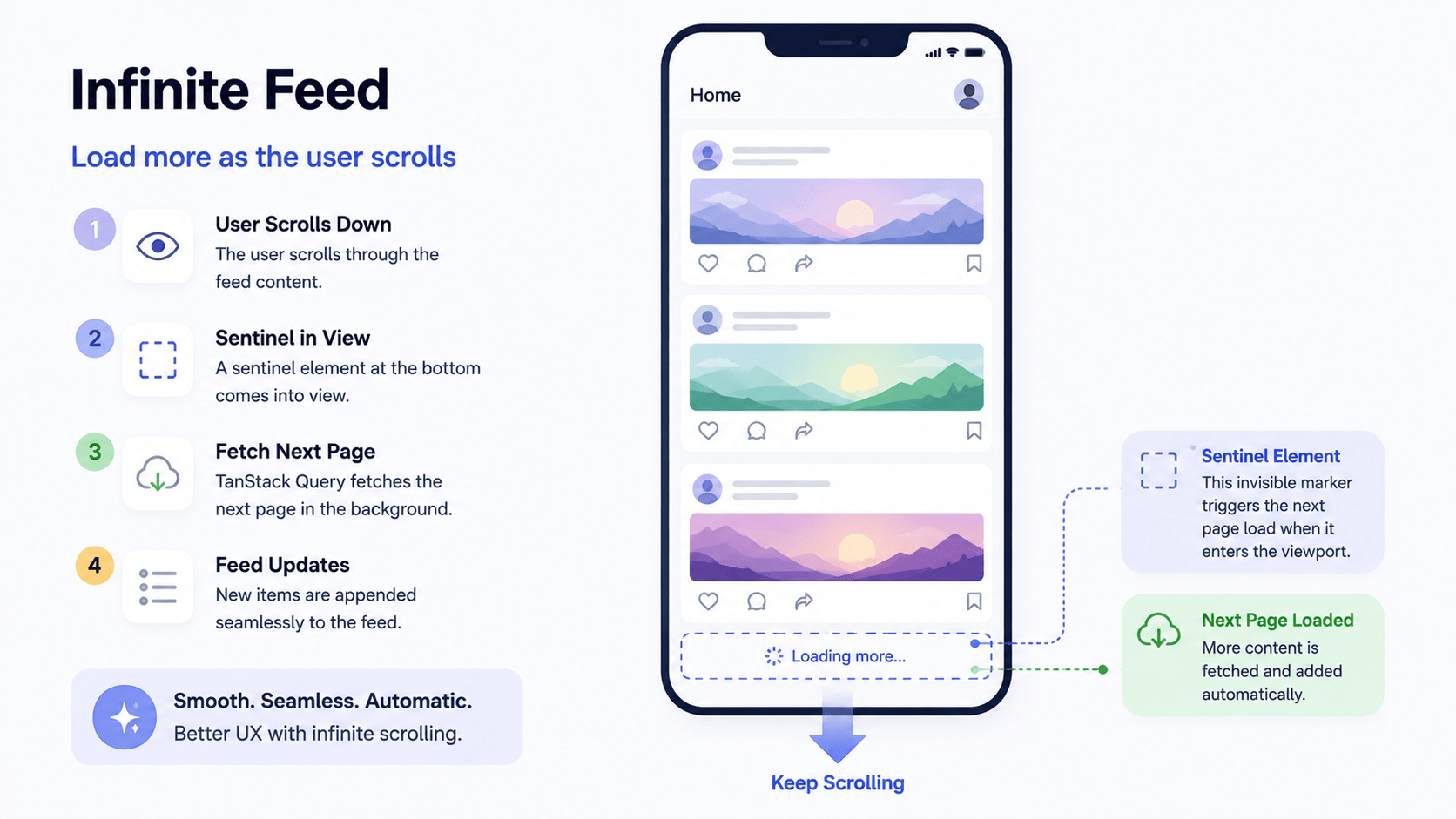
getNextPageParam– receives the last fetched page and returns the parameter for the next request (a page number or cursor), orundefinedonce there’s nothing left.fetchNextPage()– call this (typically when a sentinel element scrolls into view) to request the next page.hasNextPage– boolean flag for whether more pages exist.isFetchingNextPage– boolean flag for whether the next page is currently loading.
Building an Infinite Feed with Intersection Observer
js
import React, { useEffect } from 'react';
import { useInfiniteQuery } from '@tanstack/react-query';
import { useInView } from 'react-intersection-observer';

async function fetchPostsPage({ pageParam = 1 }) {
  const res = await fetch(`/api/posts?page=${pageParam}&limit=10`);
  if (!res.ok) throw new Error('Failed to fetch posts');
  return res.json(); // Returns { items: [...], nextPage: 2, totalPages: 5 }
}

export function InfinitePostFeed() {
  const { ref, inView } = useInView(); // Detects when target element enters viewport

  const {
    data,
    fetchNextPage,
    hasNextPage,
    isFetchingNextPage,
    status,
    error,
  } = useInfiniteQuery({
    queryKey: ['infinite-posts'],
    queryFn: fetchPostsPage,
    initialPageParam: 1,
    getNextPageParam: (lastPage) => {
      return lastPage.nextPage <= lastPage.totalPages ? lastPage.nextPage : undefined;
    },
  });

  useEffect(() => {
    if (inView && hasNextPage && !isFetchingNextPage) {
      fetchNextPage();
    }
  }, [inView, hasNextPage, isFetchingNextPage, fetchNextPage]);

  if (status === 'pending') return <div>Loading feed...</div>;
  if (status === 'error') return <div>Error loading feed: {error.message}</div>;

  return (
    <div style={{ maxWidth: '600px', margin: '0 auto' }}>
      <h1>Infinite Feed</h1>

      {data.pages.map((page, pageIndex) => (
        <React.Fragment key={pageIndex}>
          {page.items.map((post) => (
            <div key={post.id} style={{ padding: '16px', borderBottom: '1px solid #ccc' }}>
              <h3>{post.title}</h3>
              <p>{post.body}</p>
            </div>
          ))}
        </React.Fragment>
      ))}

      <div ref={ref} style={{ padding: '20px', textAlign: 'center' }}>
        {isFetchingNextPage
          ? 'Loading more posts...'
          : hasNextPage
          ? 'Scroll down for more'
          : 'You have reached the end of the feed!'}
      </div>
    </div>
  );
}
The useInView hook (from react-intersection-observer) wraps the browser’s native Intersection Observer API so you don’t manage it by hand. Once inView flips to true on that sentinel <div>, the useEffect (see our React useEffect lifecycle guide for a refresher on dependency arrays) fires fetchNextPage() automatically.
Quick Reference
TanStack Query Patterns Cheat Sheet
Quick-reference guide for TanStack Query (React Query) concepts. Match server mutations, optimistic updates, rollback, infinite pagination, and scroll triggers to their hooks and use cases.
| Concept | Hook / Property | Use Case |
|---|---|---|
| Server Mutations | useMutation({ mutationFn }) |
Creating, updating, or deleting server resources |
| Optimistic Updates | onMutate + setQueryData |
Instantly updating UI prior to network response |
| Rollback on Failure | onError + snapshot context |
Reverting cache if optimistic mutation throws an error |
| Infinite Pagination | useInfiniteQuery({ getNextPageParam }) |
Loading paginated list pages continuously |
| Scroll Trigger | IntersectionObserver / ref |
Triggering fetchNextPage() when the user reaches the bottom |
FAQ
Do TanStack Query optimistic updates work with useInfiniteQuery, not just useMutation?
Yes the same onMutate/onError pattern applies; you’d write to the specific page inside data.pages and roll back the whole data object on failure, since infinite query cache shape is an array of pages rather than a single object.
What happens if a user fires two optimistic mutations back to back?
Each mutate() call gets its own onMutate snapshot, so rollbacks stay isolated per call but you should still call cancelQueries first, or a slower first request can resolve after a second one and overwrite it with stale data.
Is useInfiniteQuery still supported in the latest TanStack Query version?
Yes, it remains a core hook, though the initialPageParam requirement shown above only applies from v5 onward v4 projects use a slightly different signature.



